
Welcome to the RaGEZONE - MMORPG development forums.

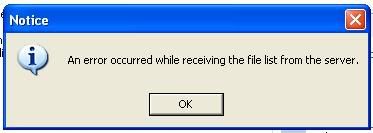
error occurred while receiving the file list from the Server

This is a discussion on error occurred while receiving the file list from the Server within the Pangya Online forums, part of the MMO and MMORPG Developments category; How to fix? ---------- Post added at 05:25 AM ---------- Previous post was at 05:25 AM ---------- Win7 Ultimate 32 ...

Page 1 of 2 12 LastLast
Results 1 to 15 of 19
  1. #1
    Newbie
    Rank
    Member
    Join Date
    Jan 2011
    Posts
    2
    Liked
    0

    error occurred while receiving the file list from the Server

    Click


    How to fix?

    ---------- Post added at 05:25 AM ---------- Previous post was at 05:25 AM ----------

    Win7 Ultimate 32 Bit

  2. #2
    Member
    Rank
    Member
    Join Date
    Dec 2008
    Posts
    90
    Liked
    55

    Re: error occurred while receiving the file list from the Server

    Error in Server ini3...

    check the game folder has that file inside: update.cln
    Last edited by fasa2008; 05-02-11 at 06:49 AM.

  3. #3
    Registered
    Rank
    Member
    Join Date
    Feb 2011
    Posts
    13
    Liked
    0

    Re: error occurred while receiving the file list from the Server

    Quote Originally Posted by fasa2008 View Post
    Error in Server ini3...

    check the game folder has that file inside: update.cln

    what does that mean?

  4. #4
    Creator of Code
    Rank
    Member +
    Join Date
    Mar 2006
    Location
    Sweden
    Posts
    605
    Liked
    149

    Re: error occurred while receiving the file list from the Server

    Make sure that file is there, and that error comes from a filetransfer error (lost packets or whatever) while getting the file from ini3's server (ini3 is the thai company running PangYa in thailand)
    Make a donation of you like my code: Yunko

  5. #5
    Registered
    Rank
    Member
    Join Date
    Feb 2011
    Posts
    13
    Liked
    0

    Re: error occurred while receiving the file list from the Server

    did u mean that i must connected to the internet?
    if not, where i can found that update.cln? cuz it didnt exist in my game folder


    -Edited-
    it works well now, thanks :D but now i can't login to the server :(
    Last edited by gempz; 07-02-11 at 11:18 AM.

  6. #6
    Deny everything.
    Rank
    Moderator
    Join Date
    Jun 2005
    Location
    Net Slum
    Posts
    565
    Liked
    126

    Re: error occurred while receiving the file list from the Server

    gempz, per default the game connects to ini3's patch-servers every time you start it - so yes, you have to be online or you'll get the error iXpressVEVO shows in his initial post. However, you can set up your own patch-server (or at least pretend to be one) and modify the URL in ProjectG.exe - allowing you to play offline without internet connection.

    If you're interested in changing the patch-server, do the following:
    • Grab the updatelist from http://patch.pangya.in.th/patch_S4/updatelist
    • Get portable XAMPP, IIS or whatever webserver you like up and running on your local machine/server.
    • Create a new directory patch_S4 in the htdocs/webroot and place the updatelist you grabbed in it.
    • Open your ProjectG.exe with a hex editor, search for patch.pangya.in.th and replace it with your machine's hostname/IP address. If your modification uses less characters than the original address, fill up the rest of the address with the hex values 00.


    The login problem is a whole different story (and has probably been answered already - so do a quick search and check the stickies!) and not part of this topic.
    Last edited by Tsukasa; 07-02-11 at 12:06 PM.

  7. #7
    Hardcore Member
    Rank
    Member
    Join Date
    Jan 2011
    Posts
    117
    Liked
    29

    Re: error occurred while receiving the file list from the Server

    Quote Originally Posted by Tsukasa View Post
    gempz, per default the game connects to ini3's patch-servers every time you start it - so yes, you have to be online or you'll get the error iXpressVEVO shows in his initial post. However, you can set up your own patch-server (or at least pretend to be one) and modify the URL in ProjectG.exe - allowing you to play offline without internet connection.

    If you're interested in changing the patch-server, do the following:
    • Grab the updatelist from http://patch.pangya.in.th/patch_S4/updatelist
    • Get portable XAMPP, IIS or whatever webserver you like up and running on your local machine/server.
    • Create a new directory patch_S4 in the htdocs/webroot and place the updatelist you grabbed in it.
    • Open your ProjectG.exe with a hex editor, search for patch.pangya.in.th and replace it with your machine's hostname/IP address. If your modification uses less characters than the original address, fill up the rest of the address with the hex values 00.


    The login problem is a whole different story (and has probably been answered already - so do a quick search and check the stickies!) and not part of this topic.
    im going to do a little test Tsukasa im make a folder name it patch_S4 drop the file in it put it in my install dir and change

    http://patch.pangya.in.th to C:\Program Files\NtreevSoft\PangYa_Th and see if it pulls the file local or not

  8. #8
    Deny everything.
    Rank
    Moderator
    Join Date
    Jun 2005
    Location
    Net Slum
    Posts
    565
    Liked
    126

    Re: error occurred while receiving the file list from the Server

    I can already tell you it won't because a.) your local path is much longer than the original address and b.) it's using WinINet calls do grab the file.
    Last edited by Tsukasa; 07-02-11 at 12:46 PM.

  9. #9
    Hardcore Member
    Rank
    Member
    Join Date
    Jan 2011
    Posts
    117
    Liked
    29

    Re: error occurred while receiving the file list from the Server

    would replacing the entire line with 00 stop it from calling the file

  10. #10
    Deny everything.
    Rank
    Moderator
    Join Date
    Jun 2005
    Location
    Net Slum
    Posts
    565
    Liked
    126

    Re: error occurred while receiving the file list from the Server

    The reason the error pops up in the first place is because the file cannot be pulled (let it be because the patch-server is down or whatever). What you're suggesting is giving the client an address that can never ever be pulled from. I'd think the chance for success is extremely low.

    If you want to disable it so badly, try what chreadie suggested (although I somehow doubt that's all, you probably also need to jump over the part where the file is actually getting parsed - but that's not my forte).
    Last edited by Tsukasa; 07-02-11 at 12:54 PM.

  11. #11
    Newbie
    Rank
    Member
    Join Date
    Jan 2011
    Posts
    2
    Liked
    0

    Re: error occurred while receiving the file list from the Server

    Quote Originally Posted by Acardia View Post
    im going to do a little test Tsukasa im make a folder name it patch_S4 drop the file in it put it in my install dir and change

    http://patch.pangya.in.th to C:\Program Files\NtreevSoft\PangYa_Th and see if it pulls the file local or not

    it's work Thank

  12. #12
    Hardcore Member
    Rank
    Member
    Join Date
    Jan 2011
    Posts
    117
    Liked
    29

    Re: error occurred while receiving the file list from the Server

    Quote Originally Posted by iXpressVEVO View Post
    it's work Thank
    O.o really it failed when i tried it

  13. #13
    Registered
    Rank
    Member
    Join Date
    Feb 2011
    Posts
    13
    Liked
    0

    Re: error occurred while receiving the file list from the Server

    Quote Originally Posted by Tsukasa View Post
    gempz, per default the game connects to ini3's patch-servers every time you start it - so yes, you have to be online or you'll get the error iXpressVEVO shows in his initial post. However, you can set up your own patch-server (or at least pretend to be one) and modify the URL in ProjectG.exe - allowing you to play offline without internet connection.

    If you're interested in changing the patch-server, do the following:
    • Grab the updatelist from http://patch.pangya.in.th/patch_S4/updatelist
    • Get portable XAMPP, IIS or whatever webserver you like up and running on your local machine/server.
    • Create a new directory patch_S4 in the htdocs/webroot and place the updatelist you grabbed in it.
    • Open your ProjectG.exe with a hex editor, search for patch.pangya.in.th and replace it with your machine's hostname/IP address. If your modification uses less characters than the original address, fill up the rest of the address with the hex values 00.


    The login problem is a whole different story (and has probably been answered already - so do a quick search and check the stickies!) and not part of this topic.
    umm, still a bit confused about this. does replacing the patch.pangya.in.th with either my machine's hostname/IP address will do the same result? because i got a problem how to acquire my local machine IP..

    oh and also i use xampp like Tsukasa, but cannot found the webroot inside htdocs

  14. #14
    Deny everything.
    Rank
    Moderator
    Join Date
    Jun 2005
    Location
    Net Slum
    Posts
    565
    Liked
    126

    Re: error occurred while receiving the file list from the Server

    Quote Originally Posted by Acardia View Post
    O.o really it failed when i tried it
    Yeah, curious thing. Because replacing the address with a local path cannot work - WinINet only supports HTTP and FTP. I'd say ignore his post :)

    Quote Originally Posted by gempz View Post
    umm, still a bit confused about this. does replacing the patch.pangya.in.th with either my machine's hostname/IP address will do the same result? because i got a problem how to acquire my local machine IP..
    Yes, there should be no difference whether you're using your IP address or your hostname (except in some exotic network configurations).

    An easy way to check whether this will go well is by opening your browser and checking whether visiting http://your_hostname/ works. If you see your website you can safely hex the address into your ProjectG.exe.

    Quote Originally Posted by gempz View Post
    oh and also i use xampp like Tsukasa, but cannot found the webroot inside htdocs
    The webroot or wwwroot is the IIS counterpart of the Apache's htdocs folder. So for your XAMPP you'll simply create the patch_S4 folder inside your htdocs folder and put the updatelist in the patch_S4 folder. Sorry if this was misleading.

  15. #15
    Hardcore Member
    Rank
    Member
    Join Date
    Jan 2011
    Posts
    117
    Liked
    29

    Re: error occurred while receiving the file list from the Server

    i went to fasa's exe cause i read the updatelist was disabled in it i can give up hearing guitar clubs for trouble free gaming


Page 1 of 2 12 LastLast

Posting Permissions

  • You may not post new threads
  • You may not post replies
  • You may not post attachments
  • You may not edit your posts
  •