- Joined
- May 18, 2005
- Messages
- 293
- Reaction score
- 7
FAQ:
Does this guide support router users? NoHow do I create a Homepage/Website/page?
http://forum.ragezone.com/f196/guide-video-mu-web-set-up-322459/
Help I have problems restoring
http://forum.ragezone.com/f196/guide-restoring-databases-season-3-picture-guide-354236/
(Yeah I know it says season 3, but it is for all season (0 to 3
 )
)How do I change drive name?
If you're having trouble without a D: drive, go here. this is a beautiful guide on showing you how to change ALL your drives without trouble!
To view the content, you need to sign in or register
Im getting a loginserver fails when running the muserver start up
Chek all places where need to write IP!
There is 3 places!D:/MuServer/Data/comomserver.cfg
There is 1 places!D:/MuServer/Data/iplist.cfg
There is 1 places!D:/MuServer/Data/lang/chs
There is 1 places!D:/MuServer/Data/lang/kor
There is 1 places!D:/MuServer/Data/lang/tai
There is 1 places!D:/MuServer/CS/connectserver.cfg
There is 1 places!D:/MuServer/CS/connectserverlist.cfg
There is 1 places!D:/MuServer/CS/data/connectserverlist.cfg
There is 1 places!D:/MuServer/CS/data/serverlist.cfg
In this sections you need to write your IP address and all will be OK!
Ok here is the deal. I was tired of using old guides with files that wasent downloadable. So I made my own guide.
Content:
1. Server setup I (Installing Microsoft SQL Server (MSSQL))2. Server setup II (Starting MSSQL service, downloading and extracting the mu server)
3. Adding ODBC links
4. Edit ips and password (Editing the ips and password for the MuServer)
5. Client setup + main.exe (Creating a client, launcher and replacing the main.exe)
1. Server setup I (Installing Microsoft SQL Server (MSSQL))
1. Download Microsoft SQL Server (MSSL)
To view the content, you need to sign in or register
2. Run SQLEVAL.exe.
Make the installation folder "C:\SQLEVAL.exe"
Press "Finish"
3. Go to "C:\SQLEVAL"
Open autorun.exe
Select "SQL 2000 Server Compotents"
Select "Install Database Server"
Press "Next" four times, then "Yes".
Select "Server and Client tools" (Default)
Press "Next" two times.
Select "Use the Local System account" and press "Next"
Select "Mixed Mode (Windows Authentication and SQL Server Authentication)"
Type a password (This will be used in your mu server aswell)
Press "Next" and "Finish"
Now you have installed the Microsoft SQL Server!
2. Server setup II (Starting MSSQL service, downloading and extracting the mu server)
1. Go to "Start" -> "Microsoft SQL Server" -> Run "Service Manager" and press "Start"2. Download the muserver from one of these mirrors:
To view the content, you need to sign in or register
To view the content, you need to sign in or register
To view the content, you need to sign in or register
To view the content, you need to sign in or register
3. Extract the muserver.rar to "D:\MuServer" (If you dont have D drive I recommend http://forum.ragezone.com/f196/guide-how-make-substitute-d-drive-61585/)
4. Go to "Start" -> "All Programs" -> "Microsoft SQL Server" -> Run "Enterprise Manager" - Then click on "SQL Server group" -> "(local) (Windows NT) -> "Databases"
5. Right click in the right coloumn (Where the databases are) and press "New database" - Call it MuOnline and press "Ok"
Right click in the right coloumn (Where the databases are) "New database" - Call it Ranking and press "Ok"
6. Remember to delete the files in "D:\Muserver\db"
Right click on the datbase "MuOnline" and go to "All Tasks" -> "Restore database"
Click on From Device
Click on Select Devices
Click on Add
Click on the "..." and go to D:\MuServer\db baks\ and select MuOnline
Go to options after pressing "Ok"
Here you can edit where the server should save log.
Press "Ok" two times
Do the same thing with the "Ranking" except the "File name:" should be Ranking instet of MuOnline
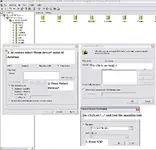
If you are having problems with this section I have added a picture that might help:

Now you are finished. Go to the next step!
3. Adding ODBC links
1. Go to "Muserver\Utilities\ODBC" and run "dsnd.reg" (dsnc.reg is for C:\)Press "Yes"
4. Edit ips and password (Editing the ips and password for the MuServer)
1. Go to "D:\Muserver\Utilities\IP-CHANGER"Start "IpChanger.exe"
Change "Muserver" to your server name (Example The Mu Souls)
Change 80.172.121.132 to your ip (Go to
To view the content, you need to sign in or register
for your ip)Press "Atualizar" (Save)
Now it should show all the files beeing changed
2. Go to "Muserver\Links-D" and change 4.exe (Right click on it and press "Properties")
Change 81.198.129.112 to your ip
Do the same in 8.exe (There are two 81.198.129.112 this time)
These files are for starting the server manually instet of using the "MuServerStartup.exe"
The D in Links-D is for your harddrive letter (D:\)
3. Go to "D:\MuServer\MU2003_EVENT_SERVER\DATA" and open svconfig.ini
Change si26208$$ to your password (The one you set in MSSQL)
Do the same in "Muserver\RankingServer\svconfig.ini"
4. Now you should be ready to run your server!
You can start it by starting MUServerStartUP which is located in "D:\MuServer\" in the bottom
Remember to check if every ip and password is changed: (VERY IMPORTANT)
Muserver\data\lang\chs\commonloc.cfg
Muserver\data\commonserver.cfg
Muserver\data\IpList.dat
Muserver\Links-D\4.ink
Muserver\Links-D\8.ink
Muserver\MU2003_EVENT_SERVER\DATA\svconfig.ini
Muserver\RankingServer\svconfig.ini
Muserver\CS\data\Connectserverlist.dat
Muserver\CS\data\ServerList.dat
Muserver\CS\Connectserverlist.dat
Muserver\StartUp.ini
5. Client setup + main.exe (Creating a client, launcher and replacing the main.exe)
1. Download the client from one of these mirrors:
To view the content, you need to sign in or register
To view the content, you need to sign in or register
To view the content, you need to sign in or register
Extract to any where, then install anywhere (I installed it in C:\Program Files\mu-dauns)
2. Download the main.exe from on of these mirrors:
To view the content, you need to sign in or register
To view the content, you need to sign in or register
To view the content, you need to sign in or register
To view the content, you need to sign in or register
Extract and put it in your client root (C:\Program Files\mu-dauns)
Replace it with the current main.exe
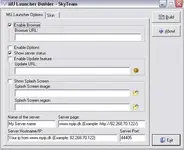
3. Go to "D:\Muserver\Utilities" and start Builder
Some information:
Name of the server: Your server name
Server page: Your server homepage/website/page
Server Hostname/IP/Your Ip(From
To view the content, you need to sign in or register
Your ip from
To view the content, you need to sign in or register
Server Port: Default is 44405
Here is how my launcher looks like: (This is just an example)
Press "Build" and put the "Launcher.exe" into to your client root (C:\Program Files\mu-dauns)
Now you are ready to connect to your server!!
Credits:
- All the upload hosts
- Ragezone for having my guide

- Microsoft for the MSSQL
- Bagadzelna for the 97d+99i ( http://forum.ragezone.com/f197/release-muserver-97d-99-a-130600/ )
- And in the end all my fans (lol)
Please let me know if you have any ideas to the guide or if you get any errors :jester:
I think I remembered everything

That was all !!
Attachments
Last edited: