- Joined
- Jul 2, 2012
- Messages
- 790
- Reaction score
- 125
Hello all, Today I NanayaQ will show you how to edit your zen/bonus market shop. (if you have gameserver 1-7 folder you have to replace all of them to all them, so the realm will proper item in the zen/bonus shop)
The Follow tool you going to need is:
1. Your ShopCommodity.slk should be located in your Xdrive:Server Name Folder/GameServer/Slk
2. Either Microsoft Excel or Gnumeric (I didn't mention notepad++ because its easier on the software I mention)
3.Your Items.slk ( you will need it for the item name and ID)
Tips: things you should know, Type|Base Type|Sub Type|:
Type has 2 value 0 = Zen shop and 1 = Bonus Shop as far as I think.
Base Type about 1-7 value more or less here some, 1 = Hot Sales, 2 = Functional, 4 = Forge, 8 = Fashion, 16 = Mounts, 32 = Pets, 64 = Potions, 128 = Bouns Market.
Last but not least the Sub Type are most likely you could say its like having a folder within a folder for example Hot has 3 sub Popular, Sales, and Packs those value are range 0-2 only.. You will have to mess around with them to get in the right places. Also a side note... "You can only hold up to 440 item Yes there is a limited" (Unless you hex) As for Price its up to you and 0 is for no cost, Make sure you have the right itemID if you want to add or replace items in your market.
Here is an example

-------------------------------------------------------------------------------------------
Here my shopcommodity.slk you can use it and edit your own items. If you have doubts then back your old shopcommodity files.
-----------------------------------------------------
Links
The Follow tool you going to need is:
1. Your ShopCommodity.slk should be located in your Xdrive:Server Name Folder/GameServer/Slk
2. Either Microsoft Excel or Gnumeric (I didn't mention notepad++ because its easier on the software I mention)
3.Your Items.slk ( you will need it for the item name and ID)
Tips: things you should know, Type|Base Type|Sub Type|:
Type has 2 value 0 = Zen shop and 1 = Bonus Shop as far as I think.
Base Type about 1-7 value more or less here some, 1 = Hot Sales, 2 = Functional, 4 = Forge, 8 = Fashion, 16 = Mounts, 32 = Pets, 64 = Potions, 128 = Bouns Market.
Last but not least the Sub Type are most likely you could say its like having a folder within a folder for example Hot has 3 sub Popular, Sales, and Packs those value are range 0-2 only.. You will have to mess around with them to get in the right places. Also a side note... "You can only hold up to 440 item Yes there is a limited" (Unless you hex) As for Price its up to you and 0 is for no cost, Make sure you have the right itemID if you want to add or replace items in your market.
Here is an example
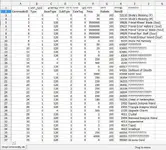
-------------------------------------------------------------------------------------------
Here my shopcommodity.slk you can use it and edit your own items. If you have doubts then back your old shopcommodity files.
-----------------------------------------------------
Links
To view the content, you need to sign in or register
To view the content, you need to sign in or register
Last edited: