Server + Client @ 1.4.2 & Guide

Status
Not open for further replies.
Pictures at bottom

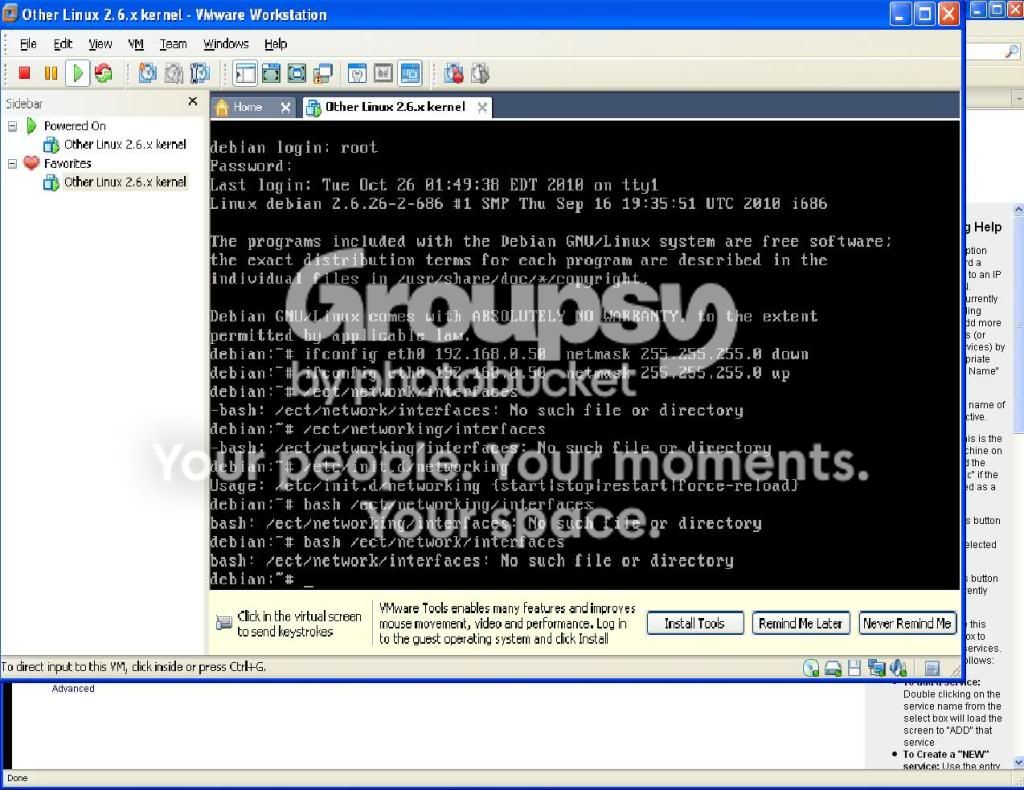
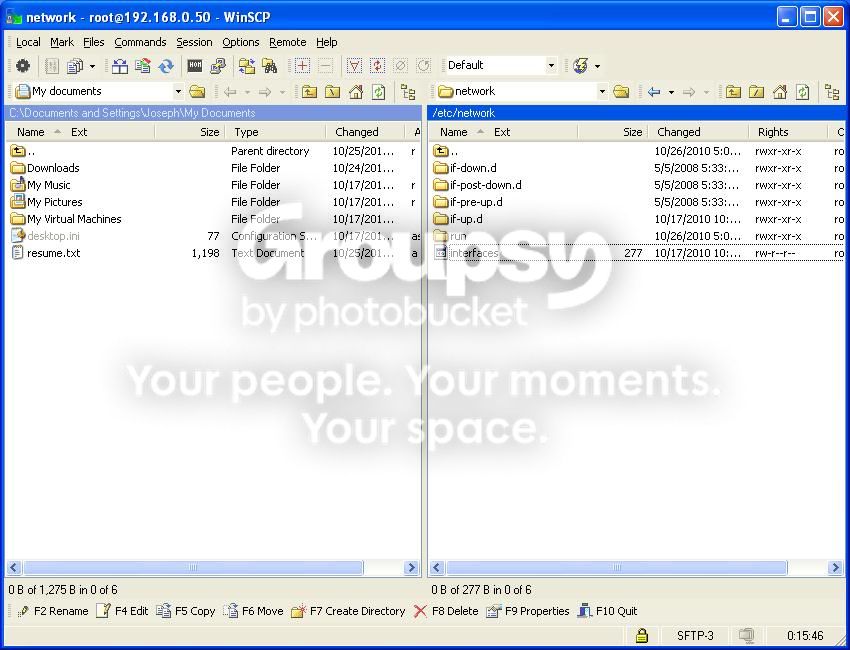
its debian 5.x and the interfaces is ect/networking/interfaces but it says the file ant there but thru winsch i find it and it reads

# This file describes the network interfaces available on your system
# and how to activate them. For more information, see interfaces(5).

# The loopback network interface
auto lo
iface lo inet loopback

# The primary network interface
allow-hotplug eth0
iface eth0 inet dhcp


this might be also why i can access it from any pc in the house but not over the web

29000,80,443,8008,8080 ports are forwarded
static nat pointed at 192.168.0.50
dynamic dns set up in router also
das7002 - Server + Client @ 1.4.2 & Guide - RaGEZONE Forums

das7002 - Server + Client @ 1.4.2 & Guide - RaGEZONE Forums

das7002 - Server + Client @ 1.4.2 & Guide - RaGEZONE Forums

das7002 - Server + Client @ 1.4.2 & Guide - RaGEZONE Forums

das7002 - Server + Client @ 1.4.2 & Guide - RaGEZONE Forums

das7002 - Server + Client @ 1.4.2 & Guide - RaGEZONE Forums
 
Last edited:
It's ETC not ECT :glare:

nano /etc/network/interfaces
---- edit config ----
/etc/init.d/networking restart

Then tada! You can acces your server with the new IP you entered...


/etc/network/interfaces
Code:
# This file describes the network interfaces available on your system
# and how to activate them. For more information, see interfaces(5).

# The loopback network interface
auto lo
iface lo inet loopback

# The primary network interface
allow-hotplug eth0
iface eth0 inet static

address 192.168.0.50
netmask 255.255.255.0
gateway 192.168.0.1
network 192.168.0.0
broadcast 192.168.0.255
 
Last edited:
It's ETC not ECT :glare:

nano /etc/network/interfaces
---- edit config ----
/etc/init.d/networking restart

Then tada! You can acces your server with the new IP you entered...


/etc/network/interfaces
Code:
# This file describes the network interfaces available on your system
# and how to activate them. For more information, see interfaces(5).

# The loopback network interface
auto lo
iface lo inet loopback

# The primary network interface
allow-hotplug eth0
iface eth0 inet static

address 192.168.0.50
netmask 255.255.255.0
gateway 192.168.0.1
network 192.168.0.0
broadcast 192.168.0.255


that works but still cant access it over the web
 
i got it working it was a combo of my screen saver kiling the gen. host and me loging on the pc that is hosting the server. thax for all your guyses help OOPS posted with brothers account
 
Last edited:
Thanks for an excellent guide! I followed it and set up everything and it seems working.
But please guys, give some response to this:

Thanks Ronny excellenet work ..but i am having problem if someone could help i am confused as to what client to use I used your client from codeplex but still cannnot get it to work

As i am having exactly the same problem. I can connect to my server, everything is showing as online, i made an account without problems, but i have no idea how to start the client.
I followed the guide on below Documentation section, it took some time for this Patch to modify the files, but as I noticed later, it removed launcher and patcher folders completely. Now when i try to start elementclient.exe, just an error pops up saying "Please start game from launcher.exe"
What i am doing wrong?
My server is up and running, but i cant get to play on it.

Thanks!
 
As a note as I was testing on Ubuntu as a lot of people use that and I prefer Ubuntu over Debian (even though Ubuntu is based on Debian)

/emul/ia32-linux/usr/lib/ on Debian is just /lib32 on Ubuntu just as an fyi

i tested the server on ubuntu desktop and server edition and both worked great

---------- Post added at 10:44 AM ---------- Previous post was at 10:09 AM ----------

i dunno if this would help people better understand howto setup a server or not but i was thinking about starting a video tutorial on how to setup ronnys server step by step from installation of linux to the very end result i think it would be a great edition to the ragezone forums ill just upload the videos to a filehost and people can download them to learn let me know what you all think and get back to me on it then i will probably do it if i get enough feed back from everyones opinion's on it
 
i tested the server on ubuntu desktop and server edition and both worked great

---------- Post added at 10:44 AM ---------- Previous post was at 10:09 AM ----------

i dunno if this would help people better understand howto setup a server or not but i was thinking about starting a video tutorial on how to setup ronnys server step by step from installation of linux to the very end result i think it would be a great edition to the ragezone forums ill just upload the videos to a filehost and people can download them to learn let me know what you all think and get back to me on it then i will probably do it if i get enough feed back from everyones opinion's on it

My opinion on that is... there are already enough people that barely understand how Linux and all of its daemons 'work'

If they can't understand the text guide they probably should not be doing this, it is after all not that hard to figure out 'how' Linux works

Main reason behind this, stop people that have no idea how to run a server from running one, and to prevent a lot of vulnerable servers to open up and then come back here complaining they got 'hacked'

I mean really when I first tried making a pw server I had no idea how the actual pw server files etc worked, I knew the game well because I have been playing it for quite some time but it truly wasn't that hard to get it working after I messed with it a bit (having run linux servers for 10 years probably did /help/ a lot there but realistically like I have said earlier it isnt hard)

Anyway, long post is long
 
i know just figuring id help in some way cause u know even with ronny's server setup here people are still having troubles so i figured maybe with a video tutorial and then seing exactly what is being done would help alot
 
Is it more or less possible to upgrade mah server to ronnys server by just replacing the whole gamed folder with ronnys files ? Its more the question if he changed anything else.

---------- Post added at 06:07 PM ---------- Previous post was at 05:40 PM ----------

Is it more or less possible to upgrade mah server to ronnys server by just replacing the whole gamed folder with ronnys files ? Its more the question if he changed anything else.
 
sure its possible im sure all u do is what u just said replace the gamed folder make sure u change all the ips in the config files to your server ip
 
guide work 100% ->

i have 64 bit debian and getting mysql error some sorta when trying to connect my client. is it then wrong installation method for libraries ?
or simple solution: i use 32 bit debian?:D:blushing:
 
Status
Not open for further replies.
Back