3D Object Converter

"export" is actualy the wrong word, you need to batchconvert it, with the full version theres 0 error, with the trial you will face some bugs on your batched items.

fullversion can be found in google ;)

don't forget if you try to make houses you need working octree files, that's harder... you need autodesk with plugins for it.
 
"export" is actualy the wrong word, you need to batchconvert it, with the full version theres 0 error, with the trial you will face some bugs on your batched items.

fullversion can be found in google ;)

don't forget if you try to make houses you need working octree files, that's harder... you need autodesk with plugins for it.

What plugins, to create octree files?
And about the z3m files, like helmets, can you create them too with 3d object converter? (new models, not only modifications)?
 
3d model converter don't work in the new format .msh
 
Last edited:
best of object-converter XD

question the -converter not Well illustrates three-dimensional distorted in converter

IzzdihaR - 3D Object Converter - RaGEZONE Forums
IMPORT TO 3D MAX FORMAT WAVE.OBJ IS distorted


IzzdihaR - 3D Object Converter - RaGEZONE Forums
 
not werking export to 3ds format from converter

and is not work import 3ds to 3dmax not suport
 
yes
It is true what you say but what to do to avoid mistake in converter or 3dmax

Thanks for the answer
 
Yes, I know a little 3d max

But the problem in converter no suport 3d model :glare:

Slot some other files The same problem

This model in 3d max no probleme
 
Last edited:
This is not a problem texture or uv map

Problem in converter no suport smoth or Three dimensional general is Just a view on converter
 
This is just an experiment

Workmanship of the ball in 3d max and export in format 3ds
IzzdihaR - 3D Object Converter - RaGEZONE Forums


Now open the format export from 3d max and open it to converter her the ball is distorted :banghead:


IzzdihaR - 3D Object Converter - RaGEZONE Forums


Try any 3D file that finds the same result:*:

Excuse me I do not know English well Dalk explain my picture

As I have noticed, the program does not support smooth just a view:stickyman:
 
Last edited:
use correct texture in the view or no is
Same result

It's over:grr::vroam:
 
Last edited:
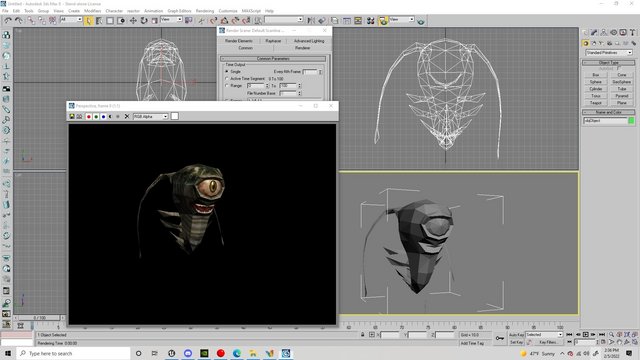
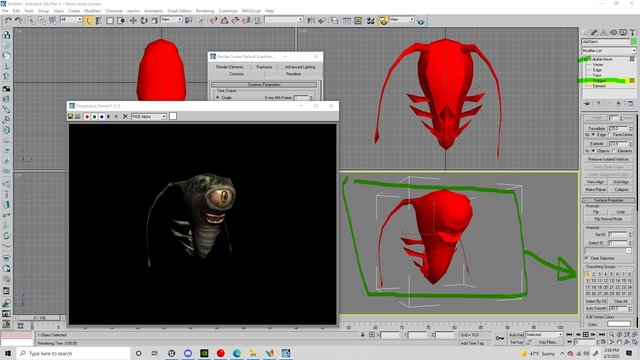
I'm alittle late to the responses, but each 3D program supports different ways to shade polygons. You can use smoothing groups to solve the issues with the blocky meshes.
IzzdihaR - 3D Object Converter - RaGEZONE Forums


Select Mesh, click the [+], Select all polygons on the mesh(turns red when selected) and scroll down on the right and select a shading group. You can break this down more by selecting certain sections of Polygons you want smoothed together to create hard edge lines. I just did the whole mesh for a general demonstration. This is 3DS Studio 8.
IzzdihaR - 3D Object Converter - RaGEZONE Forums
 
Last edited:
Back