Aura Kingdom Ultimate Server Installer

Since you're using Debian 12 (which runs on kernel version 6.1), there’s a high chance the server files may not operate correctly, especially since their binaries are somewhat outdated. If we had access to the source code, it would be possible to recompile for compatibility, but unfortunately, that’s not an option here. It's worth noting that the server files run smoothly on Debian 11 — I've personally tested this, and others have confirmed the same.

After reviewing your previous message, it seems like a core command like sudo was missing from your Debian 11 installation. This suggests that Debian 11 may not have been set up correctly, potentially leading to other missing functions as well. As a result, the installer may not have worked properly due to these missing components.
Hey Dulgan,

yeah after going back down to Debian 11 everything worked fine.

seems like when u install ur script on a VPS everything runs smoothly without errors

i tried several times on my PC but it always had different errors haha but still Thank you! <3
 
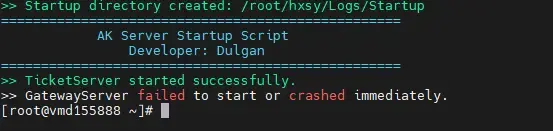
Hello my dear ones i have a little problem. thanks to the instructions i have got everything so far now it is so that with me only the ticket server starts then the gateway server wants to start but unfortunately it doesn't and i don't know where to start there my operating system is Anim Linux 9/CentOS 9 with 16gb ram maybe someone can help me?

with kind regards
 

Attachments

  • MobaXterm_D9eerTCVci - Aura Kingdom Ultimate Server Installer - RaGEZONE Forums
    MobaXterm_D9eerTCVci.webp
    10 KB · Views: 114
I have the error shown in the image. Could anyone help me with this?
I am using Ubuntu 20.04.6

Error gateway - Aura Kingdom Ultimate Server Installer - RaGEZONE Forums
 
Last edited:
I've made some updates to the installer to improve compatibility with Ubuntu 20/22 and CentOS. The necessary libraries are now installed automatically, making setup smoother on these systems.

However, please note that the binaries may still not work perfectly on these OS versions.

Additionally, the start and stop scripts have been improved for better process management, logging, and stability. Servers now start and stop more reliably, and logs are handled more efficiently.
 
1740831013879 - Aura Kingdom Ultimate Server Installer - RaGEZONE Forums

i have this error how to fix
And where to get client working with this sv thanks
 
Last edited:
Hello Dulgan, thank you for the installer. I ran into this problem when trying to start up the server.

I'm on debian-11.1.0 with Tailscale installed.
IP Assigned is Tailscale's, I ran "ultimate server installer" script after fresh installed debian and Tailscale.

AK_server error - Aura Kingdom Ultimate Server Installer - RaGEZONE Forums


Edited: Fixed by fresh installing on VirtualBox with Bridged mode, thanks a lots!
 
Last edited:
Anyone know how to fix this thanks
Clean installed Debian 11 on either VirtualBox or VMWare.
If Hamachi/Tailscale, make sure you bind your Network to "Bridged Mode"

If hosted locally, NAT might works thought I haven't try.

Also here for the client
 
Last edited:
Clean installed Debian 11 on either VirtualBox or VMWare.
If Hamachi/Tailscale, make sure you bind your Network "Bridged Mode" to Hamachi/Tailscale s' interface.

If hosted locally, NAT might works thought I haven't try.

ALso here for the client
Can i use debian 10 i install it on vps ?
 
When I try to login into my server I get this:
1741013179941-[RaGEZONE] - Aura Kingdom Ultimate Server Installer - RaGEZONE Forums

1741013525085-[RaGEZONE] - Aura Kingdom Ultimate Server Installer - RaGEZONE Forums


Someone know why I cannot login?
For the client part I just changed the connect.ini...I didn't do anything else.
 
Last edited:
When I try to login into my server I get this:
View attachment 276982
View attachment 276983

Someone know why I cannot login?
For the client part I just changed the connect.ini...I didn't do anything else.
Idk what went wrong but here is how I did.

1. Clean install Debian 11 with SSH server
(Config RAM 4GB+, CPU 4c+, Network NAT mode).
2. After you get to login part, login to as your root
3. SSH from windows into your Debian machine
4. Copy and paste the installer from GitHub and run it
5. Follow the instructions and make sure you save postgresql details.
6. Restart the Debian after installing server and start the server using /root/hxsy/start
7. Make sure to change port in connect.ini in client
7.1 Server=x.x.x.x,6543
 
Last edited:
I managed but I had to change my username with lower case... Like my user name was Insan3us and I had to change in insan3us to work to login. Someone know why?

And now I have this visual bug:
1741079953151 - Aura Kingdom Ultimate Server Installer - RaGEZONE Forums

Someone know how to fix it?
Thank you for the help
 
I managed but I had to change my username with lower case... Like my user name was Insan3us and I had to change in insan3us to work to login. Someone know why?

And now I have this visual bug:
View attachment 277039
Someone know how to fix it?
Thank you for the help
Thanks for reminding me that the username needs to be created under certain conditions — I’ve updated the script accordingly. Also, you can find a fix for the scene issue you mentioned below. Later today, I’ll also add the v15 client link to the main message.

Scene Fix
 
Thanks for reminding me that the username needs to be created under certain conditions — I’ve updated the script accordingly. Also, you can find a fix for the scene issue you mentioned below. Later today, I’ll also add the v15 client link to the main message.

Scene Fix
Can you please tell me how I can fix the problem with username lower case issue without making again the installation?

I have a new issue:
1741082309336 - Aura Kingdom Ultimate Server Installer - RaGEZONE Forums


I have to put my cursor on yellow dot to actually click on red dot if you uderstand what I'm saying...

1741082461417 - Aura Kingdom Ultimate Server Installer - RaGEZONE Forums


And Also I cannot write the character name...I cannot click on the box to write the name...
 

Attachments

  • 1741082439628 - Aura Kingdom Ultimate Server Installer - RaGEZONE Forums
    1741082439628.webp
    408 bytes · Views: 80
Last edited:
Can you please tell me how I can fix the problem with username lower case issue without making again the installation?
The server binaries only accept lowercase usernames under certain conditions during communication. The only way to fully fix this would be to edit the server binaries themselves. But since we don’t have the source code, that would be a pretty painful process — to be honest, it’s not really something I’m planning to spend time on.
 
The server binaries only accept lowercase usernames under certain conditions during communication. The only way to fully fix this would be to edit the server binaries themselves. But since we don’t have the source code, that would be a pretty painful process — to be honest, it’s not really something I’m planning to spend time on.
And about the screenshots above, do you have any ideas?

P.S: Is the resolution from client.ini. I solve it. Thank you!
 
Last edited:
Back