

Cabal EP33 Docker Server - Automated Installation Script

Newbie Spellweaver
Joined
Sep 5, 2022
Messages
19
Reaction score
57
Cabal EP33 Docker Server - Automated Installation Script
Easy Installation Solution​


Overview
This release is based on HariSeldon 's EP33 docker version with automated installation script. It includes all fixes and improvements from the second version.

Fixed Issues:
  • Fixed missing cabal_container (cabalep33)
  • Fixed guild warehouse issue (AgentShop_01.ini port correction)
  • Fixed LoginSvr.bin (Husky)

Features
  • Fully automated installation
  • Automatic IP detection and configuration
  • Error checking
  • Easy server management commands

System Requirements
  • Debian 11 (Bullseye)
  • Minimum 4GB RAM
  • Minimum 20GB free disk space
  • Root access
  • Internet connection

Download Information
  • Download Link:
  • File: CabalEP33_Docker_Judixe.rar
  • Password: ragezone

Installation
After downloading the files, simply run these commands:

Code:
# Login as root
sudo su

# Go to root directory
cd /root

# Extract files (Password: ragezone)
unrar x CabalEP33_Docker_Judixe.rar

# Make installation script executable
chmod +x install.sh

# Start installation
./install.sh

Support
If you encounter any issues during or after installation, please post in this thread. We'll be happy to help.

When reporting issues, please include:
  • Error message you encountered
  • Your server specifications
  • At which step you experienced the issue

Credits


Important Note​
This installation package has been tested and verified to work only on Debian 11. It's important to follow the installation guide carefully.

 
Cabal EP33 Docker Server - Automated Installation Script
Easy Installation Solution​


Overview
This release is based on HariSeldon 's EP33 docker version with automated installation script. It includes all fixes and improvements from the second version.

Fixed Issues:
  • Fixed missing cabal_container (cabalep33)
  • Fixed guild warehouse issue (AgentShop_01.ini port correction)
  • Fixed LoginSvr.bin (Husky)

Features
  • Fully automated installation
  • Automatic IP detection and configuration
  • Error checking
  • Easy server management commands

System Requirements
  • Debian 11 (Bullseye)
  • Minimum 4GB RAM
  • Minimum 20GB free disk space
  • Root access
  • Internet connection

Download Information
  • Download Link:
  • File: CabalEP33_Docker_Judixe.rar
  • Password: ragezone

Installation
After downloading the files, simply run these commands:

Code:
# Login as root
sudo su

# Go to root directory
cd /root

# Extract files (Password: ragezone)
unrar x CabalEP33_Docker_Judixe.rar

# Make installation script executable
chmod +x install.sh

# Start installation
./install.sh

Support
If you encounter any issues during or after installation, please post in this thread. We'll be happy to help.

When reporting issues, please include:
  • Error message you encountered
  • Your server specifications
  • At which step you experienced the issue

Credits


Important Note​
This installation package has been tested and verified to work only on Debian 11. It's important to follow the installation guide carefully.
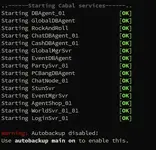
so the files go to root and not home anymore?
 
so the files go to root and not home anymore?
Yes, put it on root and it will do everything automatically

I just wrote a script for a smooth and automatic installation of docker and I was able to run it on the client but I couldn't find the db name and password :D this is actually a one-button installation script
 
Last edited:
Cabal EP33 Docker Server - Automated Installation Script
Easy Installation Solution​


Overview
This release is based on HariSeldon 's EP33 docker version with automated installation script. It includes all fixes and improvements from the second version.

Fixed Issues:
  • Fixed missing cabal_container (cabalep33)
  • Fixed guild warehouse issue (AgentShop_01.ini port correction)
  • Fixed LoginSvr.bin (Husky)

Features
  • Fully automated installation
  • Automatic IP detection and configuration
  • Error checking
  • Easy server management commands

System Requirements
  • Debian 11 (Bullseye)
  • Minimum 4GB RAM
  • Minimum 20GB free disk space
  • Root access
  • Internet connection

Download Information
  • Download Link:
  • File: CabalEP33_Docker_Judixe.rar
  • Password: ragezone

Installation
After downloading the files, simply run these commands:

Code:
# Login as root
sudo su

# Go to root directory
cd /root

# Extract files (Password: ragezone)
unrar x CabalEP33_Docker_Judixe.rar

# Make installation script executable
chmod +x install.sh

# Start installation
./install.sh

Support
If you encounter any issues during or after installation, please post in this thread. We'll be happy to help.

When reporting issues, please include:
  • Error message you encountered
  • Your server specifications
  • At which step you experienced the issue

Credits


Important Note​
This installation package has been tested and verified to work only on Debian 11. It's important to follow the installation guide carefully.

Screenshot 2025-04-30 180755 - Cabal EP33 Docker Server - Automated Installation Script - RaGEZONE Forums

why is it giving me an error?
 
first run the file I just posted

steps:

chmod +x installv2.sh


sudo ./installv2.sh

then run install.sh
 

Attachments

first run the file I just posted

steps:

chmod +x installv2.sh


sudo ./installv2.sh

then run install.sh
always the same mistake

Code:
E: Unable to find package apt-cdrom
E: Unable to find package basic-packages
Kurulum tamamlandı!
root@CabalEP33:~# echo "Diğer gerekli packageler yükleniyor..."
apt-get install -y \
apt-cdrom \
apt-utils \
basic-packages

echo "Kurulum tamamlandı!"
Diğer gerekli packageler yükleniyor...
Reading package lists... Done
Building dependency tree... Done
Reading state information... Done
E: Unable to find package apt-cdrom
E: Unable to find package basic-packages
Kurulum tamamlandı!
 
there is a problem with package uploads, let's do it like this

delete all install.sh files

and put the new one I will give you on your server

then run it and send me a screenshot


Code:
chmod +x installnew.sh
sudo ./installnew.sh
 

Attachments

I added all the package installations for you and made it completely in english, share with me when you get problems


new file
install.sh
Code:
chmod +x install.sh

sudo ./install.sh

don't forget to delete the old .sh!


Code:
# Changelog for Cabal EP33 Installation Script

## Version 2.0.0 (2025-04-30)

### Added
- **Repository Management**
  - Added comprehensive Debian Bullseye repositories
  - Added source repositories for better package management
  - Added backports repositories
  - Added alternative mirror support
  - Added Docker official repository with GPG key verification

### Enhanced
- **Package System**
  - Added automatic package system repair functionality
  - Added broken package detection and fixing
  - Added missing dependency resolution
  - Added package verification system

### New Features
- **MySQL Installation and Configuration**
  - Added interactive MySQL root password setup
  - Added Cabal database user creation with custom credentials
  - Added automatic database creation (cabal_auth_db and cabal_game_db)
  - Added MySQL security hardening
  - Added UTF8 character set configuration
  - Added performance optimization settings
  - Added ODBC integration with custom credentials
  - Added secure credential storage

### Package Additions
- **Development Tools**
  - build-essential
  - gcc and g++
  - make and cmake
  - autoconf and automake
  - pkg-config
  - libtool

- **Network Tools**
  - net-tools
  - iproute2
  - ifupdown
  - iputils-ping
  - netcat
  - nmap
  - tcpdump
  - iptables
  - openssh-server
  - openssl

- **System Utilities**
  - zip/unzip
  - tar
  - gzip
  - bzip2
  - vim
  - nano
  - htop
  - screen
  - tmux
  - sudo
  - rsync

### Improvements
- **Docker Installation**
  - Added Docker installation verification
  - Added Docker Compose plugin
  - Added Docker Buildx plugin
  - Added automatic service startup
  - Added hello-world container test

### Security
- **System Security**
  - Added secure APT repository handling
  - Added GPG key verification for all repositories
  - Added secure package verification
  - Added MySQL security hardening
  - Added secure credential storage

### Cleanup
- **System Cleanup**
  - Added comprehensive Docker cleanup
  - Added old installation files cleanup
  - Added package cache cleanup
  - Added repository cleanup

### Documentation
- Added step-by-step progress messages
- Added color-coded status messages
- Added error checking and reporting
- Added installation verification steps

### Error Handling
- Added comprehensive error checking
- Added detailed error messages
- Added automatic error recovery where possible
- Added installation state verification

## Version 1.0.0 (Initial Release)
- Basic installation script with minimal functionality
- Basic Docker support
- Basic package installation
- Basic error handling
 

Attachments

I added all the package installations for you and made it completely in english, share with me when you get problems


new file
install.sh
Code:
chmod +x install.sh

sudo ./install.sh

don't forget to delete the old .sh!


Code:
# Changelog for Cabal EP33 Installation Script

## Version 2.0.0 (2025-04-30)

### Added
- **Repository Management**
  - Added comprehensive Debian Bullseye repositories
  - Added source repositories for better package management
  - Added backports repositories
  - Added alternative mirror support
  - Added Docker official repository with GPG key verification

### Enhanced
- **Package System**
  - Added automatic package system repair functionality
  - Added broken package detection and fixing
  - Added missing dependency resolution
  - Added package verification system

### New Features
- **MySQL Installation and Configuration**
  - Added interactive MySQL root password setup
  - Added Cabal database user creation with custom credentials
  - Added automatic database creation (cabal_auth_db and cabal_game_db)
  - Added MySQL security hardening
  - Added UTF8 character set configuration
  - Added performance optimization settings
  - Added ODBC integration with custom credentials
  - Added secure credential storage

### Package Additions
- **Development Tools**
  - build-essential
  - gcc and g++
  - make and cmake
  - autoconf and automake
  - pkg-config
  - libtool

- **Network Tools**
  - net-tools
  - iproute2
  - ifupdown
  - iputils-ping
  - netcat
  - nmap
  - tcpdump
  - iptables
  - openssh-server
  - openssl

- **System Utilities**
  - zip/unzip
  - tar
  - gzip
  - bzip2
  - vim
  - nano
  - htop
  - screen
  - tmux
  - sudo
  - rsync

### Improvements
- **Docker Installation**
  - Added Docker installation verification
  - Added Docker Compose plugin
  - Added Docker Buildx plugin
  - Added automatic service startup
  - Added hello-world container test

### Security
- **System Security**
  - Added secure APT repository handling
  - Added GPG key verification for all repositories
  - Added secure package verification
  - Added MySQL security hardening
  - Added secure credential storage

### Cleanup
- **System Cleanup**
  - Added comprehensive Docker cleanup
  - Added old installation files cleanup
  - Added package cache cleanup
  - Added repository cleanup

### Documentation
- Added step-by-step progress messages
- Added color-coded status messages
- Added error checking and reporting
- Added installation verification steps

### Error Handling
- Added comprehensive error checking
- Added detailed error messages
- Added automatic error recovery where possible
- Added installation state verification

## Version 1.0.0 (Initial Release)
- Basic installation script with minimal functionality
- Basic Docker support
- Basic package installation
- Basic error handling
Screenshot 2025-04-30 183447 - Cabal EP33 Docker Server - Automated Installation Script - RaGEZONE Forums

same error
 
Back
