Compiled Minecraft Dungeons+Guide

Joined
Jun 27, 2010
Messages
1,067
Reaction score
1,492
Download:

If you want to compile yourself you need to
Code:
git lfs checkout
inside spice folder to restore the missing files.

Install:
Visual Studio 2017(I have used Enterprise version)
Unreal 4.22.3(From epic store)

Open "Dungeons.uproject" with Unreal (it will need to convert the project because we don't have the unreal editor form mojang), it will compile some things and generate "Dungeons.sln" open it with VS2017 edit "DungeonsGameInstance.cpp" line 200 to disable the login page.

Code:
        //if (online::usingNullSubsystem(GetWorld()))
        //{
            LoginFlow = CreateDefaultSubobject<UDungeonsLoginFlowNull>(TEXT("LoginFlow"));
        //}
        //else
        //{
        //    LoginFlow = CreateDefaultSubobject<UDungeonsLoginFlowWin>(TEXT("LoginFlow"));
        //}
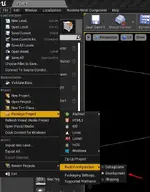
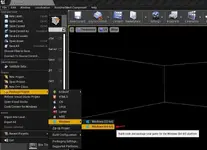
Now go back to the editor click File>Package Project>Build Configuration change the to Development now again on File>Package Project>Windows>Windows (64-bit) it will ask the output folder where the compiled+Cooked game files will be saved it will take a long time depending on your system(mine took about 3hours).
Screenshot_1 - Compiled Minecraft Dungeons+Guide - RaGEZONE Forums Screenshot_8 - Compiled Minecraft Dungeons+Guide - RaGEZONE Forums

Virustotal:
Code:
https://www.virustotal.com/gui/file/41d99dcea467d56f03e6fff1f604af1f576e1ae161076fb823c4423f4f55f913?nocache=1
https://www.virustotal.com/gui/file/e06e486a16e0566d3665f6f5c9e693b8bac2edad7b84fbce0d153c5d2597a5ad?nocache=1
https://www.virustotal.com/gui/file/4b18117dce7137fc6f318684758a7ee766a285c27e2bf5d28e8fe5022ed4fe41?nocache=1
https://www.virustotal.com/gui/file/fab174fcea8bd346c9af2fdf22d53d8c61a43ab0bf4f698f04f6d04c5df0bc6c?nocache=1
 
Last edited:
Download:

If you want to compile yourself you need to
Code:
git lfs checkout
inside spice folder to restore the missing files.

Install:
Visual Studio 2017(I have used Enterprise version)
Unreal 4.22.3(From epic store)

Open "Dungeons.uproject" with Unreal (it will need to convert the project because we don't have the unreal editor form mojang), it will compile some things and generate "Dungeons.sln" open it with VS2017 edit "DungeonsGameInstance.cpp" line 200 to disable the login page.

Code:
        //if (online::usingNullSubsystem(GetWorld()))
        //{
            LoginFlow = CreateDefaultSubobject<UDungeonsLoginFlowNull>(TEXT("LoginFlow"));
        //}
        //else
        //{
        //    LoginFlow = CreateDefaultSubobject<UDungeonsLoginFlowWin>(TEXT("LoginFlow"));
        //}
Now go back to the editor click File>Package Project>Build Configuration change the to Development now again on File>Package Project>Windows>Windows (64-bit) it will ask the output folder where the compiled+Cooked game files will be saved it will take a long time depending on your system(mine took about 3hours).
View attachment 297523View attachment 297525

Virustotal:
Code:
https://www.virustotal.com/gui/file/41d99dcea467d56f03e6fff1f604af1f576e1ae161076fb823c4423f4f55f913?nocache=1
https://www.virustotal.com/gui/file/e06e486a16e0566d3665f6f5c9e693b8bac2edad7b84fbce0d153c5d2597a5ad?nocache=1
https://www.virustotal.com/gui/file/4b18117dce7137fc6f318684758a7ee766a285c27e2bf5d28e8fe5022ed4fe41?nocache=1
https://www.virustotal.com/gui/file/fab174fcea8bd346c9af2fdf22d53d8c61a43ab0bf4f698f04f6d04c5df0bc6c?nocache=1
It seems like in-game menus can't be navigated with controller or keyboard. It only works in the main menu.
 
Last edited:
Hey ashlay and everyone,


Thanks for the compile guide—super detailed! Followed similar steps on my end (VS2017 + UE 4.22.3 from Epic), did the git lfs checkout in the spice folder to grab the missing LFS files, converted the .uproject (it complained about missing Mojang custom engine bits but proceeded), edited DungeonsGameInstance.cpp line ~200 to force the Null login flow like you showed:


text

<span><span>//if (online::usingNullSubsystem(GetWorld()))</span></span><br><span><span>//{</span></span><br><span><span> LoginFlow = CreateDefaultSubobject&lt;UDungeonsLoginFlowNull&gt;(TEXT("LoginFlow"));</span></span><br><span><span>//}</span></span><br><span><span>//else</span></span><br><span><span>//{</span></span><br><span><span>// LoginFlow = CreateDefaultSubobject&lt;UDungeonsLoginFlowWin&gt;(TEXT("LoginFlow"));</span></span><br><span><span>//}</span></span>


Switched to Development build config, packaged for Win64—took about 2.5-3 hours on my machine too (i7 + decent GPU helps).


Couple notes from testing:
  • Agrees with ZeptoBST: In-game menus (inventory, pause, etc.) seem unresponsive to keyboard/controller after login bypass—only main menu works properly. Mouse still navigates fine though.
  • Game launches and plays levels offline, but no online features (obviously, since login skipped). Some assets/textures missing or placeholder in places—probably due to the custom UE4 branch not fully matching stock 4.22.3.
  • VirusTotal on the packaged exe + dlls came back clean-ish (similar to your links, 0-2 detections max, mostly heuristics).

Anyone figure out a workaround for controller/menu nav yet? Or got the full custom engine branch to avoid conversion issues? Would love to see if we can get proper input rebinding or mod hooks in.


Thanks again for sharing the steps—cool peek into how Dungeons was built!
 
Last edited:
nice guide, though when trying to rebuild the modules I get this error. I'm sure I did
Code:
git lfs checkout
, maybe I got a bad copy of the source code?
1773952680044 - Compiled Minecraft Dungeons+Guide - RaGEZONE Forums
 
nice guide, though when trying to rebuild the modules I get this error. I'm sure I did
Code:
git lfs checkout
, maybe I got a bad copy of the source code?
View attachment 298202
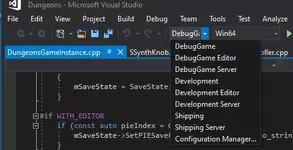
Is that error on unreal editor? if yes try to compile using visual studio, open Dungeons.sln select "DebugGame" and "win64" and build it.
 

Attachments

  • Screenshot_2 - Compiled Minecraft Dungeons+Guide - RaGEZONE Forums
    Screenshot_2.webp
    21.2 KB · Views: 45
Hey Everyone! Does anybody has those two files(BP_Boat_Square, S_CowardsArmor_CowardsArmor)? If so, can you please post them? Thanks!
 
Back