- Joined
- Jan 28, 2013
- Messages
- 236
- Reaction score
- 127
Original source
Register System is working 4.0 and 1.0 files.

What I want to mention. From the first time, the Registration refused to work and where to fill in the database was also not entirely clear.
I decided to look at the contents of the register.php file.
In this file you should pay attention to the lines: from 269 to 272
As we can see the database access password was not set.
The host address is registered as: localhost.
The name of the database "account_data" should be noted.
In registration testing, I used a local server with a host: localhost
The user has access to the database: root
Database Access Password: root
Database created in phpMyAdmin: account_data
This is how the contents of the file (fragment) began to look: register.php
Next, open phpMyAdmin and create a new Database: account_data

Go to the SQL tab and paste the data below and click the "Go" button:

It remains the case for small - to register our new game account. But, first check a couple of things:
1. The folder SimpleRegisterScript (it is better to get rid of the spaces in the folder name) with the contents placed in the directory: C:\wamp\www\
2. PostgreSQL, phpMyAdmin, AccountServer - Started.
Now that all the preparations have been completed in the browser, go to:
Fill in the fields and confirm the registration.

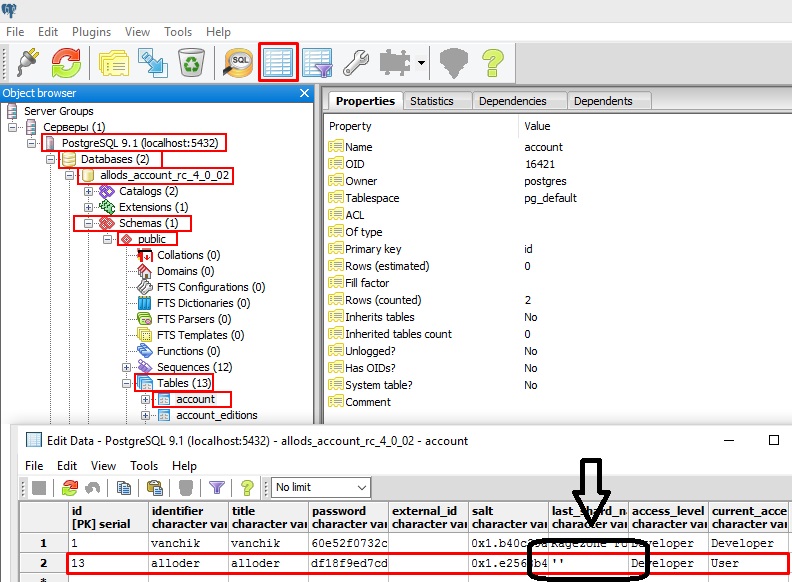
If everything is done correctly, the account we just created will appear in the PostgreSQL

and phpMyAdmin databases.

attachment:
Register System is working 4.0 and 1.0 files.
What I want to mention. From the first time, the Registration refused to work and where to fill in the database was also not entirely clear.
I decided to look at the contents of the register.php file.
In this file you should pay attention to the lines: from 269 to 272
Code:
[COLOR=#116644]269[/COLOR]     [COLOR=#0055AA]$webhost[/COLOR]=[COLOR=#AA1111]"localhost"[/COLOR];       [COLOR=#AA5500]// host[/COLOR]
[COLOR=#116644]270[/COLOR]     [COLOR=#0055AA]$webuser[/COLOR]=[COLOR=#AA1111]"root"[/COLOR];           [COLOR=#AA5500]// user[/COLOR]
[COLOR=#116644]271[/COLOR]     [COLOR=#0055AA]$webpwd[/COLOR]=[COLOR=#AA1111]""[/COLOR];               [COLOR=#AA5500]// password[/COLOR]
[COLOR=#116644]272[/COLOR] [COLOR=#0055AA]$webdb[/COLOR]=[COLOR=#AA1111]"account_data"[/COLOR]; [COLOR=#AA5500]// database[/COLOR]The host address is registered as: localhost.
The name of the database "account_data" should be noted.
In registration testing, I used a local server with a host: localhost
The user has access to the database: root
Database Access Password: root
Database created in phpMyAdmin: account_data
This is how the contents of the file (fragment) began to look: register.php
Code:
[COLOR=#116644]269[/COLOR]     [COLOR=#0055AA]$webhost[/COLOR]=[COLOR=#AA1111]"127.0.0.1"[/COLOR];       [COLOR=#AA5500]// host[/COLOR]
[COLOR=#116644]270[/COLOR]     [COLOR=#0055AA]$webuser[/COLOR]=[COLOR=#AA1111]"root"[/COLOR];           [COLOR=#AA5500]// user[/COLOR]
[COLOR=#116644]271[/COLOR]     [COLOR=#0055AA]$webpwd[/COLOR]=[COLOR=#AA1111]"root"[/COLOR];           [COLOR=#AA5500]// password[/COLOR]
[COLOR=#116644]272[/COLOR]     [COLOR=#0055AA]$webdb[/COLOR]=[COLOR=#AA1111]"account_data"[/COLOR];   [COLOR=#AA5500]// database[/COLOR]
Next, open phpMyAdmin and create a new Database: account_data
Go to the SQL tab and paste the data below and click the "Go" button:
Code:
[COLOR=#0055AA][I]SET[/I][/COLOR] [COLOR=#0055AA][I]FOREIGN_KEY_CHECKS[/I][/COLOR]=[COLOR=#116644]0[/COLOR];
[COLOR=#0055AA][I]CREATE[/I][/COLOR] [COLOR=#0055AA][I]TABLE[/I][/COLOR] `account_data` (
  `id` [COLOR=#0055AA]int[/COLOR]([COLOR=#116644]10[/COLOR]) [COLOR=#0055AA][I]NOT[/I][/COLOR] [COLOR=#770088]NULL[/COLOR] [COLOR=#0055AA][I]AUTO_INCREMENT[/I][/COLOR],
  `accountname` [COLOR=#0055AA]varchar[/COLOR]([COLOR=#116644]20[/COLOR]) [COLOR=#0055AA][I]NOT[/I][/COLOR] [COLOR=#770088]NULL[/COLOR],
  `password` [COLOR=#0055AA]varchar[/COLOR]([COLOR=#116644]20[/COLOR]) [COLOR=#0055AA][I]NOT[/I][/COLOR] [COLOR=#770088]NULL[/COLOR],
  `email` [COLOR=#0055AA]varchar[/COLOR]([COLOR=#116644]35[/COLOR]) [COLOR=#0055AA][I]NOT[/I][/COLOR] [COLOR=#770088]NULL[/COLOR],
  `coins` [COLOR=#0055AA]varchar[/COLOR]([COLOR=#116644]255[/COLOR]) [COLOR=#0055AA][I]NOT[/I][/COLOR] [COLOR=#770088]NULL[/COLOR],
  `notice` [COLOR=#0055AA]varchar[/COLOR]([COLOR=#116644]255[/COLOR]) [COLOR=#0055AA][I]NOT[/I][/COLOR] [COLOR=#770088]NULL[/COLOR],
  [COLOR=#0055AA][I]PRIMARY[/I][/COLOR] [COLOR=#0055AA][I]KEY[/I][/COLOR] (`id`)
) [COLOR=#0055AA][I]ENGINE[/I][/COLOR]=InnoDB [COLOR=#0055AA][I]AUTO_INCREMENT[/I][/COLOR]=[COLOR=#116644]11[/COLOR] [COLOR=#770088]DEFAULT[/COLOR] [COLOR=#0055AA][I]CHARSET[/I][/COLOR]=utf8;
It remains the case for small - to register our new game account. But, first check a couple of things:
1. The folder SimpleRegisterScript (it is better to get rid of the spaces in the folder name) with the contents placed in the directory: C:\wamp\www\
2. PostgreSQL, phpMyAdmin, AccountServer - Started.
Now that all the preparations have been completed in the browser, go to:
Code:
http:[COLOR=#AA5500]//localhost/SimpleRegisterScript/register.php[/COLOR]Fill in the fields and confirm the registration.
If everything is done correctly, the account we just created will appear in the PostgreSQL
and phpMyAdmin databases.
attachment:
To view the content, you need to sign in or register
Last edited: