GM Tool

Status
Not open for further replies.
You should add all attributes to the awakening..
and I havent tried this myself, but it doesnt, well should not, work with writing /sro Attack Speed.. Attack speed is 77 (or so I think, you can check at defineattribute.h)

Actually it's really easy to fix your source files so that you can do:
/sro AnyAttributeNumber Value

That fix is even posted in this thread: http://forum.ragezone.com/f724/official-source-snippets-compilation-785509/
Just look in the spoiler under SRO fix.
 
idk, mybe you already have this, mybe not... make its go, so its update hes "list" to your resource so no one have to ask for a "V17-18" gm commands, get the GM tool.exe at your rescoure map, ands its just get all your items of your server :)

how about this?
 
Version 1.3!


Whats updated?

• Added alot more commands to the In-Game tab.
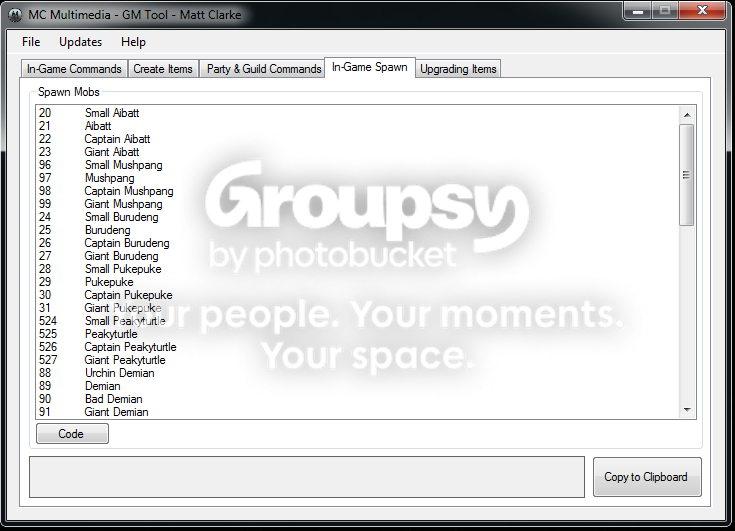
• New tabs, "Ingame Spawn", "Upgrading items".
• Updated the guild siege commands.
• Added a new update window.
• Upgrading tabs has a whole new set of commands.

Previews
Matt Clarke - GM Tool - RaGEZONE Forums

Matt Clarke - GM Tool - RaGEZONE Forums

Matt Clarke - GM Tool - RaGEZONE Forums

Matt Clarke - GM Tool - RaGEZONE Forums
 
You can also type in game
PHP:
[DllImport("User32.dll", EntryPoint = "FindWindow", CharSet = CharSet.Auto)]
public static extern IntPtr FindWindow(string lpClassName, string lpWindowName);

[DllImport("user32.dll", ExactSpelling = true, CharSet = CharSet.Auto)]
[return: MarshalAs(UnmanagedType.Bool)]
internal static extern bool SetForegroundWindow(IntPtr hWnd);

IntPtr handle = new IntPtr(0);

handle = FindWindow("FLYFF");

if( SetForegroundWindow(handle) )
{
SendKeys.Send("{ENTER}");
SendKeys.Send("{S}{T}{U}{F}{F}");
SendKeys.Send("{ENTER}");
// give focus back to your application
}
I'm not sure this will work specifically, but it's basically how to do it. I'd write it in vb if it wasn't such a pain...
 
You can also type in game
PHP:
[DllImport("User32.dll", EntryPoint = "FindWindow", CharSet = CharSet.Auto)]
public static extern IntPtr FindWindow(string lpClassName, string lpWindowName);

[DllImport("user32.dll", ExactSpelling = true, CharSet = CharSet.Auto)]
[return: MarshalAs(UnmanagedType.Bool)]
internal static extern bool SetForegroundWindow(IntPtr hWnd);

IntPtr handle = new IntPtr(0);

handle = FindWindow("FLYFF");

if( SetForegroundWindow(handle) )
{
SendKeys.Send("{ENTER}");
SendKeys.Send("{S}{T}{U}{F}{F}");
SendKeys.Send("{ENTER}");
// give focus back to your application
}
I'm not sure this will work specifically, but it's basically how to do it. I'd write it in vb if it wasn't such a pain...

What do you mean dude? Like, use this in the project and it will send the commands ingame?
 
What do you mean dude? Like, use this in the project and it will send the commands ingame?

KrYpT0n's reply was good to explain it, but I just wanna be a ***** and explain it further because I actually understood the code.

PHP:
handle = FindWindow("FLYFF"); 

if( SetForegroundWindow(handle) ) 
{ 
SendKeys.Send("{ENTER}"); 
SendKeys.Send("{S}{T}{U}{F}{F}"); 
SendKeys.Send("{ENTER}"); 
// give focus back to your application 
}

That's what I focused on, because that's doing the major work. The DLL import just makes it possible.

PHP:
handle = FindWindow("FLYFF");

Find the window "FLYFF", which "FLYFF" is, most of the time, the window name of the game.

PHP:
if( SetForegroundWindow(handle) ) 
{ 
SendKeys.Send("{ENTER}"); 
SendKeys.Send("{S}{T}{U}{F}{F}"); 
SendKeys.Send("{ENTER}"); 
// give focus back to your application 
}

Pretty self explanatory.

If the window is found, as well as brings the window to the Foreground, meaning in the front, then send the key, {ENTER}, being the enter key, activating the chat window, {S}{T}{U}{F}{F}, being the things sent in the chat, and the last {ENTER} being it sending it to the server, being interpreted as either chat or command, and by your tool, being GM command.

/Like a boss
 
KrYpT0n's reply was good to explain it, but I just wanna be a ***** and explain it further because I actually understood the code.

PHP:
handle = FindWindow("FLYFF"); 

if( SetForegroundWindow(handle) ) 
{ 
SendKeys.Send("{ENTER}"); 
SendKeys.Send("{S}{T}{U}{F}{F}"); 
SendKeys.Send("{ENTER}"); 
// give focus back to your application 
}

That's what I focused on, because that's doing the major work. The DLL import just makes it possible.

PHP:
handle = FindWindow("FLYFF");

Find the window "FLYFF", which "FLYFF" is, most of the time, the window name of the game.

PHP:
if( SetForegroundWindow(handle) ) 
{ 
SendKeys.Send("{ENTER}"); 
SendKeys.Send("{S}{T}{U}{F}{F}"); 
SendKeys.Send("{ENTER}"); 
// give focus back to your application 
}

Pretty self explanatory.

If the window is found, as well as brings the window to the Foreground, meaning in the front, then send the key, {ENTER}, being the enter key, activating the chat window, {S}{T}{U}{F}{F}, being the things sent in the chat, and the last {ENTER} being it sending it to the server, being interpreted as either chat or command, and by your tool, being GM command.

/Like a boss

nice explaining..
since flyff windows arent named "FLYFF" anymore, maybe you should be able to write in the name urself?
 
Or, instead of looking for the window name, search for the process name instead?

Although it's possible, I bet most servers don't bother changing the name and leave it as Neuz.exe

Edit: Just thought of something else. Do both of those. First search for process name. If that fails, search for window name. If that fails, ask if their game is currently running. If they choose yes, prompt them to insert the window name.
 
KrYpT0n's reply was good to explain it, but I just wanna be a ***** and explain it further because I actually understood the code.

PHP:
handle = FindWindow("FLYFF"); 

if( SetForegroundWindow(handle) ) 
{ 
SendKeys.Send("{ENTER}"); 
SendKeys.Send("{S}{T}{U}{F}{F}"); 
SendKeys.Send("{ENTER}"); 
// give focus back to your application 
}

That's what I focused on, because that's doing the major work. The DLL import just makes it possible.

PHP:
handle = FindWindow("FLYFF");

Find the window "FLYFF", which "FLYFF" is, most of the time, the window name of the game.

PHP:
if( SetForegroundWindow(handle) ) 
{ 
SendKeys.Send("{ENTER}"); 
SendKeys.Send("{S}{T}{U}{F}{F}"); 
SendKeys.Send("{ENTER}"); 
// give focus back to your application 
}

Pretty self explanatory.

If the window is found, as well as brings the window to the Foreground, meaning in the front, then send the key, {ENTER}, being the enter key, activating the chat window, {S}{T}{U}{F}{F}, being the things sent in the chat, and the last {ENTER} being it sending it to the server, being interpreted as either chat or command, and by your tool, being GM command.

/Like a boss

Okay, thanks for the explanation dude. Appreciate it alot =)

nice explaining..
since flyff windows arent named "FLYFF" anymore, maybe you should be able to write in the name urself?

Yea, I might add a setup section, so the user can input the name of the server's neuz, or whatever they call it, then the DLL see's it or something like that.

Or, instead of looking for the window name, search for the process name instead?

Although it's possible, I bet most servers don't bother changing the name and leave it as Neuz.exe

Edit: Just thought of something else. Do both of those. First search for process name. If that fails, search for window name. If that fails, ask if their game is currently running. If they choose yes, prompt them to insert the window name.

Like I said at the comment above, I'll try and do that, if that doesnt work, I'll investigate in looking into finding the process names.

Thanks for all your help guys!
 
Hi, well, its not done yet, need to get some things done with the combo box, using
Code:
ComboBox1.SelectedIndex
But I need to get it to work with the Awakes and other things. It will be finished, just I'm not spending much time on it at the moment. I might even release the source for it aswell, just for shits and giggles.
 
i have some realy good suggestions thaad i would love to have!

1) try to add all awaking options, also % onces and LB etc,etc,etc
2) wen you put the GM tool on your resource its automitics reads items ID en monsters ID so the gm tool, got evry items/monster thad in your server, and this way you dont need GM tool open+ propitem.txt and propmover.txt this would be so great if you can do this!!!
 
i have some realy good suggestions thaad i would love to have!

1) try to add all awaking options, also % onces and LB etc,etc,etc
2) wen you put the GM tool on your resource its automitics reads items ID en monsters ID so the gm tool, got evry items/monster thad in your server, and this way you dont need GM tool open+ propitem.txt and propmover.txt this would be so great if you can do this!!!

Well, I'll be including the propitem.txt and the moneters list into the solution. So I can hopefully include them and the ListBox will list everything inside the .txt file. But I'd have to make some way of making it take out un-neccesary words.
 
Nc This Help's Alot... +1 Keep it up

Hey guys, I've took a break from the PHP Admin project, it was wrecking my head with the PHP haha. So I coded a little GM Tool, it doesn't connect to the game, but it does give you most codes. I'll be extending it to go on for Guild, Items, Party's, Armour, Accessories etc. Just trying to find the time ;D Thanks guys!

It is up for download, but I'm still developing it so, that's why I posted it here.

UPDATES

Added a text-box for people to insert a name, then the command outputs with the name beside it.

Added a little button at top called "updates" click it to find out the most recent update.


New features coming soon!

  • Party Commands ☑ - Done
  • Guild Commands ☑ - Done
  • Pet Commands
  • Fully Updated Weapons Codes
  • Fully Updated Armour Codes
  • Accessories Commands ☑ - Done
  • CS Sets Commands

If you have any suggestions, post underneath :D:

[UPDATE - 16/12/11]
• Updated the updates window.
• Added a default logo for the program.
• Added a party commands tab.
• Re-Arranged the Summon & Teleport to player Commands.
• Added a restriction on value boxes only for numbers.
• Made the program recognized you need to select a stat.
• Added Party and Guild Commands.
• Added Misc Commands on the Ingame Tab.
• Added a level / job selection on In-game page.

__
Version 1.3!


Whats updated?

• Added alot more commands to the In-Game tab.
• New tabs, "Ingame Spawn", "Upgrading items".
• Updated the guild siege commands.
• Added a new update window.
• Upgrading tabs has a whole new set of commands.

Previews
Matt Clarke - GM Tool - RaGEZONE Forums

Matt Clarke - GM Tool - RaGEZONE Forums

Matt Clarke - GM Tool - RaGEZONE Forums

Matt Clarke - GM Tool - RaGEZONE Forums

Matt Clarke - GM Tool - RaGEZONE Forums

_____________________

Hope this update helps you more :D:

It Helps alot
 
Nc This Help's Alot... +1 Keep it up


It Helps alot

Thanks. :)

It's like rocknetwork gm tool pretty much the same, a little more usefull for english ppl, and this 1 will have more features probably :D good job.

Yea, its a bit more updated than the Rocknetwork, but it was 100% made by me so thats what makes the difference haha. I'll be adding something to change the languages on the Tool soon so other countries can understand.
 
Status
Not open for further replies.
Back