[Help] !item error and question

Junior Spellweaver
Joined
Oct 9, 2015
Messages
198
Reaction score
0
Hello RageZone, I'm currently using HeliosMS source and my !item [id] not working. It doesn't give me the item I typed in my inventory. Is there any !item [id] that's working?

Also, I'm curious about HeliosMS source too, if I edit ChannelServer.java; WorldServer.java; LoginServer.java and edit "localhost" string to my Hamachi IP, will it take any positive effect?

For example:

[net.channel.ChannelServer.java]
Registry registry = LocateRegistry.getRegistry("localhost", Registry.REGISTRY_PORT, new SslRMIClientSocketFactory());


to

[net.channel.ChannelServer.java]
Registry registry = LocateRegistry.getRegistry("<My Hamachi IP>", Registry.REGISTRY_PORT, new SslRMIClientSocketFactory());


Please reply helps to my thread. Thanks!

 
The "127.0.0.1" is edited into the client that YOU and only you use to connect to the server. (adminclient)
The "hamachiIP" is edited into the client that is given to anyone on the HAMACHI network. (userclient)
 
Upvote 0
Hmmm then there's must be my Hamachi IP got a problem.
Is there a way to check if my Hamachi is reachable to the client?

127.0.0.1 ip changed to hamachi ip instead -> for players to connect from the internet only.
127.0.0.1 ip stay the same -> for server owner to connect from server host machine only.

if you're on the same network as host but not on the host machine, you could try making it "192.168.x.x" (check ipconfig in cmd).

Did I make that clear enough? Hope you can solve this issue~!
 
Upvote 0
Oh wait... I just checked and my 80, 7575, 8484, 8585, 8486 not found... I followed your steps. Did I do something wrong?
 
Upvote 0
Oh wait... I just checked and my 80, 7575, 8484, 8585, 8486 not found... I followed your steps. Did I do something wrong?

Reinstall wamp, are you sure there arent any antivirus blocking the connection?

Read these please, you may have missed a step:
http://forum.ragezone.com/f428/setting-server-client-website-version-691153/


Make sure the MySQL account you are using inside the server source is allowing access to all connections and not just for "127.0.0.1" (yourself), if you're not using "root" account with no password (not recommended) update the DatabaseConnection.java to match the user and password in the source or sometimes its in an .INI

idk


btw even if you're using Hamachi you yourself will connect to your own pc hosting the server using "127.0.0.1" while others need to be in the hamachi group with your hamachi ip
 
Last edited:
Upvote 0
Reinstall wamp, are you sure there arent any antivirus blocking the connection?

Read these please, you may have missed a step:
http://forum.ragezone.com/f428/setting-server-client-website-version-691153/


Make sure the MySQL account you are using inside the server source is allowing access to all connections and not just for "127.0.0.1" (yourself), if you're not using "root" account with no password (not recommended) update the DatabaseConnection.java to match the user and password in the source or sometimes its in an .INI

idk


btw even if you're using Hamachi you yourself will connect to your own pc hosting the server using "127.0.0.1" while others need to be in the hamachi group with your hamachi ip

I tried first link, not working as well.
I tried second link, my Default Gateway is 192.168.1.1
I can't access to the website, so is 192.168.0.1
Is this website important?
 
Upvote 0
Oh nevermind, I manage to access the website!
But it's still not working.
I can't find 8484 and other ports here.


Here's what I have done:
http://imgur.com/a/Tlxzh
 
Upvote 0
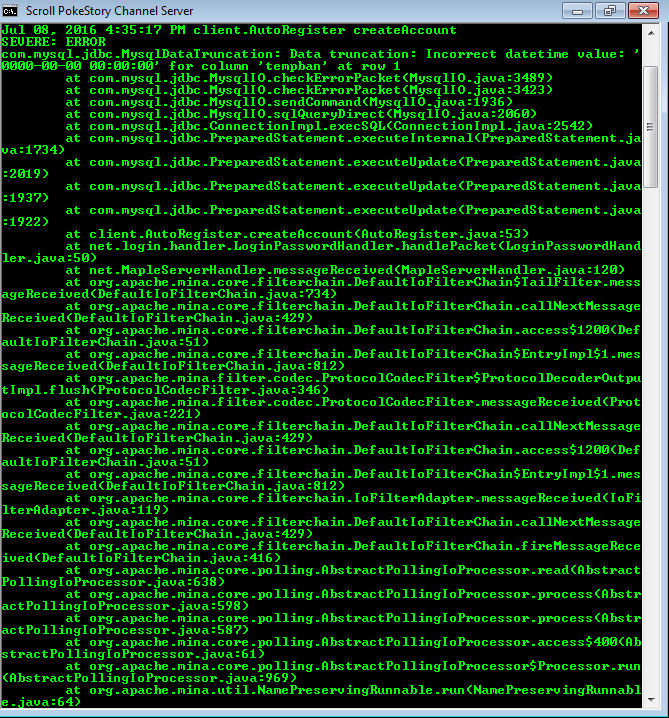
What is the error? Missing sql table? Missing or wrong column?

pics or it didn't happen.

p.s you don't need to use DMZ as I believe there is something inherently insecure with forwarding all ports just for this situation (some ports are used for known hacktools)..
 
Last edited:
Upvote 0
Now it's `birthday` error. Still 0000:00:00.
I tried
--
-- Definition of table `accounts`
--

DROP TABLE IF EXISTS `accounts`;
CREATE TABLE `accounts` (
`id` int(11) NOT NULL AUTO_INCREMENT,
`name` varchar(13) NOT NULL DEFAULT '',
`password` varchar(128) NOT NULL DEFAULT '',
`salt` varchar(128) DEFAULT NULL,
`pin` varchar(10) DEFAULT NULL,
`loggedin` tinyint(4) NOT NULL DEFAULT '0',
`lastlogin` timestamp NULL DEFAULT NULL,
`createdat` timestamp NOT NULL DEFAULT CURRENT_TIMESTAMP,
`birthday` date NOT NULL DEFAULT '1970-01-01',
`banned` tinyint(1) NOT NULL DEFAULT '0',
`banreason` text,
`gm` tinyint(1) NOT NULL DEFAULT '0',
`macs` tinytext,
`paypalNX` int(11) DEFAULT NULL,
`mPoints` int(11) DEFAULT NULL,
`cardNX` int(11) DEFAULT NULL,
`webadmin` int(1) DEFAULT '0',
`nick` text,
`mute` int(1) DEFAULT '0',
`sitelogged` text,
`ip` text,
`style` int(11) DEFAULT '5',
`cursor` int(11) DEFAULT '1',
`donator` int(1) NOT NULL DEFAULT '0',
`mwlb` tinyint(1) NOT NULL DEFAULT '0',
`greason` tinyint(4) unsigned zerofill NOT NULL DEFAULT '0007',
`tempban` timestamp NOT NULL DEFAULT '1970-01-01 00:00:01',
`points` int(11) NOT NULL DEFAULT '0',
`votepoints` int(10) unsigned NOT NULL DEFAULT '0',
`lastknownip` varchar(45) DEFAULT NULL,
`email` varchar(45) DEFAULT NULL,
`GMPoints` tinyint(1) NOT NULL DEFAULT '50',
PRIMARY KEY (`id`),
UNIQUE KEY `name` (`name`),
KEY `ranking1` (`id`,`banned`,`gm`)
) ENGINE=InnoDB AUTO_INCREMENT=2709 DEFAULT CHARSET=latin1;


--
-- Dumping data for table `accounts`
--

/*!40000 ALTER TABLE `accounts` DISABLE KEYS */;
/*!40000 ALTER TABLE `accounts` ENABLE KEYS */;
 
Upvote 0
I think I port forward wrongly.


There are ports that I currently forward is 80-80, 3306-3306 ( not sure if necessary ), 8484-8484, 8585-8589, 7575-7595, 443-443 ( it's on my friend's, so I think I will take it lol ), 5252-5252 ( on my friend's too ), 8888-8888 ( not sure if necessary ), 8486-8486, 8585-8589, 8787-8788. (Can't port forward 8080) Barely because my modem uses 192.168.1.100:8080.
Is it right?
 
Upvote 0
Back