ICARUS 2024

Hello everybody

new update for the server with client

Matar - ICARUS 2024 - RaGEZONE Forums


replace ip : 192.168.1.131 with yours in confg + world DB + client

vm link:

client link :

mirror:

I dont have much free time to make everything work i put this and make it playable so feel free to help each other to fix things

Have Fun
My friend, seeing that you're still in Icarus made me happy, and it reminded me of my old project. I watched the videos and felt really sad — seeing something I poured my heart into day and night come to an end is heartbreaking =(


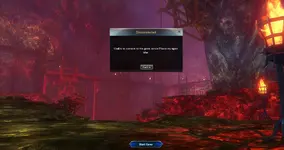
Can someone explain how to change the ips? everytime i try to open the client it says can't find server
 
Vmware will need to rewrite the configs too, and in the database in the World table.

Vmware C:\Server\Conf\

change the ip addresses of all files here. Just don't touch the local 127.0.0.1.


View attachment 279887


When you start Login server for the first time, the program will prompt you for the ip you need. The program will prompt you for the desired ip.

Just do not change the address 127.0.0.1


And here
View attachment 279889
Okay thanks man! i will changes these with my own IP4 and re test again
 
Okay thanks man! i will changes these with my own IP4 and re test again
I was able to start the server without using WMvare and set up SQL and WEB server

I would like to draw your attention to the extreme importance of the WEB server, as the game client uses it to log into the game.

To my surprise the server build is very high quality, if you compare with other games that I tried to run.
Thanks Matar
 
I was able to start the server without using WMvare.
and to configure SQL and WEB server

I would like to draw your attention to the critical importance of WEB server as the game client uses it to log in to the game.
Oh yea, you managed to run the server locally without the need of vmware? i guess its possible yea since it runs on windows
 
Oh yea, you managed to run the server locally without the need of vmware? i guess its possible yea since it runs on windows
Yes, it took me a bit of work, and the lack of information prevented me from doing it quickly. Especially since I don't know English and have difficulty translating :( But I got it done in a week. If the server programs terminate on startup, add more RAM.
I will try in this forum thread to help anyone who needs it. I was like this myself))))))
 
Yes, it took me a bit of work, and the lack of information prevented me from doing it quickly. Especially since I don't know English and have difficulty translating :( But I got it done in a week. If the server programs terminate on startup, add more RAM.
I will try in this forum thread to help anyone who needs it. I was like this myself))))))
if you need any help in translation let me know! i can give you a hand!

Hi


Game\Gamedata\adataxml\LoginSerer.xml
i changed everything as you said but still its not working, not sure what i am doing wrong here
 

Attachments

  • Screenshot_1 - ICARUS 2024 - RaGEZONE Forums
    Screenshot_1.webp
    132.3 KB · Views: 80
  • Screenshot_2 - ICARUS 2024 - RaGEZONE Forums
    Screenshot_2.webp
    146.6 KB · Views: 78
Last edited:
if you need any help in translation let me know! i can give you a hand!


i changed everything as you said but still its not working, not sure what i am doing wrong here

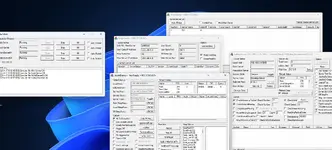
The LoginServer window should look like this
1744847300918 - ICARUS 2024 - RaGEZONE Forums

I have the top ip of Gate matching the bottom Main IP
1744846661405 - ICARUS 2024 - RaGEZONE Forums

And also in the header of the WorldServer window you should appear the name of the server. in your case it is EU. And my server is called Aurora.
If you see in the title of the window WorldServer Not Ready then you need to wait. It's launching.

1744846758427 - ICARUS 2024 - RaGEZONE Forums


In the LobbyServer window, the EU name should also appear in the title bar.
And in the list of sockets the following line should appear
1744846985955 - ICARUS 2024 - RaGEZONE Forums


And please note that I have only one ip address displayed in all the windows.
These signs let you know that the server is fully started and you can try to enter the game
 
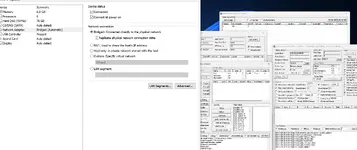
I dont know why it is showing 2 different IPs, maybe its something wrong i am doing in the VMware network setting? i have it on this
 

Attachments

  • Screenshot_3 - ICARUS 2024 - RaGEZONE Forums
    Screenshot_3.webp
    173.6 KB · Views: 69
I dont know why it is showing 2 different IPs, maybe its something wrong i am doing in the VMware network setting? i have it on this
And please note that I have only one ip address displayed in all the windows.

I dont know why it is showing 2 different IPs, maybe its something wrong i am doing in the VMware network setting? i have it on this
In the file settings, change to ip 192.168.8.9 and in the Database the same.
In the game client this ip is also set.

Forget about this address 192.168.8.8.


You have an error in your WMvare settings as well. Make the network NAT

1744847774835 - ICARUS 2024 - RaGEZONE Forums


Once you change the settings to NAT, see what address the Virtual Machine has received. It may be different.


I suggest that after changing the NAT and turning on the machine, look for the IP in the LoginServer “User Gate IP Address” window, where the correct IP will be displayed immediately. and write it in all server and client configurations.
1744848138797 - ICARUS 2024 - RaGEZONE Forums


PS: This is how the windows of a successfully configured and started server look like
1744848438983 - ICARUS 2024 - RaGEZONE Forums
1744848438995 - ICARUS 2024 - RaGEZONE Forums
 
Last edited:
The problem is fixed now after i did what you said! thank you so much! but now i have a new problem, it says wrong account then closes the client. i didn't even type anything. also if you have discord its better, i dont want to spam this post with my problems
 
The problem is fixed now after i did what you said! thank you so much! but now i have a new problem, it says wrong account then closes the client. i didn't even type anything. also if you have discord its better, i dont want to spam this post with my problems
You're not the only one with problems. Others may have them too. And our correspondence here will help a lot of people.
You can message me here on my direct message.

The client may close if the long key UID is incorrect in the BAT file.

In the bat-file change everything to

Code:
start Bin64/Launcher.exe /i:191317b5-0cfd-4000-8f26-d6136eb81040 /O /r:123456 /u:matar /m:p


UID is a md5 hash, and it is created when a new account is registered. It can be seen in the registration process via PostMan and also in the database

In this version you will not have a login and password form when logging into the game. Only in the BAT file you can specify these data.

BAT file consists of UID, PASS, LOGIN

But I think it is possible to program some kind of launcher in which then the user can authorize and start the game. And at the moment only a BAT file with login data
 
Last edited:
You're not the only one with problems. Others may have them too. And our correspondence here will help a lot of people.
You can message me here on my direct message.

The client may close if the long key UID is incorrect in the BAT file.

In the bat-file change everything to

Code:
start Bin64/Launcher.exe /i:191317b5-0cfd-4000-8f26-d6136eb81040 /O /r:123456 /u:matar /m:p


UID is a md5 hash, and it is created when a new account is registered. It can be seen in the registration process via PostMan and also in the database

In this version you will not have a login and password form when logging into the game. Only in the BAT file you can specify these data.

BAT file consists of UID, PASS, LOGIN

But I think it is possible to program some kind of launcher in which then the user can authorize and start the game. And at the moment only a BAT file with login data

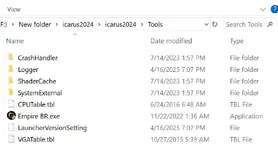
what about this? isn't this a launcher?
 

Attachments

  • Screenshot_4 - ICARUS 2024 - RaGEZONE Forums
    Screenshot_4.webp
    36.9 KB · Views: 64
I haven't figured it out. and I haven't figured out how to change its settings for my server.

Most likely you have to compile it for yourself.
Hey. I See all want magmapora. Maybe i can Help with that. But i need a bit If Help from you Guys. On my Server the Lobby and world Servers Just Crash after they loaded. I cant figuare Out IT dies that suddenly. And with the Server If this thread i have the Account ist wrong isssue. Help would bei nice

Hello everybody

new update for the server with client

Matar - ICARUS 2024 - RaGEZONE Forums


replace ip : 192.168.1.131 with yours in confg + world DB + client

vm link:

client link :

mirror:

I dont have much free time to make everything work i put this and make it playable so feel free to help each other to fix things

Have Fun
Hey, I try to swap the DBs, can you tell me how I do that? I have get it working with my server data, the newest, all thats left are teh databases.
 
Last edited:
You do not have enough RAM
Hey. I See all want magmapora. Maybe i can Help with that. But i need a bit If Help from you Guys. On my Server the Lobby and world Servers Just Crash after they loaded. I cant figuare Out IT dies that suddenly. And with the Server If this thread i have the Account ist wrong isssue. Help would bei nice


Hey, I try to swap the DBs, can you tell me how I do that? I have get it working with my server data, the newest, all thats left are teh databases.

I need to know how I can open DB outside the VM from Navicat
My advice is to open the DB from Server Manager Studio SQL
It is already installed on the virtual machine.

Or you will have to open ports and configure DB user so that it can work on any host
 
You do not have enough RAM


My advice is to open the DB from Server Manager Studio SQL
It is already installed on the virtual machine.

Or you will have to open ports and configure DB user so that it can work on any host
Hey, the server in the VM works allready. But mine doesnt. I also see that the Server on the Host PC trys to use the IP from the VM and I cant fix that. So now i try to install it on a VM. But iam way to stupid to even set up sql XD is there a manual or guide (the one postet here on RZ just says install SQL, make database. But I cant do that I can not even creat the SQL instance)?
 
Back