juver sourcee updated files

to disable auto pot when cuthp/antipot enable, u can add this code :
find switch (pITEM->sDrugOp.emDrug)replace with this
Code:
{ 
               if (fPercent_HP < (float)m_pAutoPotion.m_nHPSet) 
       {            if (m_pLandMan->m_bPVPTyrannyMap) return;          
           if ( m_bProhibitPotion )        return; 
           if (m_fAutoPotDelay_[0] >= GLGaeaServer::GetInstance().GetAutoPotionDelay()) 
           { 
               m_sHP.INCREASE(pITEM->sDrugOp.wCureVolume, pITEM->sDrugOp.bRatio);
                m_fAutoPotDelay_[0] = 0.0f; 
               bUse = TRUE; 
           } 
       } 
   } 
   break;

to disable in pvp maps replace with this in your button control id
Code:
if (CHECK_MOUSEIN_LBUPLIKE(dwMsg))
        {
            if (CInnerInterface::GetInstance().IsVisibleGroup(AUTOSYSTEM_WINDOW))        CInnerInterface::GetInstance().HideGroup(AUTOSYSTEM_WINDOW);
            { 
 PLANDMANCLIENT pLandManClient = GLGaeaClient::GetInstance().GetActiveMap();
                                if ( pLandManClient->m_bPVPTyrannyMap ||                                     pLandManClient->m_bClubBattle ||                                     pLandManClient->m_bClubDeathMatch ||                                     pLandManClient->m_bPVPCaptureTheFlagMap ||                                     pLandManClient->m_bPVPSchoolWarsMap   ) 
                                        {
                                        CInnerInterface::GetInstance().PrintConsoleText ( "you cannot use 'AutoSystem' durring PVPEvents!") ; 
                                        }
                                            else    
CInnerInterface::GetInstance().ShowGroupFocus(AUTOSYSTEM_WINDOW);
            }
        }

to enable qweasd slot just trace the QWEASD word. relate to ITEM_CURE


Thank you so much brother, you deserve a lot of likes.
 
to disable auto pot when cuthp/antipot enable, u can add this code :
find switch (pITEM->sDrugOp.emDrug)replace with this
Code:
{ 
               if (fPercent_HP < (float)m_pAutoPotion.m_nHPSet) 
       {            if (m_pLandMan->m_bPVPTyrannyMap) return;          
           if ( m_bProhibitPotion )        return; 
           if (m_fAutoPotDelay_[0] >= GLGaeaServer::GetInstance().GetAutoPotionDelay()) 
           { 
               m_sHP.INCREASE(pITEM->sDrugOp.wCureVolume, pITEM->sDrugOp.bRatio);
                m_fAutoPotDelay_[0] = 0.0f; 
               bUse = TRUE; 
           } 
       } 
   } 
   break;

to disable in pvp maps replace with this in your button control id
Code:
if (CHECK_MOUSEIN_LBUPLIKE(dwMsg))
        {
            if (CInnerInterface::GetInstance().IsVisibleGroup(AUTOSYSTEM_WINDOW))        CInnerInterface::GetInstance().HideGroup(AUTOSYSTEM_WINDOW);
            { 
 PLANDMANCLIENT pLandManClient = GLGaeaClient::GetInstance().GetActiveMap();
                                if ( pLandManClient->m_bPVPTyrannyMap ||                                     pLandManClient->m_bClubBattle ||                                     pLandManClient->m_bClubDeathMatch ||                                     pLandManClient->m_bPVPCaptureTheFlagMap ||                                     pLandManClient->m_bPVPSchoolWarsMap   ) 
                                        {
                                        CInnerInterface::GetInstance().PrintConsoleText ( "you cannot use 'AutoSystem' durring PVPEvents!") ; 
                                        }
                                            else    
CInnerInterface::GetInstance().ShowGroupFocus(AUTOSYSTEM_WINDOW);
            }
        }

to enable qweasd slot just trace the QWEASD word. relate to ITEM_CURE


my build fail, what did I miss? sorry Im just a newbie, I tried the second code that can disable the button, but what part of it would be in indented on the last statement?

also I tried the first code, and still can use auto potion in the are that is prohibited from using HP potion.
 
Last edited:
my build fail, what did I miss? sorry Im just a newbie, I tried the second code that can disable the button, but what part of it would be in indented on the last statement?

also I tried the first code, and still can use auto potion in the are that is prohibited from using HP potion.

for prohibited potion find the code i just told u up there on glcharmsg.cpp .
for button u can use this but change the header on cpp file pch.h to stdafx.hView attachment AutoPilotButton.rar
 
Hello everyone I'm having trouble locating my autosystem buttons on sir Empirez source share. Can anyone share gui texts and textures so i can compare? Thank you so much.
 
Hello everyone I'm having trouble locating my autosystem buttons on sir Empirez source share. Can anyone share gui texts and textures so i can compare? Thank you so much.
the autosystem gui and guitext is on the source folder search autopilot in uiinnercfg03.

<CONTROL Local="Common" Id="AUTOPILOT_BUTTON"> <WINDOW_POS X="632" Y="538" W="35" H="59" /> </CONTROL> <CONTROL Local="Common" Id="AUTOPILOT_BUTTON_IMAGE"> <WINDOW_POS X="0" Y="0" W="35" H="35" /> <TEXTURE SizeX="128" SizeY="128">autopilot_gui.dds</TEXTURE> <TEXTURE_POS X="60" Y="92" W="35" H="35" /> </CONTROL>


for prohibited potion find the code i just told u up there on glcharmsg.cpp .
for button u can use this but change the header on cpp file pch.h to stdafx.hView attachment 171332
Hello brother, sorry for bothering you again. I got a problem when I change the EMACTIONSIZE = 6 and on BasicPotionTray.cpp I change to - 6, but now my potiontray from above is gone, and the auto potion on autosystem cannot be use anymore.

UKnowMeKnow - juver sourcee updated files - RaGEZONE Forums
 
the autosystem gui and guitext is on the source folder search autopilot in uiinnercfg03.

<CONTROL Local="Common" Id="AUTOPILOT_BUTTON"> <WINDOW_POS X="632" Y="538" W="35" H="59" /> </CONTROL> <CONTROL Local="Common" Id="AUTOPILOT_BUTTON_IMAGE"> <WINDOW_POS X="0" Y="0" W="35" H="35" /> <TEXTURE SizeX="128" SizeY="128">autopilot_gui.dds</TEXTURE> <TEXTURE_POS X="60" Y="92" W="35" H="35" /> </CONTROL>


Thank you so much brother!
 
the autosystem gui and guitext is on the source folder search autopilot in uiinnercfg03.

<CONTROL Local="Common" Id="AUTOPILOT_BUTTON"> <WINDOW_POS X="632" Y="538" W="35" H="59" /> </CONTROL> <CONTROL Local="Common" Id="AUTOPILOT_BUTTON_IMAGE"> <WINDOW_POS X="0" Y="0" W="35" H="35" /> <TEXTURE SizeX="128" SizeY="128">autopilot_gui.dds</TEXTURE> <TEXTURE_POS X="60" Y="92" W="35" H="35" /> </CONTROL>


Hello brother, sorry for bothering you again. I got a problem when I change the EMACTIONSIZE = 6 and on BasicPotionTray.cpp I change to - 6, but now my potiontray from above is gone, and the auto potion on autosystem cannot be use anymore.

UKnowMeKnow - juver sourcee updated files - RaGEZONE Forums
open your glchardata , find emskillquicksize(slot skill) and emactionquicksize (this one for slot potion) double the value if u have 30 then make it 60 and 6 to 12.
 
open your glchardata , find emskillquicksize(slot skill) and emactionquicksize (this one for slot potion) double the value if u have 30 then make it 60 and 6 to 12.

Yes this is the default settings from your source brother, but there is a number 6 on the slot tray near the D key if I use this code. So I tried the fix that set it to 6, but the problem is, maybe it is not compatible because my slot tray become invisible
 
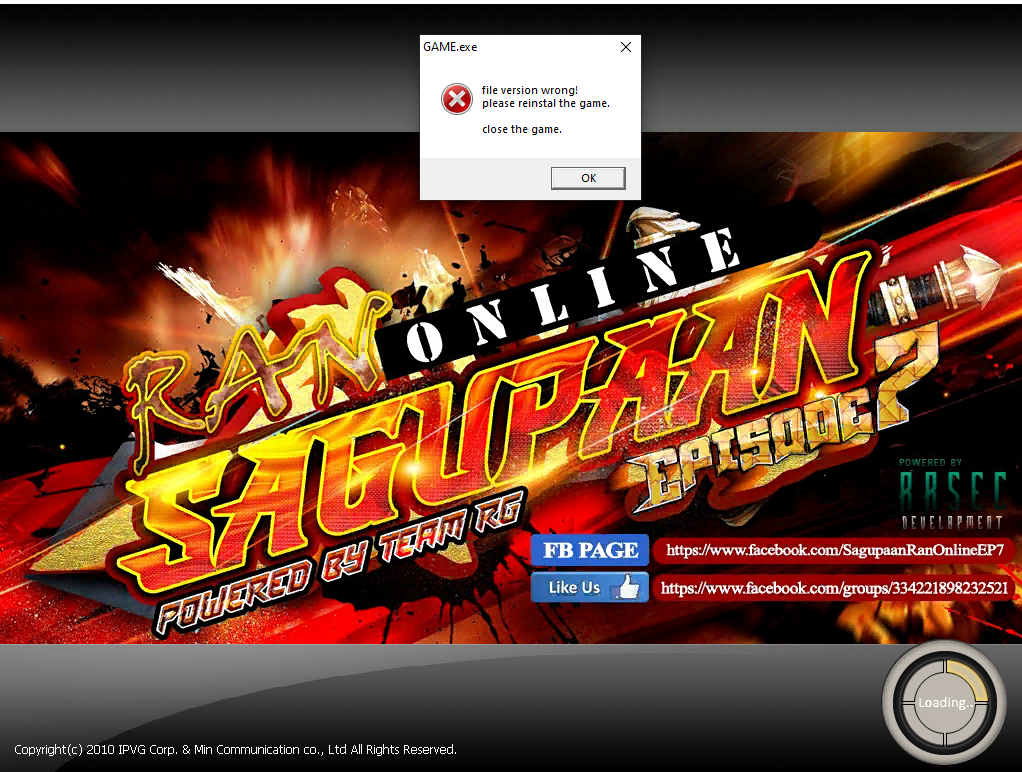
Hello how to disable this rcc checking

im using this source


i already did this too

//GLOGIC::bGLOGIC_PACKFILE = FALSE;
//GLOGIC::bGLOGIC_ZIPFILE = TRUE;
//GLOGIC::bENGLIB_ZIPFILE = TRUE;

im using Ran Sagupaan Client

UKnowMeKnow - juver sourcee updated files - RaGEZONE Forums
 
Hello how to disable this rcc checking

im using this source


i already did this too

//GLOGIC::bGLOGIC_PACKFILE = FALSE;
//GLOGIC::bGLOGIC_ZIPFILE = TRUE;
//GLOGIC::bENGLIB_ZIPFILE = TRUE;

im using Ran Sagupaan Client

UKnowMeKnow - juver sourcee updated files - RaGEZONE Forums

Make sure your Client Side files are in RCC format brother
 
Yes its already in rcc format for the glogic but still getting this error what i do is encrtpy the file first then put it on rcc then copy it on the glogic folder

It is not just the glogic folder but all folder that is needed to be in rcc format. Try to compare other clients that are in RCC format.
 
level/glogic/npctalk/quest these all rcc i made it


Like sir empirez said from this thread you don't need to creat your own rcc you just find other rcc clients and modify it.
you forgot the other rcc other than you mentioned.
 
Back