
object issue

Newbie Spellweaver
Joined
Nov 5, 2025
Messages
76
Reaction score
6
Hi everyone,

I'm having a strange issue with some world objects in AION 4.6 PTS.

In the first screenshot (Heiron), everything works normally. The portal has a bright visual effect, its name appears in the bottom-right corner, and the mouse cursor changes to a gear icon when hovering over it, allowing me to interact with it.

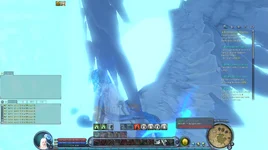
However, in Verteron and Eltnen, the portals seem to be missing.

There is no object name displayed, the cursor doesn't change to a gear icon, and nothing can be selected or interacted with normally.

The portal's visual effects also seem to be missing or not rendering correctly, as the area looks much darker compared to the working portal in Heiron.

I've also noticed that some other world objects seem to be missing or invisible.

As shown in the third screenshot, I can still find and select these objects through the F8 (Test UI), even though they don't appear or behave normally in the game world.

It seems that some objects may still exist in the game data, but their models or visual effects are not being displayed correctly.

Has anyone experienced something similar?

Could this be related to client files, missing models/effects, object templates, or spawn data?

Any help would be appreciated. Thanks!
 

Attachments

  • 1792734141247 - object issue - RaGEZONE Forums
    1792734141247.webp
    157.1 KB · Views: 1
  • 1792734149154 - object issue - RaGEZONE Forums
    1792734149154.webp
    197.6 KB · Views: 1
  • 1792734156025 - object issue - RaGEZONE Forums
    1792734156025.webp
    195.3 KB · Views: 1
Hi everyone,

I'm having a strange issue with some world objects in AION 4.6 PTS.

In the first screenshot (Heiron), everything works normally. The portal has a bright visual effect, its name appears in the bottom-right corner, and the mouse cursor changes to a gear icon when hovering over it, allowing me to interact with it.

However, in Verteron and Eltnen, the portals seem to be missing.

There is no object name displayed, the cursor doesn't change to a gear icon, and nothing can be selected or interacted with normally.

The portal's visual effects also seem to be missing or not rendering correctly, as the area looks much darker compared to the working portal in Heiron.

I've also noticed that some other world objects seem to be missing or invisible.

As shown in the third screenshot, I can still find and select these objects through the F8 (Test UI), even though they don't appear or behave normally in the game world.

It seems that some objects may still exist in the game data, but their models or visual effects are not being displayed correctly.

Has anyone experienced something similar?

Could this be related to client files, missing models/effects, object templates, or spawn data?

Any help would be appreciated. Thanks!
Judging by the chat window design, you're not running version 4.6. These bugs could be caused by a missing model in the client or in the world.

There are lines like these in the spawn file that "attach" the world model to the NPC as part of its geodata. If the NPC tries to "attach" to an unregistered object, the result is the same as what you showed.
1792743586027 - object issue - RaGEZONE Forums


This error may also be related to the absence of the model itself, which should be visible in the world. To do this, go to the desired folder in the world in the client (client\levels), open the mission_mission0.xml file in the world folder, and find a block that looks something like this:
XML:
<Entity AionFXPartialGlow="0" AionFXPostGlow="0" Angles="0,-0,-160.00005" CastShadowMaps="0" CastShadows="0" EntityClass="PlaceableObject" EntityGUID="1124658689" EntityId="42" EnvSkyBoxObject="" EnvTimeShow="" EnvWeatherHide="" EnvWeatherShow="" EventType="" HiddenInGame="0" IgnoreFog="0" IgnoreViewDist="0" Layer="Placeable" LodRatio="100" Name="Teleporter_dragon02_2" Pos="397.11661,184.29782,432.80328" PreCalcShadows="0" ReceiveLightmap="0" RecvShadowMaps="1" SelfShadowing="0" SkipOnLowSpec="0" SyncAnimation="0" Type="Entity" ViewDistRatio="100" >
   <customColors CustomEquipColor1="1,1,1,2.59089e-008" CustomEquipColor2="1,1,1,2.59089e-008" CustomHairColor="1,1,1,2.59089e-008" CustomSkinColor="1,1,1,2.59089e-008" />
   <MRT_Params CastShadowPLSM="0" CastShadowPSSM="0" RecvShadowPLSM="0" RecvShadowPSSM="0" />
   <Properties fFontScale="0.1" fileLadderCGF="Objects\npc\level_object\teleporter_dragon\Teleporter_dragon02.cgf" gostring_Text="" />
  </Entity>

In this block, the EntityClass="PlaceableObject" (editor_classname) attribute indicates that this is a world model, and EntityId="42" (editor_id) is the model's ID.
With this data, you can find the NPC that uses this model, and vice versa.
 
Upvote 0
Judging by the chat window design, you're not running version 4.6. These bugs could be caused by a missing model in the client or in the world.

There are lines like these in the spawn file that "attach" the world model to the NPC as part of its geodata. If the NPC tries to "attach" to an unregistered object, the result is the same as what you showed.
View attachment 314929

This error may also be related to the absence of the model itself, which should be visible in the world. To do this, go to the desired folder in the world in the client (client\levels), open the mission_mission0.xml file in the world folder, and find a block that looks something like this:
XML:
<Entity AionFXPartialGlow="0" AionFXPostGlow="0" Angles="0,-0,-160.00005" CastShadowMaps="0" CastShadows="0" EntityClass="PlaceableObject" EntityGUID="1124658689" EntityId="42" EnvSkyBoxObject="" EnvTimeShow="" EnvWeatherHide="" EnvWeatherShow="" EventType="" HiddenInGame="0" IgnoreFog="0" IgnoreViewDist="0" Layer="Placeable" LodRatio="100" Name="Teleporter_dragon02_2" Pos="397.11661,184.29782,432.80328" PreCalcShadows="0" ReceiveLightmap="0" RecvShadowMaps="1" SelfShadowing="0" SkipOnLowSpec="0" SyncAnimation="0" Type="Entity" ViewDistRatio="100" >
   <customColors CustomEquipColor1="1,1,1,2.59089e-008" CustomEquipColor2="1,1,1,2.59089e-008" CustomHairColor="1,1,1,2.59089e-008" CustomSkinColor="1,1,1,2.59089e-008" />
   <MRT_Params CastShadowPLSM="0" CastShadowPSSM="0" RecvShadowPLSM="0" RecvShadowPSSM="0" />
   <Properties fFontScale="0.1" fileLadderCGF="Objects\npc\level_object\teleporter_dragon\Teleporter_dragon02.cgf" gostring_Text="" />
  </Entity>

In this block, the EntityClass="PlaceableObject" (editor_classname) attribute indicates that this is a world model, and EntityId="42" (editor_id) is the model's ID.
With this data, you can find the NPC that uses this model, and vice versa.
Thanks for your reply!
I'm actually using AION 4.6 PTS. The timestamp in the chat window is displayed through version.dll, which is why the UI looks slightly different.
Regarding the object issue, the strange thing is that everything was working normally before.
I haven't modified the mission_mission0.xml files or the related world models, but some objects and portals suddenly stopped appearing or working correctly.
Some of these objects can still be selected through F8 (Test UI), but they are invisible or cannot be interacted with normally.
Is it possible for the connection between NPCs and world objects to stop working even if the related files haven't been modified?
Could this be caused by the server executable, spawn loading, or some other issue?
Thanks again for your help!
 
Upvote 0
I'm actually using AION 4.6 PTS. The timestamp in the chat window is displayed through version.dll, which is why the UI looks slightly different.
Regarding the object issue, the strange thing is that everything was working normally before.
I haven't modified the mission_mission0.xml files or the related world models, but some objects and portals suddenly stopped appearing or working correctly.
Some of these objects can still be selected through F8 (Test UI), but they are invisible or cannot be interacted with normally.
Is it possible for the connection between NPCs and world objects to stop working even if the related files haven't been modified?
Could this be caused by the server executable, spawn loading, or some other issue?
Thanks again for your help!
Download the objects and levels folder again, perhaps something was deleted there.
 
Upvote 0
Back
