
- Joined
- Aug 11, 2022
- Messages
- 129
- Reaction score
- 438
In this guide we’ll go over several ways of reducing the RAM footprint of the TERA server without sacrificing any (or as little as possible) functionality.
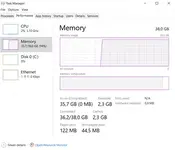
Using these tweaks, I’ve managed to reduce the ram usage of a v100 server VM down to 32 GB:

1. Channel count tweak
TERA maps are made out of multiple channels, each containing a copy of all npcs and objects. The more channels the server has to load, the more memory it will use, so it makes sense to reduce the channel count of each map to just one. For that, go to Datasheet\ContinentData.xml. There, we change initChannelCount and initChannelCountByQA to 1 for each continent.
2. Using single World Server
The default TERA server setup uses multiple world servers – two for dungeons, one for battlegrounds, one for the open world etc. This makes sense for a production environment, but introduces a lot of redundancy and thus balloons the memory usage. To change that, we go to ServerConfig.xml and scroll to the bottom to <WorldServerList>:

And change it to just that:

Now, simply starting the WorldServer is enough to play the open world and dungeon content. Not sure about battlegrounds as I don’t know of a way to test them.
3. Other ServerConfig.xml tweaks
Treat these as experimental - I'm not 100% sure what all of these settings do, but applying them provides a massive RAM decrease, and so far I haven't found any impact on stability or functionality.
3.1. "threadNum" for word server.
Set threadNum="2" or threadNum="4" for world server (right under <WorldServerConfig>, inside the <Capacity> section).
Total memory usage on 71.04 server:
threadNum="0" - 25,8 GB
threadNum="2" - 22,7 GB
threadNum="4" - 23,2 GB
Server start times are identical
3.2. Session tweak
Under <ArbiterServerConfig>, inside <Capacity> section, set worldSessions="2" for 71.03 and lower versions, worldSessions="4" for 100.02 server, else the world server would close.
Under <WorldServerConfig>, inside <Capacity> section, set arbiterClient="1" bfArbiterClient="1" and dungeonArbiterClient="1".
If the server doesn't launch for you, try raising the values slightly.
Total memory usage on 71.04 server:
arbiterClient="16" & bfArbiterClient="2" & dungeonArbiterClient="4" & worldSessions="64" - 28,1 GB
arbiterClient="1" & bfArbiterClient="1" & dungeonArbiterClient="1" & worldSessions="2" - 23,2 GB
3.3 Client session tweak
Look for a clientSessions under <ArbiterServerConfig> and change it to the amount of players you expect on your server. It might sound dumb, but this thing has a substantial impact on the memory usage – changing it from 10000 to 2 saved me around 6 gigabytes of RAM.
4. Limit MSSQL memory
By default, MSSQL uses all free memory, so you can end up with sqlservr.exe eatin up 10 gigs of RAM. To change that, open SQL Server Management studio, right click on your server in object explorer -> properties. In memory tab, change "Maximum server memory (in MB)" to whatever you like (2048 seem to work perfectly fine)

5. Using only what you need
There are quite a few of services that are not necessarily needed for the server to work. In my setup, I only need to launch the following:
Feel free to correct me if I've got something wrong.
Using these tweaks, I’ve managed to reduce the ram usage of a v100 server VM down to 32 GB:
1. Channel count tweak
TERA maps are made out of multiple channels, each containing a copy of all npcs and objects. The more channels the server has to load, the more memory it will use, so it makes sense to reduce the channel count of each map to just one. For that, go to Datasheet\ContinentData.xml. There, we change initChannelCount and initChannelCountByQA to 1 for each continent.
2. Using single World Server
The default TERA server setup uses multiple world servers – two for dungeons, one for battlegrounds, one for the open world etc. This makes sense for a production environment, but introduces a lot of redundancy and thus balloons the memory usage. To change that, we go to ServerConfig.xml and scroll to the bottom to <WorldServerList>:
And change it to just that:
Now, simply starting the WorldServer is enough to play the open world and dungeon content. Not sure about battlegrounds as I don’t know of a way to test them.
3. Other ServerConfig.xml tweaks
Treat these as experimental - I'm not 100% sure what all of these settings do, but applying them provides a massive RAM decrease, and so far I haven't found any impact on stability or functionality.
3.1. "threadNum" for word server.
Set threadNum="2" or threadNum="4" for world server (right under <WorldServerConfig>, inside the <Capacity> section).
Total memory usage on 71.04 server:
threadNum="0" - 25,8 GB
threadNum="2" - 22,7 GB
threadNum="4" - 23,2 GB
Server start times are identical
3.2. Session tweak
Under <ArbiterServerConfig>, inside <Capacity> section, set worldSessions="2" for 71.03 and lower versions, worldSessions="4" for 100.02 server, else the world server would close.
Under <WorldServerConfig>, inside <Capacity> section, set arbiterClient="1" bfArbiterClient="1" and dungeonArbiterClient="1".
If the server doesn't launch for you, try raising the values slightly.
Total memory usage on 71.04 server:
arbiterClient="16" & bfArbiterClient="2" & dungeonArbiterClient="4" & worldSessions="64" - 28,1 GB
arbiterClient="1" & bfArbiterClient="1" & dungeonArbiterClient="1" & worldSessions="2" - 23,2 GB
3.3 Client session tweak
Look for a clientSessions under <ArbiterServerConfig> and change it to the amount of players you expect on your server. It might sound dumb, but this thing has a substantial impact on the memory usage – changing it from 10000 to 2 saved me around 6 gigabytes of RAM.
4. Limit MSSQL memory
By default, MSSQL uses all free memory, so you can end up with sqlservr.exe eatin up 10 gigs of RAM. To change that, open SQL Server Management studio, right click on your server in object explorer -> properties. In memory tab, change "Maximum server memory (in MB)" to whatever you like (2048 seem to work perfectly fine)
5. Using only what you need
There are quite a few of services that are not necessarily needed for the server to work. In my setup, I only need to launch the following:
- TopographyServer
- Mysql with api
- ArbiterServer, hub, hub_gw and arb_gw_tw2_log
- WorldServer
Feel free to correct me if I've got something wrong.
Attachments
Last edited: