TERA API (node.js), Shop and Launcher with Client Patcher

Did you successfully call TERA Shop in-game after changing the language?Following the hint given by Archgeus, the contents of the file 'CoherentGTWeb-00000.xml' in version 100.02 were the same, so I added the language code I added and ran the client, but I failed to call TERA Shop.
I gave up using the kr and put it on german language =/
 
In .env it says:
Code:
# Set the ID of the benefit that will be activated for the VIP/premium status.
# See StrSheet_AccountBenefit for more details about available IDs.
# If leave empty, the ID 333 (EME VIP) will be used.
API_PORTAL_BENEFIT_ID_ELITE_STATUS=333

Where is the VIP/premium status set? I want to remove for certain account.
What I tried is to remove 333 entry in db's table account_benefits, but the benefit is still active ingame, even after relog.


Solved: id 335 had name of 333.
 
Last edited:
HI,

You must edit the ip;port in the launcher to your server ip address.

So, as example, if you server have 192.168.1.100 as ip and 8090 as predefined port, then in the launcher must have,

1734276647937 - TERA API (node.js), Shop and Launcher with Client Patcher - RaGEZONE Forums

1734276674885 - TERA API (node.js), Shop and Launcher with Client Patcher - RaGEZONE Forums


Also, make sure that the port 8090 is reachable outside of the server (Firewall)
 
Hello, I haven't been able to find info on my issue so I figured I'd ask.

The launcher no longer functions at all. When you launch the launcher, it appears in taskbar but doesn't have any popup anymore. It's essentially disappeared and cannot be used. Very strange since it worked previously with no changes on my end.
 
Hello, I haven't been able to find info on my issue so I figured I'd ask.

The launcher no longer functions at all. When you launch the launcher, it appears in taskbar but doesn't have any popup anymore. It's essentially disappeared and cannot be used. Very strange since it worked previously with no changes on my end.

Hi,

Recheck ports and the ip of the server where you are hosting the api.

That launcher issue is always a ip/port connectivity thing.
 
Hi,

Recheck ports and the ip of the server where you are hosting the api.

That launcher issue is always a ip/port connectivity thing.
Hello, Thanks for responding, I've checked and the ports are open and the IP has stayed the same. I had someone set this server up for me and I'm just trying to get it back to a working state so please be patient, lol. I do not know where to check on the server side if things have remained the same. Where might I check the config files for what I need, serverconfig.xml did not have any ports listed.
 
Hello, Thanks for responding, I've checked and the ports are open and the IP has stayed the same. I had someone set this server up for me and I'm just trying to get it back to a working state so please be patient, lol. I do not know where to check on the server side if things have remained the same. Where might I check the config files for what I need, serverconfig.xml did not have any ports listed.

Hi,

Ports are set in DeploymentConfig.xml, the only one you must open is the value of "portForClient" unless you have setup a proxy (like the hsdn one), then the port you set in the proxy is the one you must open (Firewall/PortForward)

I'm guessing that you're using the api by hsdn, then take a look into the .env file and search for the value of API_PORTAL_LISTEN_PORT

i've set up mine as 8090, then only 8090 port must be open. If you have a port different than mine, then that's the one you must open.

Only those ports are necessary to a normal operation.
 
TERA API + In-game Shop

API and In-game Shop implementation for the TERA Online retail server on Node.js. The API consists of four independent servers (Arbiter API, Portal API, Shop API and Admin Panel) running on different ports. Support of Arbiter server API functions, authorization, privileges, VIP items/benefits, Shop, Launcher API, SLS generator, etc.

All versions of the game are supported (using arb_gw from TW server distribution).

Last update: 26.06.2023

Changelog:

Update 26.06.2023:
  • Fixed security issue related to the activation of promo codes in the Tera Shop.
Update 30.03.2023:
  • Added new config parameter API_PORTAL_LAUNCHER_DISABLE_REGISTRATION.
  • Fixed generation of the item data in the dataItemsUpdater.js tool.
  • Minor changes for ipFromLauncher routines in the code.
Update 03.02.2023:
  • Added new config parameter API_ARBITER_USE_IP_FROM_LAUNCHER.
  • Fixed security issue with request IP spoofing (X-Forwarded-For header).
  • Removed fonts from repository (must now be downloaded separately).
Update 02.02.2023:
  • Added Gateway API method GetAccountBanByUserNo.
  • Fixed variables names and translation.
  • Fixed edit password in Admin Panel when sha512 enabled.
  • Switch from isAlphanumeric to isStrongPassword and increase password max length to 128.
Update 21.10.2022:
  • Fixed Shop scripts for supports of 32bit patches.
Update 09.10.2022:
  • Disabled gzip compression for Portal API.
  • Fixed the launcher background mask.
Update 01.09.2022:
  • Added support of KOR (kr) client region language.
Update 29.08.2022:
  • Fixed issue with definition of the timezone in Admin Panel.
  • Fix of a possible issues with passing some variables to the Admin Panel session.
Update 26.08.2022:
  • Fixed a bug with saving the number of items when editing a product/box.
Update 23.08.2022:
  • Add feature for disable check of client files when the game start.
Update 22.08.2022:
  • Fixed issue with negative values in server status.
  • Skip error if server is null in Shop Welcome view.
Update 19.08.2022:
  • Fixed issues with SQL transactions in Admin Panel.
Update 12.08.2022:
  • Minor fixes of ejs templates.
  • Added missed webfonts.
Update 10.08.2022:
  • Added serverApi and accountApi endpoints to Gateway API.
  • Highlighting HTTP errors with a warning type in the log.
Update 09.08.2022:
  • Fixed time zone when creating Boxes and Service Items.
Update 08.08.2022:
  • Minor fixes of server availability check algorithm.
Update 06.08.2022:
  • Full implementation of the Tera Shop.
  • Full implementation of Admin Panel for API features and Tera Shop.
  • Added language select in the Launcher.
  • Implementation of the promo code system (Tera Shop).
  • New server availability check algorithm.
  • Integration with the Steer Server and Tera Platform Hub.
  • The use of FCGI WebAPI and FCGI Gateway is no longer required.
  • Automatic creation of Service Items (Box).
  • Improve application console logging and debugging.
  • Now a single database for the API is used.
  • Lots of improvements and fixes.
Update 16.06.2022:
  • Added the initial benefits that will be assigned to the user on registration.
  • Added a separate config file for configuring premium items and benefits.
  • Added integration with FCGI Gateway and Box System.
  • Minor code fixes (sql transactions, code optimization).
Update 11.06.2022:
  • Fixed issue with automatic login to the last selected server.
  • Update server permissions routines for SLS.
  • Implemented /api/GetServerPermission API endpoint (server permission info).
Screenshots (Shop and Admin Panel):
View attachment 233708

Available here:

TERA Clients and Servers Collection
How to enable Item Claim system
How to allow GM commands for specific accounts

How to read OpArb errors
How to add new language translation (new region of client):
Below is how to add the French language to the Launcher:
  1. Copy the file src\locales\launcher\en.json to src\locales\launcher\fr.json.
  2. Copy the file public\launcher\css\buttons-en.css to public\launcher\css\buttons-fr.css.
  3. Open .env and add the line API_PORTAL_CLIENT_REGIONS_FRA=Français and save.
  4. Restart TeraAPI.
Make sure you have a data center DataCenter_Final_FRA.dat in your Tera Client S1Data folder.
To translate the launcher, you need to edit file src\locales\launcher\fr.json.
If you need to translate buttons, edit the file public\launcher\css\buttons-fr.css with your own images.
Blank images of the buttons available here:

Please note that the TERA Shop and Admin Panel will remain in English. To translate the TERA Shop, you need to copy file src\locales\shop\en.json to src\locales\shop\fr.json and add "fr" language entry to the file config\admin.js. Also you need to extract the necessary XMLs from the French data center and insert it to the API database using the method described here: .

Comparison of data centers with languages:
CHN: cn
EUR: en
FRA: fr
GER: de
INT: en
JPN: jp
KOR: kr
RUS: ru
SE: se
THA: th
TW: tw
USA: en

Launcher

Launcher for Tera Online that supports of all versions of the game. Based on the official version of the BHS launcher that works with the TW/JP localizers. This launcher supports all the functions of automatic game update and file integrity check. For these features to work, you need to use our tera-api. Translations an English and Russian available.

Changelog:
Update 30.06.2022:
  • Updated executable file ( with antivirus false positives).
View attachment 233709

Available here:


Custom Launcher design:

Ninja version (based on design by valentine12):
hsdn - TERA API (node.js), Shop and Launcher with Client Patcher - RaGEZONE Forums


Reaper version (based on design by S37uP!Update):
View attachment 233710


Gunner version (based on official TW Launcher):
View attachment 233711

Client Patcher

TERA Client patcher and updater (written on node.js) for original BHS Launcher.

Changelog:
Update 22.08.2022:
  • Added the feature to specify the update search directory.
Update 06.06.2022:
  • Fix issuewith packing files of zero size (elzma.exe).
Update 02.06.2022:
  • Fix issue with displaying errors.
View attachment 233712

Available here:

Client and Launcher update files structure:
Client update files structure:
  • /tera-api/public/patch/patch/ - game client packed files (like the 1-100.cab, 1-101.cab, etc.).
  • /tera-api/public/patch/db/ - update database files (like the server.db.1.cab).
  • /tera-api/public/patch/version.ini - generated by packer version.ini placed here.
Launcher update files structure:
  • /tera-api/public/patch/launcher_update/ - updates for launcher (files like LauncherInstaller_1.0.1.52.exe, created by Inno Setup script).
  • /tera-api/public/patch/launcher_info.ini - information file of launcher update version (edit manually).
Files and folders that must be removed from the client before packing:
  • \$Patch
  • \Binaries\cookies.dat
  • \S1Game\GuildFlagUpload
  • \S1Game\GuildLogoUpload
  • \S1Game\ImageCache
  • \S1Game\Logs
  • \S1Game\Screenshots
  • \S1Game\Config\S1Engine.ini
  • \S1Game\Config\S1Game.ini
  • \S1Game\Config\S1Input.ini
  • \S1Game\Config\S1Lightmass.ini
  • \S1Game\Config\S1Option.ini
  • \S1Game\Config\S1SystemSettings.ini
  • \S1Game\Config\S1TBASettings.ini
  • \S1Game\Config\S1UI.ini
  • \Launcher.exe
  • \local.db
  • \version.ini
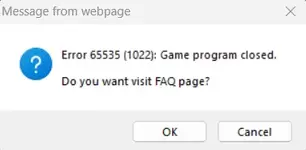
Hello, I'm sorry to bother you, but I had a problem, I kind of did everything right, but the launcher starts and thinks endlessly, after which, as I understand it, it freezes and after clicking on the image and closing the launcher, an error pops up, which is in the screenshot. Please help me, what should I do >.< ?
Здравствуйте, извините, что беспокою вас, но у меня была проблема, я вроде все правильно сделал, но лаунчер запускается и думает бесконечно, после чего, как я понимаю, зависает и после клика по изображению и закрытия лаунчера выскакивает ошибка, которая есть на скриншоте. Пожалуйста, помогите мне, что мне делать >.< ?
 

Attachments

  • Screenshot 2025-02-01 155421 - TERA API (node.js), Shop and Launcher with Client Patcher - RaGEZONE Forums
    Screenshot 2025-02-01 155421.webp
    6.5 KB · Views: 88

TERA API Update Version 1.2

Information about this update and installation in Russian:

Download:

General Changes​

  • Added the ability to directly import data from game client DataCenters files.
  • Added extended support for language codes to support clients of localizations such as USA.
  • Added the ability to disable automatic client login to the server.
  • Added the ability to disable port checking to determine server availability.
  • Added the function of dynamic data redefinition in the list of servers (see below).
  • Added a built-in function for automatic table creation and database migration.
  • Added the ability to separately launch API components.
  • Added the ability to manage caching of Portal API web content.
  • Added the function of setting rate limits for the purpose of limiting requests.
  • Added a built-in module for caching data imported from the DataCenters.
  • Added a built-in module for the scheduler of periodic API tasks.
  • Added a module for loading configuration files (added default configuration files).
  • Added support for plugins to extend the functionality of API components.
  • Added the ability to block API requests from certain IPs (types, ranges, countries).
  • Added integration with the game server database (PlanetDB).
  • Added the ability to specify a handler or function that will be triggered by game actions.
  • Added the ability to specify a custom function when activating a promo code or VIP item.
  • Improved reverse proxy configuration capability for Portal API and admin panel servers.
  • Fixed errors in models and structures of database tables.
  • Removed all SQL models of database tables for the "dataModel" category.
  • Improved handling of exceptions in controllers (Express v5).

Launcher Changes​

  • Added the function of confirming registration by email in the Launcher.
  • Added password reset function via email in the Launcher.
  • Added support for a list of servers in JSON format.
  • Added the ability to assign URL addresses for community links in the game's main menu.
  • Added the ability to assign a URL address to the page that opens when you log into the game.
  • Changed and improved authorization logic in the Launcher.
  • Fixed errors in data validation methods in the Launcher.
  • Improved display of notifications in the Launcher.
  • Replaced reCAPTCHA with its own implementation of CAPTCHA in the Launcher.
  • Changed URLs of internal API endpoints and for the Launcher.
    hsdn - TERA API (node.js), Shop and Launcher with Client Patcher - RaGEZONE Forums
    hsdn - TERA API (node.js), Shop and Launcher with Client Patcher - RaGEZONE Forums


    hsdn - TERA API (node.js), Shop and Launcher with Client Patcher - RaGEZONE Forums
    hsdn - TERA API (node.js), Shop and Launcher with Client Patcher - RaGEZONE Forums

TERA Shop Changes​

  • Added the ability to specify the number of products when purchasing in the TERA Shop.
  • Added a system of discounts for users of the TERA Shop and products.
  • Added a system of discount coupons for purchasing products in the TERA Shop.
  • Added the ability to buy products in the TERA Shop as a gift (by character name).
  • Added additional icons (tags) to highlight products in the TERA Shop.
  • Added an error message when activating an expired promo code.
  • Added the ability to set a limit on the number of activations for a promo code.
  • Added a parameter that allows you to set the initial balance of the TERA Shop upon registration.
  • Fixed an error in the TERA Shop that occurred when purchasing products with a zero cost.
  • Changed URLs of internal API endpoints and for the TERA Shop.
  • Changed the operation of transactions when activating promo codes and purchasing goods in the TERA Shop.
  • Fixed errors in the translation strings of the TERA Shop.
    hsdn - TERA API (node.js), Shop and Launcher with Client Patcher - RaGEZONE Forums


    hsdn - TERA API (node.js), Shop and Launcher with Client Patcher - RaGEZONE Forums


    hsdn - TERA API (node.js), Shop and Launcher with Client Patcher - RaGEZONE Forums

Admin Panel Changes​

  • Changed the method for handling requests when sending forms in the admin panel.
  • Added display of information about the API version and components to the API settings page.
  • Added the ability to edit TERA Shop welcome page slides from the admin panel.
  • Added a function for sync the list of characters with the PlanetDB database (on the server editing page).
  • Added display of user name field in some tables on admin panel pages.
  • Added protection for the remembered password in the admin panel.
  • Added a function for logging client behavior using the Launcher.
  • Added a function for logging actions performed via the Gateway API.
  • Added a function for logging administration queue tasks.
  • Fixed errors in data validation methods in the admin panel.
  • Fixed errors in the translation strings of the admin panel.
    hsdn - TERA API (node.js), Shop and Launcher with Client Patcher - RaGEZONE Forums


    hsdn - TERA API (node.js), Shop and Launcher with Client Patcher - RaGEZONE Forums


    hsdn - TERA API (node.js), Shop and Launcher with Client Patcher - RaGEZONE Forums

Gateway API Changes​

  • Changed time format in all endpoints to use ISO 8601 instead of Unix Timestamp.
  • Added an endpoint for retrieving the list of all available servers.
  • Added an endpoint for retrieving the list of online accounts for a specified server ID.
  • Added an endpoint for disconnecting a specified account by account ID and server ID.
  • Added an endpoint for disconnecting all accounts on a specified server.
  • Added an endpoint for retrieving the list of all registered accounts.
  • Added an endpoint for retrieving the list of characters associated with an account by account ID and server ID.
  • Added an endpoint for retrieving the list of benefits associated with a specified account.
  • Added an endpoint for register a new account based on the specified data.
  • Added an endpoint for adding a benefit by its ID and number of days for the specified account ID.
  • Added an endpoint for removing a benefit by its ID from the specified account ID.
  • Added an endpoint for banning an account by account ID.
  • Added an endpoint for retrieving the list of all shop accounts.
  • Added an endpoint for retrieving a list of all coupons.
  • Added an endpoint for retrieving a list of coupons available for a specified account ID.
  • Added an endpoint for retrieving a list of coupons that have been activated by a specified account ID.
  • Added an endpoint for retrieving details of an activated coupon by its ID.
  • Added an endpoint for adding a new coupon with the specified details.
  • Added an endpoint for retrieving the list of all available promo codes.
  • Added an endpoint for retrieving the list of promo codes activated by a specified account.
  • Added an endpoint for retrieving information about an activated promo code by its ID.
  • Added an endpoint for activating a specified promo code for a given account.
  • Added an endpoint for list of all available Boxes with contains items.
  • Added an endpoint for send the Box to the a specific account.
  • Added an endpoint for send Box to all accounts active after the specified date.

Changes in Static Content Files​

  • Changed image, script, and CSS files located in the public/launcher directory.
  • Changed image, script, and CSS files located in the public/shop directory.
  • Changed the flag icon public/launcher/images/flags/en.png to the image of the UK flag.
  • Added flag icon public/launcher/images/flags/us.png with the image of the US flag.
  • Added Font Awesome 5 Free files, located in the public/fontawesome directory.
  • Added CAPTCHA files, located in the public/captcha and data/captcha-images directories.
  • Fixed the Launcher alternative design templates according to the changes.

Database Structure Changes​

  • Removed tables data_item_conversions, data_item_templates, data_item_strings and data_skill_icons.
    hsdn - TERA API (node.js), Shop and Launcher with Client Patcher - RaGEZONE Forums
  • Added global_property table for database versions control.
  • Added report_launcher table to store client behavior log.
  • Added report_gateway table to store Gateway API requests log.
  • Added shop_slides table to store welcome page slides of TERA Shop.
  • Added shop_coupons table to store TERA Shop coupons.
  • Added shop_coupon_activated table to store information about activated TERA Shop coupons.
  • The email field in the account_info table is now unique and required.
  • The authKey field in the account_info table is now unique.
  • Fixed field names tresholdLow to thresholdLow and from tresholdMedium to thresholdMedium in the server_info table.
  • Changed primary keys in the shop_promocode_strings and shop_category_strings tables
  • If the conditions are met, all changes to the database structure are now made automatically during the migration process.

Dynamic Data Override Function in the Server List​

Allows you to dynamically replace the server IP address in the server list depending on the client's IP address or other conditions. There is GeoIP support, which allows you to issue a specified server IP address depending on the user's country. It is also possible to use IP address ranges to issue a specific server IP address. This can be useful for direct access to the server from a local network to avoid setting up a Hairpin NAT system. In addition, there is the ability to fully support dynamic DNS services such as No-IP, DynDNS and others. This will allow administrators to use a dynamic IP address to host the game server.
To configure, do the following:
  1. Copy the config/slsOverride.default.js file as config/slsOverride.js.
  2. Make the necessary changes to the config/slsOverride.jsfile (see the configuration examples and comments inside the file).
    • If you want to use the GeoIP function, download the file and place it in the data/geoip directory.
    • It is possible to automatically download and update the file "GeoLite2-City.mmdb". To enable this feature, copy the file config/geoip.default.js as config/geoip.js. Open the file config/geoip.js and set true in the enabled parameter in the autoDownload section.

Installation the Update

1. Files​

  1. Download the update files.
  2. Replace all files in the src directory with the new ones from the update.
  3. Replace all files in the public/fontawesome directory with the new ones from the update.
  4. Replace all files in the public/launcher directory with the new ones from the update.
  5. Replace all files in the public/shop directory with the new ones from the update.
  6. Copy all files from the config directory of the update to your config directory.
  7. Copy the public/captcha directory of the update to your public directory.
  8. Copy the data/captcha-images directory of the update to your data directory.
  9. Unpack the share/data/shop-slides-bg.zip archive to data/shop-slides-bg folder.
  10. Update the .env.example, package.json, README.md files, and all the *.bat files.
  11. Run npm install or install.bat script to install updated dependencies.
  12. Open .env file and add the following values to it:
    Code:
    ##################################
    # ARBITER API CONFIGURATION
    ##################################
    
    # Enable Arbiter server availability check based on TCP port check.
    # If such a check is disabled, the Arbiter server availability is checked only by
    # requesting server status from the Platform Hub.
    API_ARBITER_SERVER_PORT_CHECK=true
    
    
    ##################################
    # PORTAL API CONFIGURATION
    ##################################
    
    # Allow determination of client IP address based on "X-Forwarded-For" header.
    # This must be enabled if a reverse proxy is used. It is also necessary to specify the reverse
    # proxy IP address in parameter API_PORTAL_TRUSTPROXY_HOSTS, otherwise data spoofing is possible.
    ADMIN_PANEL_TRUSTPROXY_ENABLE=false
    
    # List of IP addresses or subnets that should be trusted as a reverse proxy.
    # Multiple entries can be listed separated by commas.
    ADMIN_PANEL_TRUSTPROXY_HOSTS=
    
    # Enable caching of Portal and Launcher web server content.
    API_PORTAL_ENABLE_CACHE=true
    
    # Set the initial balance value of In-game Shop account on user registration.
    # Set 0 as value or remove/comment parameter to disable this.
    API_PORTAL_SHOP_INITIAL_BALANCE=0
    
    # Disable automatic client enter to the game server.
    API_PORTAL_DISABLE_CLIENT_AUTO_ENTER=false
    
    # Disable launcher and launcher API (BHS).
    API_PORTAL_LAUNCHER_DISABLE=false
    
    # Enable a CAPTCHA for validation during registration.
    API_PORTAL_CAPTCHA_ENABLE=true
    
    # Enable built-in email confirmation and password reset functions.
    API_PORTAL_LAUNCHER_ENABLE_EMAIL_VERIFY=false
    
    # Outgoing mail sender name.
    API_PORTAL_EMAIL_FROM_NAME=Server Administrator
    
    # Outgoing mail sender email address.
    [email protected]
    
    
    ##################################
    # ADMIN PANEL CONFIGURATION
    ##################################
    
    # Allow determination of client IP address based on "X-Forwarded-For" header.
    # This must be enabled if a reverse proxy is used. It is also necessary to specify the reverse
    # proxy IP address in parameter API_PORTAL_TRUSTPROXY_HOSTS, otherwise data spoofing is possible.
    ADMIN_PANEL_TRUSTPROXY_ENABLE=false
    
    # List of IP addresses or subnets that should be trusted as a reverse proxy.
    # Multiple entries can be listed separated by commas.
    ADMIN_PANEL_TRUSTPROXY_HOSTS=
    
    
    ##################################
    # MAILER CONFIGURATION
    ##################################
    
    # Set the host to connect to the SMTP server.
    MAILER_SMTP_HOST=
    
    # Set the port to connect to the SMTP server.
    MAILER_SMTP_PORT=587
    
    # Enabling encryption of connections to the SMTP server.
    MAILER_SMTP_SECURE=false
    
    # Account name for authorization on the SMTP server.
    MAILER_SMTP_AUTH_USER=
    
    # Account password for authorization on the SMTP server.
    MAILER_SMTP_AUTH_PASSWORD=
    
    
    ##################################
    # PLANETDB DATABASE CONFIGURATION (SQL SERVER)
    #
    # Game server database, used for API purposes (such as characters sync).
    # The parameters are specified in the format "DB_PLANETDB_<ServerID>_",
    # where <ServerID> is the identifier of the game server.
    ##################################
    
    # Example configuration for server ID 2800:
    
    # Enable connect and using the database.
    DB_PLANETDB_2800_ENABLED=false
    
    # Set a host to connect to database.
    DB_PLANETDB_2800_HOST=127.0.0.1
    
    # Set a port to connect to database.
    DB_PLANETDB_2800_PORT=1433
    
    # Set the name of database.
    DB_PLANETDB_2800_DATABASE=PlanetDB_2800
    
    # Set the user to connect to database.
    DB_PLANETDB_2800_USERNAME=sa
    
    # Set the password to connect to database.
    DB_PLANETDB_2800_PASSWORD=
    
    
    ##################################
    # IPAPI.IS CLIENT CONFIGURATION
    ##################################
    
    # List of API keys to submit requests to, must be separated by commas.
    # If left blank, the request will be submitted without an API key.
    # To get a free API key, go here https://ipapi.is/app/signup
    IPAPI_API_KEYS=
    
    # Set the query cache lifetime (seconds).
    IPAPI_CACHE_TTL=86400 # 24 hours
    
    # Set the time to wait for a response to a request (seconds).
    IPAPI_REQUEST_TIMEOUT=3
    
    # Set the number of attempts to retry a request in case of a timeout.
    IPAPI_REQUEST_MAX_RETRIES=3
  13. Important! Since the LOG_IP_ADDRESSES_FORWARDED_FOR parameter has been removed, you should now use the API_PORTAL_TRUSTPROXY_ENABLE and API_PORTAL_TRUSTPROXY_HOSTS parameters for the Portal API, as well as ADMIN_PANEL_TRUSTPROXY_ENABLE and ADMIN_PANEL_TRUSTPROXY_HOSTS for the Admin Panel (see the comments of the parameters in the .env.example file).
  14. Configure the added parameters as you need.
    • If you do not plan to use the password reset (recovery) system via the launcher, set the API_PORTAL_LAUNCHER_ENABLE_EMAIL_VERIFY parameter to false. In this case, setting the "MAILER CONFIGURATION" section and the API_PORTAL_EMAIL_FROM_ADDRESS parameter is not required. Otherwise, you need to specify the details of your SMTP server and the account on whose behalf the messages will be sent, and also specify the sender's address in the API_PORTAL_EMAIL_FROM_ADDRESS parameter.
  15. To access the new sections in the admin panel, import the ExportSteerData_steeradmin_API.sef file in the Steer panel.
    • Refer to the "Integration with Steer Server" section of the README.md file for details.

2. DataCenter Files​

  1. Place the DataCenter files from the game client (such as: DataCenter_Final_EUR.dat, DataCenter_Final_RUS.dat, etc.) in the data/datasheets directory.
  2. Open the .env file and add the following values to it:
    Code:
    ##################################
    # DATASHEET CONFIGURATION
    ##################################
    
    # Enable binary DataCenter mode.
    # If true, the "DataCenter_Final_<region>.dat" file from the "data/datasheets"
    # directory will be used (where <region>: "EUR", "RUS", etc.).
    # If false, the unpacked XML files from the "data/datasheets/<locale>"
    # directory will be used (where <locale>: "en", "ru", etc.).
    DATASHEET_USE_BINARY=true
    
    # Enable if "DataCenter_Final_<region>.dat" files are compressed.
    DATASHEET_DATACENTER_IS_COMPRESSED=true
    
    # Enable if 64-bit version of "DataCenter_Final_<region>.dat" files is used.
    DATASHEET_DATACENTER_HAS_PADDING=true
    
    # Set Key for decrypting files "DataCenter_Final_<region>.dat".
    # Leave empty if the datacenter file is not encrypted.
    DATASHEET_DATACENTER_KEY=1c01c904ff76ff06c211187e197b5716
    
    # Set IV for decrypting files "DataCenter_Final_<region>.dat".
    # Leave empty if the datacenter file is not encrypted.
    DATASHEET_DATACENTER_IV=396c342c52a0c12d511dd0209f90ca7d
  3. Depending on the client version used, configure the added parameters.
    • The provided Key and IV values are for the game version Live-100.02 GF #11 (Gold).
    • To obtain other Key and IV values, you can use the utility (see README.md).
    • If you are using a DataCenter file from the 32-bit version of the game, you must set the DATASHEET_DATACENTER_HAS_PADDING parameter to false.

3. Database​

Important! It is highly recommended to backup your current database.
  1. Since the email field in the account_info table is now unique and required, make sure that this field is filled in your existing data rows and that there are no duplicate values. You may need to edit the data manually.
  2. Delete the data_item_conversions, data_item_strings, data_item_templates, data_skill_icons tables.
    • These tables are no longer required, as the current version uses the DataCenter from your game client directly to get this data.
    • During the first launch, as well as when changing data in the DataCenter, cache files will be created to speed up the subsequent loading of DataCenters.
  3. Perform an automatic database migration, which will happen automatically on the first launch.
    • To do this, run the command npm run start_all or run the script start__all.bat.
    • Make sure that the migration has passed without any errors.
Updated assets (alternative design) for the Launcher can be found here:
 
Last edited:
Why do you love so this game so much!! This stuff is awesome. Good Job!

  • Added the ability to directly import data from game client DataCenters files. ( this will be so helpfull for custom items )
  • Added the ability to manage caching of Portal API web content. ( cool stuff )
  • Added support for plugins to extend the functionality of API components. ( like a Frontend ? )
  • Replaced reCAPTCHA with its own implementation of CAPTCHA in the Launcher. ( I think the old one was broken so this is super awsome )
  • All the Gatewate API changes seem to make it extremely more useful
 
Last edited:
Why do you love so this game so much!! This stuff is awesome. Good Job!
  • Added support for plugins to extend the functionality of API components. ( like a Frontend ? )
The plugin system allows adding routes, controllers and database models without changing the existing API code. Of course, this can be used to create, for example, a website. We implemented this system to be able to add an additional launcher, which will probably be released later. Also, at the moment, there is no documentation created that would describe the plugin system.
 
The plugin system allows adding routes, controllers and database models without changing the existing API code. Of course, this can be used to create, for example, a website. We implemented this system to be able to add an additional launcher, which will probably be released later. Also, at the moment, there is no documentation created that would describe the plugin system.
Looking forward to the new launcher then, awesome work. When it comes to the new launcher is just an internal redesign with more functionality or is the launcher UI going to change?
 
Looking forward to the new launcher then, awesome work. When it comes to the new launcher is just an internal redesign with more functionality or is the launcher UI going to change?
We are talking about a separate launcher application that requires its own implementation on the API side using the plugin system.
 
How do I diagnose this error that I am getting from the TERA API Admin Panel when trying to add in a new product?

Code:
Operation failed: OpArb.opmsg.CreateServiceItem: 23:2603
Check this https://forum.ragezone.com/threads/...h-client-patcher.1205579/page-24#post-9163471

To be specific, 2603 can occur if the value of serviceItemTagSN_ is not found. This may indicate that the Box server database was imported incorrectly.

Original SP code from BOX_sp_2.16.1.db50.sql:
SQL:
        SELECT serviceItemTagSN INTO serviceItemTagSN_ FROM service_item_tag
        WHERE serviceItemTagSN = serviceItemTagSNString_ AND serviceItemTagEnableFlag > 0 LIMIT 1;

        IF serviceItemTagSN_ IS NULL THEN
            SET out_returnCode = out_returnCode + 2603;
            ROLLBACK;
            LEAVE MAIN;
        END IF;
 
Last edited:
Check this https://forum.ragezone.com/threads/...h-client-patcher.1205579/page-24#post-9163471

To be specific, 2603 can occur if the value of serviceItemTagSN_ is not found. This may indicate that the Box server database was imported incorrectly.

Original SP code from BOX_sp_2.16.1.db50.sql:
SQL:
        SELECT serviceItemTagSN INTO serviceItemTagSN_ FROM service_item_tag
        WHERE serviceItemTagSN = serviceItemTagSNString_ AND serviceItemTagEnableFlag > 0 LIMIT 1;

        IF serviceItemTagSN_ IS NULL THEN
            SET out_returnCode = out_returnCode + 2603;
            ROLLBACK;
            LEAVE MAIN;
        END IF;


Ah, thank you, I understand.

I see where I made the mistake. I was trying to clean out the database and start fresh and made a mistake. Thanks!
 
IS there any way to add an extra language on this new launcher?
 
Check the section "How to add new language translation", I updated the instructions in the first post. As for the "new launcher", which has not been published, there is no information yet.


Getting this error: After following the guide on post 1.
I noticed a few things
Localization.default.js does not have Spanish so I don't know if that has anything to do with the game not opening.

I tested adding this code to it, but it seems I am getting the same error :D

// LAN

{
language: "es",
locales: ["es", "es-LA"],
region: "LAN"
},

Tera API has the _ESP (database) same as the client and the. env

# Set the default region name for Client started with Launcher (e.g. EUR, RUS, TW).
API_PORTAL_CLIENT_DEFAULT_REGION=USA

# Set a list of supported regions by Client with language names.
API_PORTAL_CLIENT_REGIONS_USA=English
API_PORTAL_CLIENT_REGIONS_LAN=Espanol
#API_PORTAL_CLIENT_REGIONS_RUS=Русский
#API_PORTAL_CLIENT_REGIONS_TW=中国人

1741484986113 - TERA API (node.js), Shop and Launcher with Client Patcher - RaGEZONE Forums


Also, I committed the sin of sharing the folder where API files are and now, I am getting this error:
Any way to solve it? I try giving permits to all users but still nothing
1741485404498 - TERA API (node.js), Shop and Launcher with Client Patcher - RaGEZONE Forums
 
Last edited:
For this to work, you need to create a supported DataCenter and also make it possible for the client to work with this region.
Currently, only the languages listed in the instructions are supported. Also, If you write region: "LAN", then the DataCenter file should be called DataCenter_Final_LAN.dat. But of course, by default the client will not work with such a region.

Adding a new region to the client will also require changing the S1Game\Localization folder, as well as the CookedPC\Startup_*.upk, CookedPC\Art_Data\Packages\S1UI\S1UIRES_Help_*.gpk files and possibly other changes.
Better ask Archgeus about it.

The TERA API will return some errors if it does not find data from the DataCenter that matches the set language (in accordance with the localization.js config).
 
Last edited:
Back