

You are using an out of date browser. It may not display this or other websites correctly.
You should upgrade or use an alternative browser.
You should upgrade or use an alternative browser.
- Status
- Not open for further replies.


- Joined
- Jul 1, 2010
- Messages
- 1,254
- Reaction score
- 375
Just want to start off saying that I have not tried to change the game to another language.
But my first guess is that you have to change Letter_ENG.inc to include the french letters missing.
Copy Letter2_FRE.inc in to Letter_Eng.inc would be my guess.
That would be the easy part.
There is another way to simply change the languange of the game as a whole in source.
If you check Neuz, there should be a file called "WinMain.rc"
under "String Table"
You should see "IDS_LANG"
This is the language of what the client is going to read.
IDS_LANG = 1 is English or USA.
To change it to french it should be 8.
Or check your Lang.h file for the correct number
See if any of this works and come back to verify, thank you.
But my first guess is that you have to change Letter_ENG.inc to include the french letters missing.
Copy Letter2_FRE.inc in to Letter_Eng.inc would be my guess.
That would be the easy part.
There is another way to simply change the languange of the game as a whole in source.
If you check Neuz, there should be a file called "WinMain.rc"
under "String Table"
You should see "IDS_LANG"
This is the language of what the client is going to read.
IDS_LANG = 1 is English or USA.
To change it to french it should be 8.
Or check your Lang.h file for the correct number
See if any of this works and come back to verify, thank you.
Upvote
0
Just want to start off saying that I have not tried to change the game to another language.
But my first guess is that you have to change Letter_ENG.inc to include the french letters missing.
Copy Letter2_FRE.inc in to Letter_Eng.inc would be my guess.
That would be the easy part.
There is another way to simply change the languange of the game as a whole in source.
If you check Neuz, there should be a file called "WinMain.rc"
under "String Table"
You should see "IDS_LANG"
This is the language of what the client is going to read.
IDS_LANG = 1 is English or USA.
To change it to french it should be 8.
Or check your Lang.h file for the correct number
See if any of this works and come back to verify, thank you.
Hi, thanks a lot for your answer I'll test it tomorrow and I'll tell you if it works
Upvote
0
Just want to start off saying that I have not tried to change the game to another language.
But my first guess is that you have to change Letter_ENG.inc to include the french letters missing.
Copy Letter2_FRE.inc in to Letter_Eng.inc would be my guess.
That would be the easy part.
There is another way to simply change the languange of the game as a whole in source.
If you check Neuz, there should be a file called "WinMain.rc"
under "String Table"
You should see "IDS_LANG"
This is the language of what the client is going to read.
IDS_LANG = 1 is English or USA.
To change it to french it should be 8.
Or check your Lang.h file for the correct number
See if any of this works and come back to verify, thank you.
hi, neither solution works, I'm starting to despair I can't figure out where this is coming from :/
Upvote
0
- Joined
- Jul 1, 2010
- Messages
- 1,254
- Reaction score
- 375
Oh dang,
I did try to change the language too without any luck, sorry can't help any further, I hope you find a solution
I did try to change the language too without any luck, sorry can't help any further, I hope you find a solution
Upvote
0
Oh dang,
I did try to change the language too without any luck, sorry can't help any further, I hope you find a solution
Thanks, the only way is to translate all the TXT in the .res files of the client but it is very long
Upvote
0

- Joined
- Jan 20, 2009
- Messages
- 0
- Reaction score
- 4
Thanks, the only way is to translate all the TXT in the .res files of the client but it is very long
Easier then you may think

Download the french retail client:
To view the content, you need to sign in or register
There is also a german retail if your interested in that to:
To view the content, you need to sign in or register
Just update the resource within my base and you should be go
Upvote
0
Easier then you may think
Download the french retail client:To view the content, you need to sign in or register
There is also a german retail if your interested in that to:To view the content, you need to sign in or register
Just update the resource within my base and you should be go
Hi, I just have to get the data.res from the real french client then put them in my client?
Upvote
0
- Joined
- Jan 20, 2009
- Messages
- 0
- Reaction score
- 4
Hi, I just have to get the data.res from the real french client then put them in my client?
You could merge the text and resource over from the French res files very carefully over to my 18.1 and it should work mostly. It shouldn't be that hard but you will have to pay attention lol.
Upvote
0
You could merge the text and resource over from the French res files very carefully over to my 18.1 and it should work mostly. It shouldn't be that hard but you will have to pay attention lol.
Super thank you very much I will try
Upvote
0
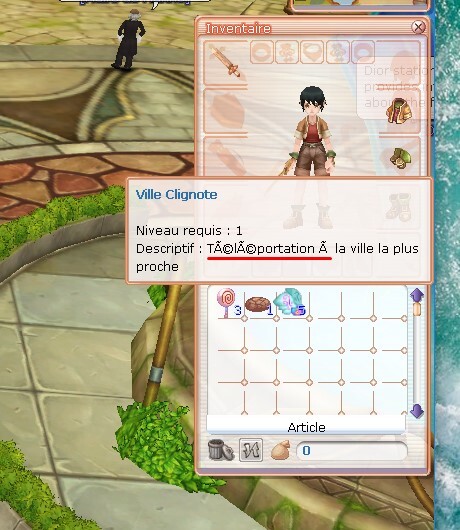
I still have the problem of weird letters instead of accents :/ yet I tried several tricks
I just have a small question about your sources v18 VS22, is there the 3rd class?
I did it!
I copied and pasted all the translations from the Official French client and put them on your V18.1 VS22 version, Thanks for your help
Upvote
0
- Joined
- Jan 20, 2009
- Messages
- 0
- Reaction score
- 4
I still have the problem of weird letters instead of accents :/ yet I tried several tricks
I just have a small question about your sources v18 VS22, is there the 3rd class?
I did it!
Glad you got it sorted finally and yes my 18.1 have 3rd jobs.
Upvote
0
Content que vous ayez enfin réglé le problème et oui, mon 18.1 a un troisième emploi.
Great thanks a lot
Upvote
0
- Status
- Not open for further replies.
RaGEZONE Sponsor

About RaGEZONE
RaGEZONE® is a leading MMO and MMORPG development community offering source codes, server files, tutorials, tools, and private servers for developers and gamers.
Forum Statistics
- Members online
- 3,034
- Guests online
- 15,019
- Total visitors
- 18,053
Totals may include hidden visitors.
RaGEZONE Partners
