Ultimate Loong Server Tutorial

Status
Not open for further replies.
Offtopic: Warmonger, I will not discuss anything about 7-zip and its no-tempfolders extraction. =)
p.s. I finally made it. just gave my HDD to my girlfriend, she has installed it and gave it to me =)
Currently trying to fix <area CA_*******> error :)
 
Last edited:
How to sync client and server?

Make sure they use the same files.
Most importantly the data -> local -> zhCN and the data -> system folders.

You can unpack your system.cpk file from your game installation, and copy those folders into your server folders.

The unpack tool for cpk files are on these forums. Just search for it.
 
Ok i managed to make all things as in tutorial , but when i start the LoginServer it gives me that "thread_update IS NOT EXIST" and at LoongWorld that error with area_CA_info ...what should i check first to get things started...Help :?:
 
Warmonger - Ultimate Loong Server Tutorial - RaGEZONE Forums

I am facing the following problem, after creating the character and log into the server
He simply born dead. how to fix
 
Warmonger - Ultimate Loong Server Tutorial - RaGEZONE Forums

I am facing the following problem, after creating the character and log into the server
He simply born dead. how to fix

You need to replace your game installation -> client folder with this ->

Remember to backup your old client folder.

Try using the server files from here as well -> http://forum.ragezone.com/f671/release-repacked-server-files-full-742208/

The death bug ( and many other bugs ) have been fixed in this release.
 
i can't seem to register an account to get in-game. from loong_login, i open the the account table and manually created a account using the tools from the repack to create an account, but when i try to login, it says invalid. any help would be appreciated.

edit: weirdest problem, when i try to login, the game close and just re-open trying to patch again and keeps repeating when i try to login. anyone having this problem?
 
Last edited:
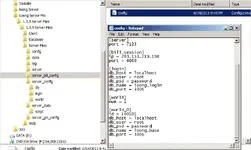
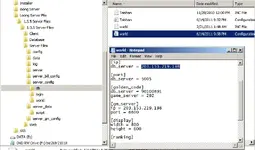
[Step 5: Configuring Files]
Open Up Your Server Files "server_config" Folder.
In This Folder Resides All The Server File Configuration Settings.
Edit Them To Correspond To Your Setup.
please specify more details, please:wink:
need to modify what and where?
 
please specify more details, please:wink:
need to modify what and where?


He means that you must edit all the ini files. You need to change all ip's to 127.0.0.1 and edit user and password information to match your Navicat settings.

Why are you using these server files? There are a lot of bugs in this release because it was one of the first releases.

You could try my guide if that will help you, but the choice is yours. Good luck!
 
I want 2 LAN connection between Computer A and Computer B to play Loong
A computer with ip: 172.16.8.3
and
B computer with ip: 172.16.8.5
A computer as a server
t have to edit the what and where for the two computers to connect and play together
Thanks
 
bill server got closed, because you changed the name in the file but you havent updated the corresponding changes to the name of the files. Take a look at those files in folder DB
 
Dear all

I already follow all the step by step but it seem a problem

Yes I already change the IP and password for my SQL

Here the PIC

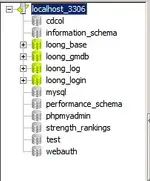
The SQL connect with my pass
Warmonger - Ultimate Loong Server Tutorial - RaGEZONE Forums


Here the SQL


Here the setting


And then I click LoginServer.exe

The error is


Any help please

Mr Warmonger Could you please cek PM

regards
Kurjay
 

Attachments

  • 01 - Ultimate Loong Server Tutorial - RaGEZONE Forums
    01.webp
    9 KB · Views: 108
  • 02 - Ultimate Loong Server Tutorial - RaGEZONE Forums
    02.webp
    7.1 KB · Views: 104
  • 03 - Ultimate Loong Server Tutorial - RaGEZONE Forums
    03.webp
    34.3 KB · Views: 93
  • 05 - Ultimate Loong Server Tutorial - RaGEZONE Forums
    05.webp
    34.5 KB · Views: 92
  • 06 - Ultimate Loong Server Tutorial - RaGEZONE Forums
    06.webp
    33.7 KB · Views: 98
please find the section CA help in this Loong forum, there is an answer how to fix that CA info thread error

---------- Post added at 11:16 AM ---------- Previous post was at 11:15 AM ----------

To Kurjay: The errors you experienced are caused by Windows DPE, you should try to add Loong Server programs to exception lists, then they can be excuted and run.
 
Dear lamphankhoi

Your advice is working nice share thanks for your advice

I already can run for:
1. Login Server
2. LoongBill
3. LoongDBB

Now the only problem is LoongWorld

Couldn't find <Area CA_info>
 

Attachments

  • 08 - Ultimate Loong Server Tutorial - RaGEZONE Forums
    08.webp
    40.1 KB · Views: 165
Status
Not open for further replies.
Back