
Error 65535 (0)

Newbie Spellweaver
Joined
Jan 16, 2024
Messages
54
Reaction score
2
Hello,

when I press "Play"-button of launcher, I do get the following error:

"Error 65535 (0): Game program closed."​


I copied "Launcher_VM_IP_192.168.1.128.exe" into TERA main folder. After first run "local.db" and "version.ini" were created.

.dat-files in S1Game/S1Data: CommonResources, DataCenter_Final_EUR, DataCenter_Final_FRA, DataCenter_Final_GER, DataCenter_Final_RUS, DataCenter_Final_SE, DataCenter_Final_USA, DownloadedResources

In .env i checked:
Code:
# Set the default region name for Client started with Launcher (e.g. EUR, RUS, TW).
API_PORTAL_CLIENT_DEFAULT_REGION=EUR

# Set a list of supported regions by Client with language names.
API_PORTAL_CLIENT_REGIONS_EUR=English
API_PORTAL_CLIENT_REGIONS_RUS=Русский
API_PORTAL_CLIENT_REGIONS_FRA=Français
API_PORTAL_CLIENT_REGIONS_GER=Deutsch

What I recognized:
The Client 100.02 GF is missing "Binaries/XIGNCODE"-folder and when I reselect between languages English, French, German all show same language on "Play"-button, while the russian is the only one that seems to actually translating the "Play"-button etc. When I remove the DataCenter files and restart launcher the translating still work...

Edit: Translating only work for Eng and Rus, but when I press "wrench"-icon while Russian is selected, then it checks *_EUR.dat... Is there something else to make GF client work on TW server?


My setup/sources:
Server/VM 100.02 TW + Launcher
Client 100.02 GF
 
Last edited:
Solution
Error still there.

What I did:
- Stopped all servers and closed Server Manager
- Rename TERA-Live100_02_TW/WebApi/src to "srcOld" and move to Desktop
- Download your repo and unzip
View attachment 263621
- copy src to "TERA-Live100_02_TW/WebApi"-folder
View attachment 263623

- Rename launcher
View attachment 263622

- Start Server Manager and start min. servers
View attachment 263624

- Start launcher and press Play

jummmm, i'm almost out of ideas, but lest try this one,

1. Stop API, rename WebApi to something else
2. Copy the entire repo which you download earlier and put in a new WebApi folder
3. Click on Install.bat and wait until the modules are downloaded.
4. Copy your old .env file from the step 1 and place it into the new folder
5. Start the API and try...
Hello,

when I press "Play"-button of launcher, I do get the following error:

"Error 65535 (0): Game program closed."​


I copied "Launcher_VM_IP_192.168.1.128.exe" into TERA main folder. After first run "local.db" and "version.ini" were created.

.dat-files in S1Game/S1Data: CommonResources, DataCenter_Final_EUR, DataCenter_Final_FRA, DataCenter_Final_GER, DataCenter_Final_RUS, DataCenter_Final_SE, DataCenter_Final_USA, DownloadedResources

In .env i checked:
Code:
# Set the default region name for Client started with Launcher (e.g. EUR, RUS, TW).
API_PORTAL_CLIENT_DEFAULT_REGION=EUR

# Set a list of supported regions by Client with language names.
API_PORTAL_CLIENT_REGIONS_EUR=English
API_PORTAL_CLIENT_REGIONS_RUS=Русский
API_PORTAL_CLIENT_REGIONS_FRA=Français
API_PORTAL_CLIENT_REGIONS_GER=Deutsch

What I recognized:
The Client 100.02 GF is missing "Binaries/XIGNCODE"-folder and when I reselect between languages English, French, German all show same language on "Play"-button, while the russian is the only one that seems to actually translating the "Play"-button etc. When I remove the DataCenter files and restart launcher the translating still work...

Edit: Translating only work for Eng and Rus, but when I press "wrench"-icon while Russian is selected, then it checks *_EUR.dat... Is there something else to make GF client work on TW server?


My setup/sources:
Server/VM 100.02 TW + Launcher
Client 100.02 GF

Hi,

Currently only English and Russian are "translated" in the launcher, in order to add more languages like german and french, you have to follow this guide, and check "How to add new language translation (new region of client):"
 
Upvote 0
Thanks for your time, but I don't want to change language. English is okay for me. The issue is that I get that error and the game don't start.
 
Upvote 0
Thanks for your time, but I don't want to change language. English is okay for me. The issue is that I get that error and the game don't start.

The GF client must work out of the box, you only have to make sure to put EUR in your env file. Also, this client is not protected with xing code, so you dont need it.

1720371667027 - Error 65535 (0) - RaGEZONE Forums


Check here for more information.
 
Upvote 0
I left .env how it was, just like you provided (as shown above). I think having GER, FRA(, RUS) won't cause conflicts because they don't work? Can I ignore Tera_Client folder in your VM if I don't want to enable patching by launcher? Also not working or unused .dat-files won't cause issues?
 
Upvote 0
I left .env how it was, just like you provided (as shown above). I think having GER, FRA(, RUS) won't cause conflicts because they don't work? Can I ignore Tera_Client folder in your VM if I don't want to enable patching by launcher? Also not working or unused .dat-files won't cause issues?

You can disable the patching, edit your env file and then set API_PORTAL_CLIENT_PATCH_NO_CHECK from false to true

Regarding the others dc, they don't interfiere between each other so you can leave it there.

I suggest you to download , replace it in your GF client and try to launch again.
 
Upvote 0
Hmm, I tried API_PORTAL_CLIENT_PATCH_NO_CHECK=true and the original DCs, but same issue.

Do I need to start all servers of Server Manager or is the some minimalistic start so it becomes simpler to troubleshoot (due to servers start time)?
 
Upvote 0
Hmm, I tried API_PORTAL_CLIENT_PATCH_NO_CHECK=true and the original DCs, but same issue.

Do I need to start all servers of Server Manager or is the some minimalistic start so it becomes simpler to troubleshoot (due to servers start time)?

Yeah,

Only those are needed for just test the client start. It will let you reach till character screen.

Ignore Proxy server start if you are not using it.

1720377329556 - Error 65535 (0) - RaGEZONE Forums
 
Upvote 0
Unfortunately, it is still not working.

The TERA_CLIENT/S1Game/S1Data of your VM contains: DataCenter_Final_EUR.dat. (Do I need CommonResources or DownloadedResources in Server/VM?)
I did set back to API_PORTAL_CLIENT_PATCH_NO_CHECK=false and patching of DataCenter_Final_EUR.dat (if I delete in my local client) works.

The eth0 adapter config of VM/server:
ipv4 vm eth0 - Error 65535 (0) - RaGEZONE Forums


This is how console of tera-api looks when starting launcher and press of "Play"-button. It seems to check server maintenance status and requests server list, even though it gives me the error 65535 (0).
teraapi consol - Error 65535 (0) - RaGEZONE Forums


Tera Main Folder of Client (local pc):
tera main folder - Error 65535 (0) - RaGEZONE Forums


S1Data of Client (local pc):
tera s1data - Error 65535 (0) - RaGEZONE Forums


Anywhere else I can check logs?
 
Last edited:

Upvote 0
Unfortunately, it is still not working.

The TERA_CLIENT/S1Game/S1Data of your VM contains: DataCenter_Final_EUR.dat. (Do I need CommonResources or DownloadedResources in Server/VM?)
I did set back to API_PORTAL_CLIENT_PATCH_NO_CHECK=false and patching of DataCenter_Final_EUR.dat (if I delete in my local client) works.

The eth0 adapter config of VM/server:
View attachment 263563

This is how console of tera-api looks when starting launcher and press of "Play"-button. It seems to check server maintenance status and requests server list, even though it gives me the error 65535 (0).
View attachment 263554

Tera Main Folder of Client (local pc):
View attachment 263557

S1Data of Client (local pc):
View attachment 263556

Anywhere else I can check logs?

Do I need CommonResources or DownloadedResources in Server/VM?

No, i placed those files as example in order to show how patch works.

Check the following steps,

1. Set API_PORTAL_CLIENT_PATCH_NO_CHECK to true and restart the API
2. Make sure that the launcher is closed and there's no launcher.exe background process.
3. Delete local.db and version.ini from client root folder.
4. Restore
5. Execute LauncherVM.exe again and only version.ini would be created, login and then start the game.

1720482181015 - Error 65535 (0) - RaGEZONE Forums


1720482196692 - Error 65535 (0) - RaGEZONE Forums


1720482227005 - Error 65535 (0) - RaGEZONE Forums


1720482252237 - Error 65535 (0) - RaGEZONE Forums


1720482545508 - Error 65535 (0) - RaGEZONE Forums
 
Upvote 0
I followed all steps, but still after pressing "Play":

after play button - Error 65535 (0) - RaGEZONE Forums


I saw your DNS of VM is 192.168.1.2, so I changed too, but no help.

Hashes by 7-Zip:
hashes - Error 65535 (0) - RaGEZONE Forums

md5: dc193ac520efac09b9faefb7f46f2405

Also tried other and even replaced its DCs, but same result.

In case of Client: I just unzipped downloaded files & copied launcher into (no installation / windows registry entry like regular games needs)

IPconfig of VM:
ipconfig - Error 65535 (0) - RaGEZONE Forums


S1Data:
S1Data - Error 65535 (0) - RaGEZONE Forums

.env snippet:

env - Error 65535 (0) - RaGEZONE Forums
 
Upvote 0
I followed all steps, but still after pressing "Play":

View attachment 263608

I saw your DNS of VM is 192.168.1.2, so I changed too, but no help.

Hashes by 7-Zip:
View attachment 263609
md5: dc193ac520efac09b9faefb7f46f2405

Also tried other and even replaced its DCs, but same result.

In case of Client: I just unzipped downloaded files & copied launcher into (no installation / windows registry entry like regular games needs)

IPconfig of VM:
View attachment 263611

S1Data:
View attachment 263613
.env snippet:

View attachment 263614

Hi,

I think i know what's happening, but in order to check if so, please do the following,

1. Uncomment API_PORTAL_CLIENT_REGIONS FRA AND GER and restart the API
2. Restore DataCenter FRA and GER into the client.
3. Relaunch LauncherVM and try again
 
Upvote 0
env - Error 65535 (0) - RaGEZONE Forums


S1Data - Error 65535 (0) - RaGEZONE Forums


Error is still there, I would expect Splash image to show up, but it does not.

Any reason our CRC64s differ?

Edit: What I realized, when you first select RUS then launcher is in russian, but if I change to i.e. GER/FRA it stays RUS. On the other hand if I select EUR(English) it becomes english and stays english even if I select GER/FRA. Tried to start with GER/FRA it returns yellow warning in tera-api along the error 65535.
 
Last edited:
Upvote 0
View attachment 263620

View attachment 263619

Error is still there, I would expect Splash image to show up, but it does not.

Any reason our CRC64s differ?

Edit: What I realized, when you first select RUS then launcher is in russian, but if I change to i.e. GER/FRA it stays RUS. On the other hand if I select EUR(English) it becomes english and stays english even if I select GER/FRA. Tried to start with GER/FRA then error comes up immediately (faster) and returns yellow warning in tera-api. EUR/RUS takes longer to return error window.

hmmm

1. Stop the API, then go to WebApi folder
2. Delete src folder
3. Download this , then copy the src folder and place it into WebApi folder
4. Rename the launcher to something else (like TERALauncher.exe)
5. Start the APi and tray again.
 
Last edited:

Upvote 0
Error still there.

What I did:
- Stopped all servers and closed Server Manager
- Rename TERA-Live100_02_TW/WebApi/src to "srcOld" and move to Desktop
- Download your repo and unzip
new webapi - Error 65535 (0) - RaGEZONE Forums

- copy src to "TERA-Live100_02_TW/WebApi"-folder
new src - Error 65535 (0) - RaGEZONE Forums


- Rename launcher
tera main folder - Error 65535 (0) - RaGEZONE Forums


- Start Server Manager and start min. servers
servers restart - Error 65535 (0) - RaGEZONE Forums


- Start launcher and press Play
 
Upvote 0
Error still there.

What I did:
- Stopped all servers and closed Server Manager
- Rename TERA-Live100_02_TW/WebApi/src to "srcOld" and move to Desktop
- Download your repo and unzip
View attachment 263621
- copy src to "TERA-Live100_02_TW/WebApi"-folder
View attachment 263623

- Rename launcher
View attachment 263622

- Start Server Manager and start min. servers
View attachment 263624

- Start launcher and press Play

jummmm, i'm almost out of ideas, but lest try this one,

1. Stop API, rename WebApi to something else
2. Copy the entire repo which you download earlier and put in a new WebApi folder
3. Click on Install.bat and wait until the modules are downloaded.
4. Copy your old .env file from the step 1 and place it into the new folder
5. Start the API and try again.

If that don't work, post the logs which are in logs folder in the Client\S1Game
 
Upvote 1
Solution
I guess the logs give the answer:

"Log file open, 07/09/24 19:34:08
[0008.63] Warning: Warning, Command line -d3d11 set, but D3D11 is not supported on this machine. Will fallback to older API.
[0009.13] Error: Fatal error!

This Graphic card is not supported direct 11!

[0009.23] Critical: HandleError re-entered."

The GTX 295 (Dual GPU and ~2 GB VRAM) not work with newer TERA? Any workaround or only new GPU?
 
Upvote 0
I guess the logs give the answer:

"Log file open, 07/09/24 19:34:08
[0008.63] Warning: Warning, Command line -d3d11 set, but D3D11 is not supported on this machine. Will fallback to older API.
[0009.13] Error: Fatal error!

This Graphic card is not supported direct 11!

[0009.23] Critical: HandleError re-entered."

The GTX 295 (Dual GPU and ~2 GB VRAM) not work with newer TERA? Any workaround or only new GPU?

hmmm, that's a very old graphic card. Maybe is time to an upgrade, that's your excuse :cool:
 
Upvote 0
Hi,

Currently only English and Russian are "translated" in the launcher, in order to add more languages like german and french, you have to follow this guide, and check "How to add new language translation (new region of client):"
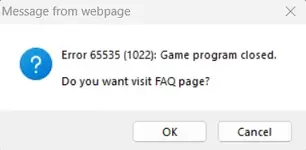
Hello, I'm sorry to bother you, but I had a problem, I kind of did everything right, but the launcher starts and thinks endlessly, after which, as I understand it, it freezes and after clicking on the image and closing the launcher, an error pops up, which is in the screenshot. Please help me, what should I do >.< ?
Здравствуйте, извините, что беспокою вас, но у меня была проблема, я вроде все правильно сделал, но лаунчер запускается и думает бесконечно, после чего, как я понимаю, зависает и после клика по изображению и закрытия лаунчера выскакивает ошибка, которая есть на скриншоте. Пожалуйста, помогите мне, что мне делать >.< ?
 

Attachments

  • Screenshot 2025-02-01 155421 - Error 65535 (0) - RaGEZONE Forums
    Screenshot 2025-02-01 155421.webp
    6.5 KB · Views: 64
Upvote 0
Back