Tera Ready Server

Hi, I want to ask working there costumes?


Sorry for my English [translate.google.com]
 
someone help me plz
UniController working
succes create account
StartGameServer.bat working
but when i try to log in into game, click login on launcher nothing happen
generator.exe : setting http:// 127.0.0.1 /server / serverlist.en

serverlist.en

<?xml version="1.0" encoding="utf-8"?>
<serverlist>
<server>
<id>1</id>
<ip>127.0.0.1</ip>
<port>14752</port>
<category sort="1">PVE</category>
<name raw_name="Tera Test -Alpha PvE">
<![CDATA[Tera Test -Alpha PvE]]>
</name>
<crowdness sort="1">No</crowdness>
<open sort="1">Low</open>
<permission_mask>0x00000000</permission_mask>
<server_stat>0x00000000</server_stat>
<popup>
<![CDATA[Unable to access the server at this time.]]>
</popup>
<language>en</language>
</server>
<server>
<id>2</id>
<ip>127.0.0.1</ip>
<port>14752</port>
<category sort="2">PVP</category>
<name raw_name="Tera Test -Beta PvP">
<![CDATA[Tera Test -Beta PvP]]>
</name>
<crowdness sort="1">No</crowdness>
<open sort="1">Low</open>
<permission_mask>0x00000000</permission_mask>
<server_stat>0x00000000</server_stat>
<popup>
<![CDATA[Unable to access the server at this time.]]>
</popup>
<language>en</language>
</server>
</serverlist>

i think is nothing wrong here but the game wont run
i use window 10 enterprise

plz give me solution :(:
sory for my bad english

thank's advanced
 
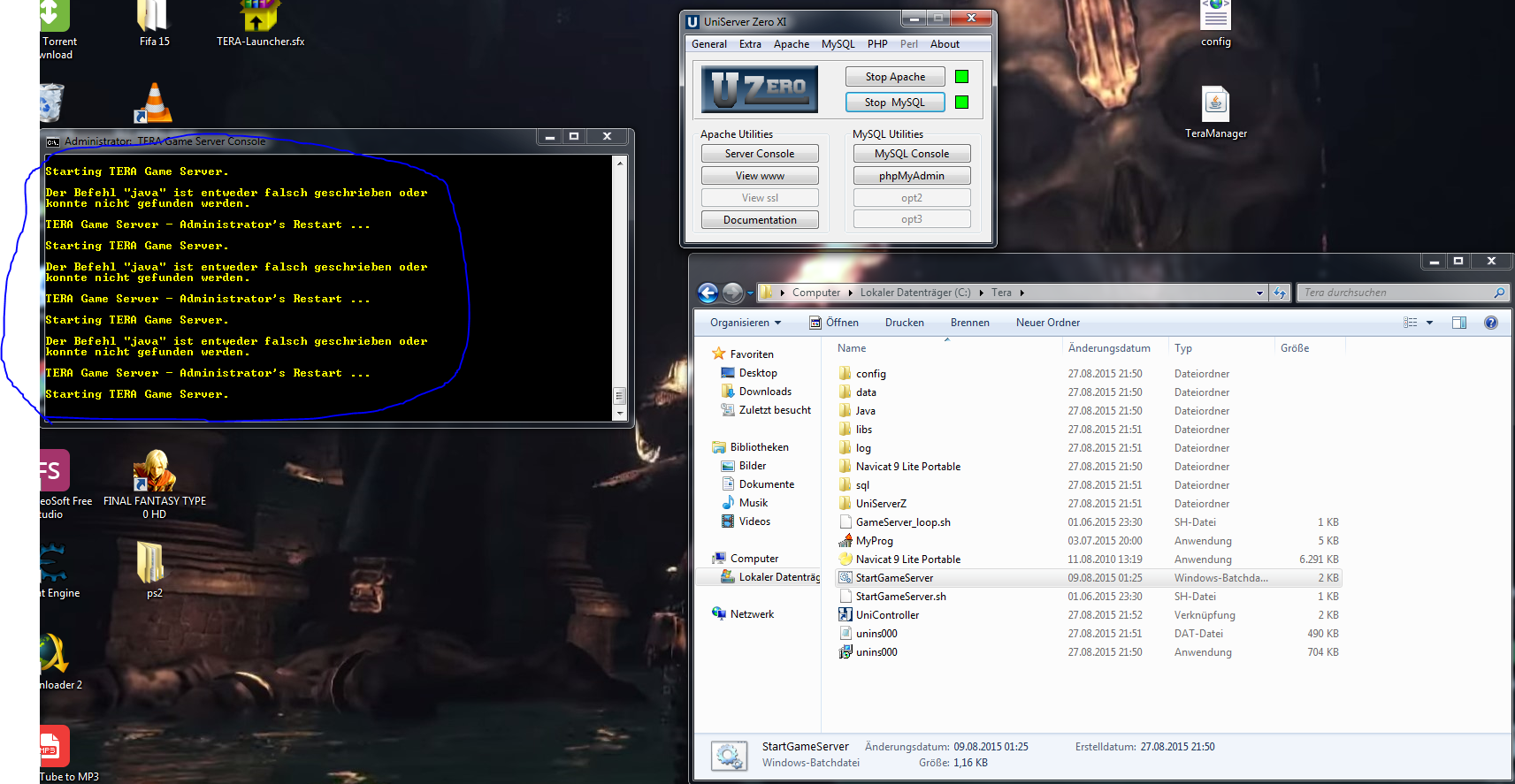
hey thanks for share.. great job... so but i have one problem when i start startgameserver comes a error....

here picture srry its in german but anything with java It is there

thanks in advance
snkdemon - Tera Ready Server - RaGEZONE Forums
I will make a small tut for the ones whit java problems
 
someone help me plz
UniController working
succes create account
StartGameServer.bat working
but when i try to log in into game, click login on launcher nothing happen
generator.exe : setting http:// 127.0.0.1 /server / serverlist.en

serverlist.en

<?xml version="1.0" encoding="utf-8"?>
<serverlist>
<server>
<id>1</id>
<ip>127.0.0.1</ip>
<port>14752</port>
<category sort="1">PVE</category>
<name raw_name="Tera Test -Alpha PvE">
<![CDATA[Tera Test -Alpha PvE]]>
</name>
<crowdness sort="1">No</crowdness>
<open sort="1">Low</open>
<permission_mask>0x00000000</permission_mask>
<server_stat>0x00000000</server_stat>
<popup>
<![CDATA[Unable to access the server at this time.]]>
</popup>
<language>en</language>
</server>
<server>
<id>2</id>
<ip>127.0.0.1</ip>
<port>14752</port>
<category sort="2">PVP</category>
<name raw_name="Tera Test -Beta PvP">
<![CDATA[Tera Test -Beta PvP]]>
</name>
<crowdness sort="1">No</crowdness>
<open sort="1">Low</open>
<permission_mask>0x00000000</permission_mask>
<server_stat>0x00000000</server_stat>
<popup>
<![CDATA[Unable to access the server at this time.]]>
</popup>
<language>en</language>
</server>
</serverlist>

i think is nothing wrong here but the game wont run
i use window 10 enterprise

plz give me solution :(:
sory for my bad english

thank's advanced

Change port in serverlist.en to 11101
 
Quick fix for the ones ho are having java problems "just instal the server in local disk D:/" not in other location the pack already have java installed but java path is in "D:/ " so you need to install in D:/ that is all.
 
Back