Re: Tutorials for EP8 Server Files (DETAILED)
cpp-4.1.1-52.el5.2.rpm
I did a google search did not find
If you share your?
try do like this...
1 - yum update
2 - copy rpm file ( home/rpm from full server file ) to your CentOS ( /home )
3 - yum install unixODBC openssl097a net-snmp-utils net-snmp-libs net-snmp lm_sensors gcc freetds dstat compat-libstdc++-33 compat-libstdc++-296
4 - rpm -Uvh /home/rpm/cabal-server-ph-1.0-1.i386.rpm
5 - copy folder ( usr , etc , home from full server files ) to your CentOS 5.8
6 - Run this script in Terminal
#!/bin/sh
chmod 0777 /etc/odbc.ini
chmod -R 0777 /etc/cabal
rm -f /usr/bin/GlobalDBAgent
rm -f /usr/bin/CashDBAgent
rm -f /usr/bin/PCBangDBAgent
rm -f /usr/bin/EventDBAgent
rm -f /usr/bin/DBAgent_*
rm -f /usr/bin/ChatNode_*
rm -f /usr/bin/WorldSvr_*
rm -f /usr/bin/AgentShop_*
rm -f /usr/bin/LoginSvr_*
rm -f /usr/bin/PartySvr_*
ln -sf /usr/bin/DBAgent /usr/bin/CashDBAgent
ln -sf /usr/bin/DBAgent /usr/bin/DBAgent_01
ln -sf /usr/bin/DBAgent /usr/bin/GlobalDBAgent
ln -sf /usr/bin/DBAgent /usr/bin/PCBangDBAgent
ln -sf /usr/bin/DBAgent /usr/bin/EventDBAgent
ln -sf /usr/bin/ChatNode /usr/bin/ChatNode_01
ln -sf /usr/bin/AgentShop /usr/bin/AgentShop_01
ln -sf /usr/bin/LoginSvr /usr/bin/LoginSvr_01
ln -sf /usr/bin/PartySvr /usr/bin/PartySvr_01
ln -sf /usr/bin/WorldSvr /usr/bin/WorldSvr_01_01
ln -sf /usr/bin/WorldSvr /usr/bin/WorldSvr_01_02
ln -sf /usr/bin/WorldSvr /usr/bin/WorldSvr_01_03
ln -sf /usr/bin/WorldSvr /usr/bin/WorldSvr_01_04
ln -sf /usr/bin/WorldSvr /usr/bin/WorldSvr_01_05
ln -sf /usr/bin/WorldSvr /usr/bin/WorldSvr_01_06
ln -sf /usr/bin/WorldSvr /usr/bin/WorldSvr_01_08
chmod 0777 /usr/bin/AuthDBAgent
chmod 0777 /usr/bin/RockAndRollITS
chmod 0777 /usr/bin/DBAgent*
chmod 0777 /usr/bin/GlobalDBAgent
chmod 0777 /usr/bin/GlobalMgrSvr
chmod 0777 /usr/bin/ChatNode*
chmod 0777 /usr/bin/CashDBAgent
chmod 0777 /usr/bin/PCBangDBAgent
chmod 0777 /usr/bin/EventDBAgent
chmod 0777 /usr/bin/EventMgrSvr
chmod 0777 /usr/bin/AgentShop*
chmod 0777 /usr/bin/LoginSvr*
chmod 0777 /usr/bin/PartySvr*
chmod 0777 /usr/bin/WorldSvr*
rm -f /etc/init.d/AuthDBAgent
rm -f /etc/init.d/RockAndRollITS
rm -f /etc/init.d/DBAgent*
rm -f /etc/init.d/GlobalDBAgent
rm -f /etc/init.d/GlobalMgrSvr
rm -f /etc/init.d/ChatNode*
rm -f /etc/init.d/CashDBAgent
rm -f /etc/init.d/PCBangDBAgent
rm -f /etc/init.d/EventDBAgent
rm -f /etc/init.d/EventMgrSvr
rm -f /etc/init.d/AgentShop*
rm -f /etc/init.d/LoginSvr*
rm -f /etc/init.d/PartySvr*
rm -f /etc/init.d/WorldSvr*
ln -sf /etc/init.d/cabal_server /etc/init.d/AuthDBAgent
ln -sf /etc/init.d/cabal_server /etc/init.d/RockAndRollITS
ln -sf /etc/init.d/cabal_server /etc/init.d/DBAgent_01
ln -sf /etc/init.d/cabal_server /etc/init.d/GlobalDBAgent
ln -sf /etc/init.d/cabal_server /etc/init.d/GlobalMgrSvr
ln -sf /etc/init.d/cabal_server /etc/init.d/ChatNode_01
ln -sf /etc/init.d/cabal_server /etc/init.d/CashDBAgent
ln -sf /etc/init.d/cabal_server /etc/init.d/PCBangDBAgent
ln -sf /etc/init.d/cabal_server /etc/init.d/EventDBAgent
ln -sf /etc/init.d/cabal_server /etc/init.d/EventMgrSvr
ln -sf /etc/init.d/cabal_server /etc/init.d/AgentShop_01
ln -sf /etc/init.d/cabal_server /etc/init.d/LoginSvr_01
ln -sf /etc/init.d/cabal_server /etc/init.d/PartySvr_01
ln -sf /etc/init.d/cabal_server /etc/init.d/WorldSvr_01_01
ln -sf /etc/init.d/cabal_server /etc/init.d/WorldSvr_01_02
ln -sf /etc/init.d/cabal_server /etc/init.d/WorldSvr_01_03
ln -sf /etc/init.d/cabal_server /etc/init.d/WorldSvr_01_04
ln -sf /etc/init.d/cabal_server /etc/init.d/WorldSvr_01_05
ln -sf /etc/init.d/cabal_server /etc/init.d/WorldSvr_01_06
ln -sf /etc/init.d/cabal_server /etc/init.d/WorldSvr_01_08
chmod 0777 /etc/init.d/AuthDBAgent
chmod 0777 /etc/init.d/RockAndRollITS
chmod 0777 /etc/init.d/DBAgent*
chmod 0777 /etc/init.d/GlobalDBAgent
chmod 0777 /etc/init.d/GlobalMgrSvr
chmod 0777 /etc/init.d/ChatNode*
chmod 0777 /etc/init.d/CashDBAgent
chmod 0777 /etc/init.d/PCBangDBAgent
chmod 0777 /etc/init.d/EventDBAgent
chmod 0777 /etc/init.d/EventMgrSvr
chmod 0777 /etc/init.d/AgentShop*
chmod 0777 /etc/init.d/LoginSvr*
chmod 0777 /etc/init.d/PartySvr*
chmod 0777 /etc/init.d/WorldSvr*
~100% working for me~
;-)
if not working.. try copy AkiSora
To view the content, you need to sign in or register
to your CentOS


:/


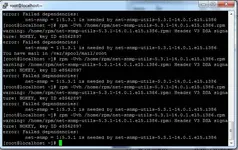
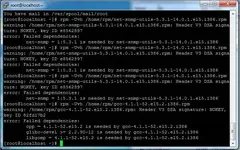


 :
: