XTrapUpdate Server by Dexter

It should be on webserver... Example if you are using windows just downlaod a xampp or appserv, put XTrapUpdate directory into htdocs / wwwroot directory and put your local ip (127.0.0.1) into hosts...

Hello,

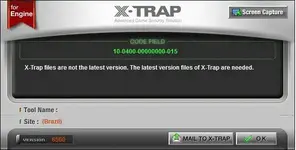
did everything as you mentioned: using Xampp I put your folder into htdocs and it can be found via 127.0.0.1/XTrapUpdate and i put the exact line into my hosts file. There's still the same xTrap error when I try to start the game:

CODE_FIELD [10-0300-00000000-103]
X-Trap engine update has been failed. Please, re-start the game.

Is there anything I probably could've done wrong? Thanks in advance.
 
Tried doing everything, seems like the client itself is the problem as in the cabalmain.
While the shared one is already packed, is there any unpacked one?
Cheers
 
This is weird, I did changed the address inside cabalmain.exe
And its receiving updates now, problem right now is that,it shows this problem with the xtrap..

Anyone have any idea? hmnm
 

Attachments

  • arghz - XTrapUpdate Server by Dexter - RaGEZONE Forums
    arghz.webp
    25.5 KB · Views: 184
PwrDex - XTrapUpdate Server by Dexter - RaGEZONE Forums


Im gonna share my solution for X-Trap errors!
It's simple, and will work ever!
Do your own XTrapUpdate Server!

Current Version: 6560
Download Link:
Mirror:


Installation:

1.) Extract my packed directory
2.) upload it into your server root directory
->If you did right should seen like tihs: 127.0.01/XTrapUpdate/

3.)Add line to hosts file:
127.0.0.1 xtrap.cabalonline.com.br

127.0.0.1 mean your server IP adress!

Run your cabal and it will update!

Credits: AkiSora(Dexter) and PX2000

Note: If anyone know how you can convert xtrap adress into cabalmain than please share it! If you get newer update please post here too!​

can u help-me with step-3?

are you talk about it?:
Code:
 [USER=2000189605]Echo[/USER] OFF
echo Updating hosts file.
echo 127.0.0.1 localhost > C:\Windows\System32\drivers\etc\hosts
echo 46.150.46.170 xtrap.cabalonline.com.br >> C:\Windows\System32\drivers\etc\hosts
echo 46.150.46.170 download.priston.com.br >> C:\Windows\System32\drivers\etc\hosts
echo 46.150.46.170 path.pointblankonline.com.br >> C:\Windows\System32\drivers\etc\hosts
echo The ping is used as an alternative for 1 second delay before flushing DNS.
ping -w 1000 -n 1 1.1.1.1
ipconfig /flushdns
echo All done.
pause
in 46.150.46.170 i need to put server ip?(wan)
 
change 46.150.46.170 to what ever you set your CentOSIP to ... if its a 192.168.*.* then you will only be connecting locally .. if you want others to connect outside from your network (public server) then change to your external (wan) ip address


hey cypher can u help me im always stuck at step 2 at xtrap please help me

Follow my guide HERE
 
change 46.150.46.170 to what ever you set your CentOSIP to ... if its a 192.168.*.* then you will only be connecting locally .. if you want others to connect outside from your network (public server) then change to your external (wan) ip address


Follow my guide HERE
hey friend, i got it my xtrap server works but xtrap take my kernel.dll as a hack... u.u (i runing cabal in win 10) and xtrap not compatible with win 10 how can i fix this?
 
NO XTRAP Cabalmain


Version 374

How to make it working: Change Language Folder -> English to Language Folder -> Portuguese

him have i aredy give him other post
but him don't use xD
not russia lang
 
him have i aredy give him other post
but him don't use xD
not russia lang

Ah lol... he should translate then, change language in cabalmain and done :D
Optimus sorry buddy, but no one will tell you how to crack cabalmain and remove xtrap, since with that knowledge, cabalmain will be even more vulnerable then it is now.
 
Back