Experienced Elementalist
- Joined
- Apr 1, 2024
- Messages
- 242
- Reaction score
- 168
Launcher for Cabal with:
✔ Auto update (MD5)
✔ Patch System
✔ Integrated Web (News / Register)
✔ Server Status
✔ UI Korean Style
✔ Animated Bar + Effects
P.S There are two Launchers on this release, it's has a simple one, with check files, automatic update system and start button, and also a Korean Style, with animations + effects + buttons and more.
Password: ragezone
✔ Auto update (MD5)
✔ Patch System
✔ Integrated Web (News / Register)
✔ Server Status
✔ UI Korean Style
✔ Animated Bar + Effects
P.S There are two Launchers on this release, it's has a simple one, with check files, automatic update system and start button, and also a Korean Style, with animations + effects + buttons and more.
 Requirements
- Windows 10 or superior
- .Compatible NET Framework
- Microsoft Edge WebView2 installed
Launcher Structure
- launcher_files/ (Home Launcher folder, which contains 2 folders, "client" and "slides". Click Generator.exe to generate all update hashs inside filelist.xml)
- launcher_files/client (it's the folder that you will put all the files that you want to update)
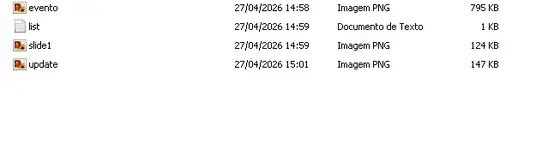
- launcher_files/slides (This contains slides that will play in the launcher. You must place the image in the slides folder and add its name to the list.txt file, for example, slide1.png. Save the list.txt file, and you're done.)
 Launcher Source Configuration
- Type ctrl + f and replace everyplace that you find the IP 192.168.1.18 for your web host or your website's domain, and remember to adjust http:// and change for https:// if you have a real webhost and valid domain, if you are using a test server in home, don't need to change http:// only the IP.
- remember, after rebuild the launcher, copy your cabalmain.exe also to launcher_files/client folder, to generate also cabalmain.exe hash with generator.exe for filelist.xml, your Launcher.exe you can just copy for your client, don't need to put inside launcher_files/client folder.
- this part of the Korean Alternative Launcher: Browser.Source = new Uri("http://SEU_SITE/register_form.php"); you can change if you want the register working inside Launcher, can do the same with the other menu options.
- Server Status you have to put your server ip, just search for: 127.0.0.1:38101
 Launcher Download Links:
To view the content, you need to sign in or register
To view the content, you need to sign in or register