CABAL LAUNCHER (AUTO UPDATE + WEB + AAA UI) Source 

Experienced Elementalist
Joined
Apr 1, 2024
Messages
242
Reaction score
168
Launcher for Cabal with:
✔ Auto update (MD5)
✔ Patch System
✔ Integrated Web (News / Register)
✔ Server Status
✔ UI Korean Style
✔ Animated Bar + Effects

P.S There are two Launchers on this release, it's has a simple one, with check files, automatic update system and start button, and also a Korean Style, with animations + effects + buttons and more.

⚠️ Requirements​


  • Windows 10 or superior
  • .Compatible NET Framework
  • Microsoft Edge WebView2 installed


⚠️ Launcher Structure
​

  • launcher_files/ (Home Launcher folder, which contains 2 folders, "client" and "slides". Click Generator.exe to generate all update hashs inside filelist.xml)
  • launcher_files/client (it's the folder that you will put all the files that you want to update)
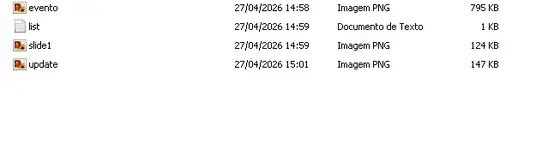
  • launcher_files/slides (This contains slides that will play in the launcher. You must place the image in the slides folder and add its name to the list.txt file, for example, slide1.png. Save the list.txt file, and you're done.)

⚙️ Launcher Source Configuration​

  • Type ctrl + f and replace everyplace that you find the IP 192.168.1.18 for your web host or your website's domain, and remember to adjust http:// and change for https:// if you have a real webhost and valid domain, if you are using a test server in home, don't need to change http:// only the IP.
  • remember, after rebuild the launcher, copy your cabalmain.exe also to launcher_files/client folder, to generate also cabalmain.exe hash with generator.exe for filelist.xml, your Launcher.exe you can just copy for your client, don't need to put inside launcher_files/client folder.
  • this part of the Korean Alternative Launcher: Browser.Source = new Uri("http://SEU_SITE/register_form.php"); you can change if you want the register working inside Launcher, can do the same with the other menu options.
  • Server Status you have to put your server ip, just search for: 127.0.0.1:38101

🚀 Launcher Download Links:​


Password: ragezone
​

 
How fix this error? 👇

Untitled - CABAL LAUNCHER (AUTO UPDATE + WEB + AAA UI) - RaGEZONE Forums
 
Hey friend, that would be great! Could you post a picture of the launcher so we can see what it looks like?
 
I chose the KR style launcher. In the KR style launcher folder, which one should I put in the server side? and which one file should I put in the client folder?

bcos i not see folder for launcher_ file at htdosc side.
 
Last edited:
I chose the KR style launcher. In the KR style launcher folder, which one should I put in the server side? and which one file should I put in the client folder?

bcos i not see folder for launcher_ file at htdosc side.
you gonna have to create launcher_files folder inside htdocs from your website and inside launcher_files folder, create two more folders (client and slides)
also inside launcher_files put the generator executable to generate the update hashes that will be find on filelist.xml, this filelist.xml contains your update hashes, so put your files that you want to update inside launcher_files/client (In order) and generate the hashes with generator.exe. Slides folder is only in case you gonna use slides on Launcher background, if you configured your website domain on the source, so won't appear any pictures inside the slide area, only the main website page will appear, if you want to show images on slide area, put the picute in .png extension and put any name you want, i usually put number, like 1.png, 2.png and on... open list.txt and put the name of the pictures and extension there in order.

I chose the KR style launcher. In the KR style launcher folder, which one should I put in the server side? and which one file should I put in the client folder?

bcos i not see folder for launcher_ file at htdosc side.
Make sure you put your website domain in every single place that asks for website ip or domain, and if you use https, remember to make sure that you put https:// in each line that asks for website domain or ip
 
Pls send format file filelist.xml. (Still file loading no have any update file)

How fix server offline? give to online. (already put ip still offline)
how put background images or put slides images


Untitled - CABAL LAUNCHER (AUTO UPDATE + WEB + AAA UI) - RaGEZONE Forums
 
Last edited:
pls share command for file filelist.xml. >>>>>Miroko
 
pls share command for file filelist.xml. >>>>>Miroko
Put generator.exe inside launcher_files, put the updates inside launcher_files/client, execute generator.exe and done, it will generate all hashs and automatically create the filelist.xml.

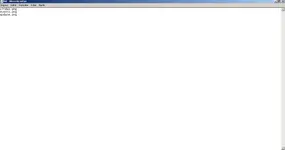
in the case of slides, open launcer_files/slide folder create a txt document named list.txt, add the name of the pictures that you add inside slides folder, like image1.png (remember, all the pictures has to be inside slides folder)

inside the source mainwindow.xaml.cs you can change the server status ip, just search for:
var result = client.BeginConnect
you will see an IP, change for your real server IP, the standard port is 38101, but if you are using other, remember to change it there either.

i forgot to add slides mode on Launcher Alternative KR, I left on attached files, the mainwindow.xaml.cs and mainwindow.xaml with this configuration, you just need to create config.txt inside lancher_files and put this: mode=website (if you want main page loaded inside the launcher) or mode=slides (if you want pictures of slides folder loading in the middle of the Launcher, don't forget to put the pictures name and extension inside list.txt in the same folder, ex: event.png, news.png in order) you can add pictures with this extensions: png, jpg, jpeg, bmp, gif, webp and the ideal Width and Height are 620x250 or proportional 1240x500.

P.S: Take a good look inside mainwindow.xaml.cs, there is a lot of parts the contains IP addresses that you have to change for your server IP or Website domain, and Discord/Facebook/Instagram parts that you need to configure either, even register/community and Home buttons that need configuration either, so configure everything correctly.
 

Attachments

It has been set as instructed, but it is still loading up. How do I solve this problem?
then already put website domain ip server still off line?
Untitled - CABAL LAUNCHER (AUTO UPDATE + WEB + AAA UI) - RaGEZONE Forums
 
It has been set as instructed, but it is still loading up. How do I solve this problem?
then already put website domain ip server still off line?
View attachment 301584
if the main page is loading it's because you didn't change the config.txt to mode=slides and the IP for the server status it's your SERVER IP and LoginSvr Port not your website domain, on the source if you search for 38101 you will see that part of the configuration, just put your server IP there and rebuild
 
Is it true that all the files have been inserted into the server site xamp folder like the picture below?
👇
Untitled - CABAL LAUNCHER (AUTO UPDATE + WEB + AAA UI) - RaGEZONE Forums


still nothing, update is successful, still loading. how to fix? 👇

Untitled 1 - CABAL LAUNCHER (AUTO UPDATE + WEB + AAA UI) - RaGEZONE Forums
 
Is it true that all the files have been inserted into the server site xamp folder like the picture below?
👇
View attachment 301636

still nothing, update is successful, still loading. how to fix? 👇

View attachment 301638
Mainwindow.cs doesn't need to be on launcher_files folder, belongs to the source code only. if isn't loading the slides instead website, it's because you didn't configured config.txt to enable slides instead website.
 
Put generator.exe inside launcher_files, put the updates inside launcher_files/client, execute generator.exe and done, it will generate all hashs and automatically create the filelist.xml.

in the case of slides, open launcer_files/slide folder create a txt document named list.txt, add the name of the pictures that you add inside slides folder, like image1.png (remember, all the pictures has to be inside slides folder)

inside the source mainwindow.xaml.cs you can change the server status ip, just search for:
var result = client.BeginConnect
you will see an IP, change for your real server IP, the standard port is 38101, but if you are using other, remember to change it there either.

i forgot to add slides mode on Launcher Alternative KR, I left on attached files, the mainwindow.xaml.cs and mainwindow.xaml with this configuration, you just need to create config.txt inside lancher_files and put this: mode=website (if you want main page loaded inside the launcher) or mode=slides (if you want pictures of slides folder loading in the middle of the Launcher, don't forget to put the pictures name and extension inside list.txt in the same folder, ex: event.png, news.png in order) you can add pictures with this extensions: png, jpg, jpeg, bmp, gif, webp and the ideal Width and Height are 620x250 or proportional 1240x500.

P.S: Take a good look inside mainwindow.xaml.cs, there is a lot of parts the contains IP addresses that you have to change for your server IP or Website domain, and Discord/Facebook/Instagram parts that you need to configure either, even register/community and Home buttons that need configuration either, so configure everything correctly.
still the file is not auto update still loading .......
Can you give me the full file that is ready to be packed for the server side xamp file?. this is because I have edited the source file and looking at the client file many times... still the problem cannot be resolved
 
Last edited:
Back