CrossFire 2.0 Server & Client

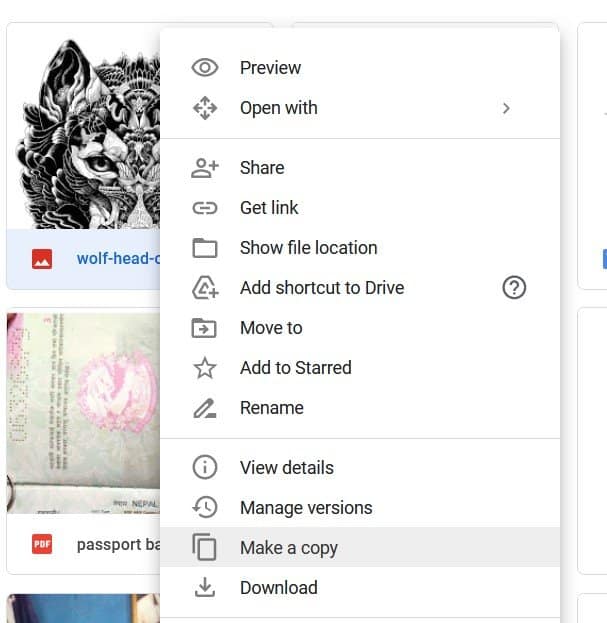
  1. Open your Google Drive account and Sign in.
  2. Go to the link of the shared file/folder.
  3. Open the file Navigate to the menu and go to File. You can also right click the file.
  4. Scroll down until you see Make as Copy.
  5. Rename and select the location.
  6. Click on Ok.
  7. Locate your copy saved in your drive.
  8. Go to the menu bar, select File.
  9. Click on Download and choose the format.

  10. Bola - CrossFire 2.0 Server & Client - RaGEZONE Forums

bot mode is fine local server :)

View attachment 237420
Does it includes the Alpha Gaming client from the pgaming file?

I can only see this.
1687294276638 - CrossFire 2.0 Server & Client - RaGEZONE Forums


Click recent from your GDrive and there you can find the opened GDrive file and make a copy to it.

1687294771391 - CrossFire 2.0 Server & Client - RaGEZONE Forums


I don't know why it keeps error when creating a copy, I even tried Incognito mode but still same, I have 100GB disk drive though.
 
Last edited:
Does it includes the Alpha Gaming client from the pgaming file?

I can only see this.
View attachment 237421

Click recent from your GDrive and there you can find the opened GDrive file and make a copy to it.

View attachment 237422

I don't know why it keeps error when creating a copy, I even tried Incognito mode but still same, I have 100GB disk drive though.

no, i modified alpha gaming files for this client, its match %99 maybe %100, cuz i dont get any error
 
no, i modified alpha gaming files for this client, its match %99 maybe %100, cuz i dont get any error
Can you share the alpha gaming client? And also I can't create a copy of the Server.7z as it keeps error. I even rebooted my pc and use Incognito again. Wanted to make a clean installation again with a simple guide, hope you can provide new links.
 
Can you share the alpha gaming client? And also I can't create a copy of the Server.7z as it keeps error. I even rebooted my pc and use Incognito again. Wanted to make a clean installation again with a simple guide, hope you can provide new links.

try this mirror

 
1687304058285 - CrossFire 2.0 Server & Client - RaGEZONE Forums


Aight guyz, According to ( cf_broadcastsrv )

You've to head up to ( C:\pmang\crossfire\cf_broadcastsrv ) and launch "BroadcastServer.exe" Then it'll ask u to install ( .NET Framework ) Just get it done and then restart all the services.

But anyone got a fix for 'cf_hostsrv' ?

I tried re-correcting the port in (Settings.ini) inside the cf_hostsrv But still facing it.
 
Hello everyone, has anyone managed to make a configuration manual? I'm seeing that a lot of people are having difficulties configuring the files... (I'm one of them)
 
To install "NTServiceDaemon\BOQGTX" open cmd in administrator and follow the example.

Code:
C:\pmang\NTServiceDaemon>BOQGTXD5G4BoxCFN.exe -install
>>Enter Using OLE Provider(SQLOLEDB or MSDAORA.1)[SQLOLEDB] : <<press enter
>>Enter Database Server IP[ex:127.0.0.1 or 127.0.0.1,7302] : 127.0.0.1,1433 SQL server ip and port
>>Enter Database Name[BILL_DB] : G4BOX_SA_BILL_DB
>>Enter Database User ID[BillUser] : "SQL User"
>>Enter Database User Password[Password] : "SQL password"
BOQGTXG4BOXCFN Created.
Registry Key setting Succeeded.

C:\pmang\NTServiceDaemon>BOQBTX5G4Box.exe -install
>>Enter Using OLE Provider(SQLOLEDB or MSDAORA.1)[SQLOLEDB] : <<press enter
>>Enter Database Server IP[ex:127.0.0.1 or 127.0.0.1,7302] : 127.0.0.1,1433 SQL server ip and port
>>Enter Database Name[BILL_DB] : G4BOX_SA_BILL_DB
>>Enter Database User ID[BillUser] : "SQL User"
>>Enter Database User Password[Password] : "SQL password"
BOQBTXG4Box Created.
Registry Key setting Succeeded.
 
Back