Combat Arms: All the Things I Have (CA:R, CA:Reloaded, CA Stuff)

People keep asking for specific 2017 clients. Check my Lithtech folder, might help:

(Games -> Combat Arms -> Releases) you'll find VER_BR_1704.04 among others

Also for anyone having trouble compiling, you just need to use VS2008 and exclude SVNRevisionToRC from the solution, as its sole purpose is to delete .rc files required by other projects. Once that’s done, everything else should compile just fine.
 
Last edited:
Actually you don't really need a CS server for cash/NX stuffs if you have some fundamental C++ knowledge, although not fully working.

For example, you can just send the balance number to client by "pUser->SetBillBalance(10000000, 10000000);" somewhere in the lobby server.

Similarly, to purchase cash items you can bypass billing part, i.e., just calling result handlers to complete the buying process, all required information are there before sending billing requests.

One more hint, you also need to trigger PickupProcess manually to reload the inventory list after buying, otherwise re-login may be needed.


1735552262053.webp
 
Last edited:
Actually you don't really need a CS server for cash/NX stuffs if you have some fundamental C++ knowledge, although not fully working.

For example, you can just send the balance number to client by "pUser->SetBillBalance(10000000, 10000000);" somewhere in the lobby server.

Similarly, to purchase cash items you can bypass billing part, i.e., just calling result handlers to complete the buying process, all required information are there before sending billing requests.

One more hint, you also need to trigger PickupProcess manually to reload the inventory list after buying, otherwise re-login may be needed.


View attachment 273704
Nice man
 
Why is there no response for 5 seconds after starting the game?

View attachment 273721
configure everything from 0 again, go to %appdata%, look for files in the temp folder and delete them, then restart your PC, completely delete Windows Defender (note - it is not to disable, it is to uninstall), install all x86 and x64 redists and install Net Framework 3.5 in the Windows resources panel and restart your computer, then redo the entire process again from the server and DServer, note - do not install any antivirus because the files do not have a signature and will always be deleted or it will have problems when starting.

disable all windows firewall ✓
 
configure everything from 0 again, go to %appdata%, look for files in the temp folder and delete them, then restart your PC, completely delete Windows Defender (note - it is not to disable, it is to uninstall), install all x86 and x64 redists and install Net Framework 3.5 in the Windows resources panel and restart your computer, then redo the entire process again from the server and DServer, note - do not install any antivirus because the files do not have a signature and will always be deleted or it will have problems when starting.

disable all windows firewall ✓
My firewall has never been turned on
 
Remaining files missing from CS Server- for cash to work, NexonMessengerService- for friends list and messenger function, I believe that the Clan is also missing something else for creation to work.
So you tested everything and all thats missing/not working is the cash shop and the clan system?
 
how fix the red menssage please tell me maybe query?
Combat-Arms_03.webp
 
Combat-Arms_01.webp


hey everyone, firstly happy new year all of you.
my problem is
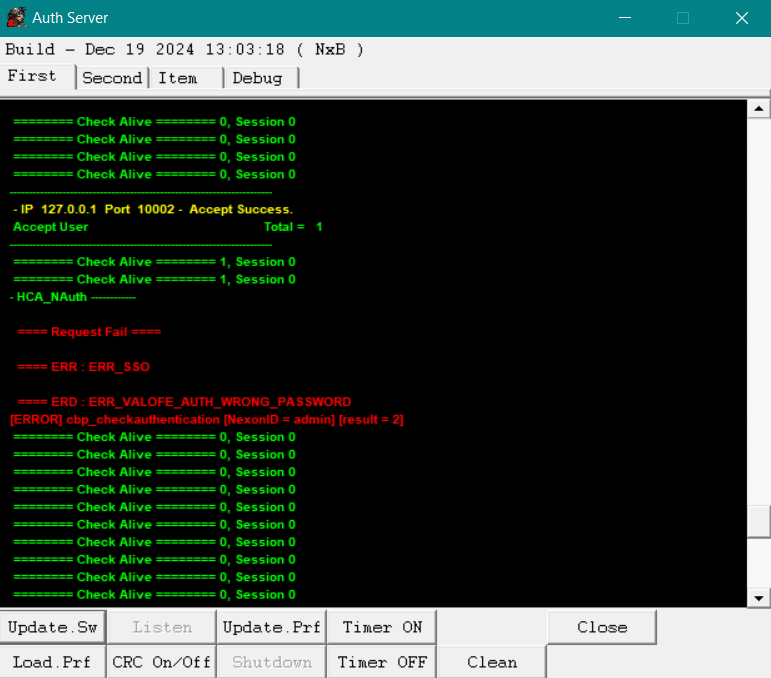
i just compiled Client + Servers and im having this problem rn. For DB i just followed ConDisk7k tuto. im open to every suggestions. Translation of error "Unable to connect account [incorrect password]". i tried to make new account which is didnt work to.
 
Here’s a video tutorial of how to set everything up, from the SQL to the game working + starting the room.


OFF topic: MentaL I’m not able to attach the video here on the forum. Only in YTB.

I followed the instructions in this video and the auth server isnt working and neither is the lobby server

Everything you did in the video I followed, I'm using compiled server files from: https://forum.ragezone.com/threads/compiled-server-files-wip.1238418/

and I'm using Combat Arms leaked Source from the OP of this thread

Does anyone know what else I'm missing? I had configured every INI file inside to target my IP localhost, I followed the video exactly with all the same naming.
In the DBDaemon INI I set the username and password to the same one that was used in the video tutorial

05b2dwM.png


-- EDIT 1 --
I was able to fix the problem by editing DbDaemon INI

and replacing:
DataSourceCombat = "127.0.0.1"
InitCatalogCombat = "COMBATARMS"
DataSourceCombatLog = "127.0.0.1"
InitCatalogCombatLog = "COMBATARMS_LOG"
UserName = "combatadmin"
UserPass = "Admin123456"

to:

DataSourceCombat = localhost\BR
DataSourceCombatLog = localhost\BR
DataSourceNexonGuard = localhost\BR

But I can't login using admin / admin, is there a default account there? not sure if I still have something not working or don't have the account yet, I'm just using the video account of the tutorial video

EDIT 2:
Anytime I try to login I get a new window that gives an error
I suspect it has something to do with WinlicenseSDK.dll that I originally had an error with until I replaced it with whichever ones are in the source files from OP of thread, but now I get different errors
The window below generates when i try to login
Vwt8AQK_d.webp


In AuthServer.exe:
BeUBhML.png


And I can confirm admin is in auth table
 
Last edited:
Back