


Junior Spellweaver
- Joined
- Nov 7, 2024
- Messages
- 160
- Reaction score
- 77
İ
For WinSDK.ini problem u can copy the file from official client or can make one with a text editor and copy past it from internet.I followed the instructions in this video and the auth server isnt working and neither is the lobby server
Everything you did in the video I followed, I'm using compiled server files from: https://forum.ragezone.com/threads/compiled-server-files-wip.1238418/
and I'm using Combat Arms leaked Source from the OP of this thread
Does anyone know what else I'm missing? I had configured every INI file inside to target my IP localhost, I followed the video exactly with all the same naming.
In the DBDaemon INI I set the username and password to the same one that was used in the video tutorial

-- EDIT 1 --
I was able to fix the problem by editing DbDaemon INI
and replacing:
DataSourceCombat = "127.0.0.1"
InitCatalogCombat = "COMBATARMS"
DataSourceCombatLog = "127.0.0.1"
InitCatalogCombatLog = "COMBATARMS_LOG"
UserName = "combatadmin"
UserPass = "Admin123456"
to:
DataSourceCombat = localhost\BR
DataSourceCombatLog = localhost\BR
DataSourceNexonGuard = localhost\BR
But I can't login using admin / admin, is there a default account there? not sure if I still have something not working or don't have the account yet, I'm just using the video account of the tutorial video
EDIT 2:
Anytime I try to login I get a new window that gives an error
I suspect it has something to do with WinlicenseSDK.dll that I originally had an error with until I replaced it with whichever ones are in the source files from OP of thread, but now I get different errors
The window below generates when i try to login

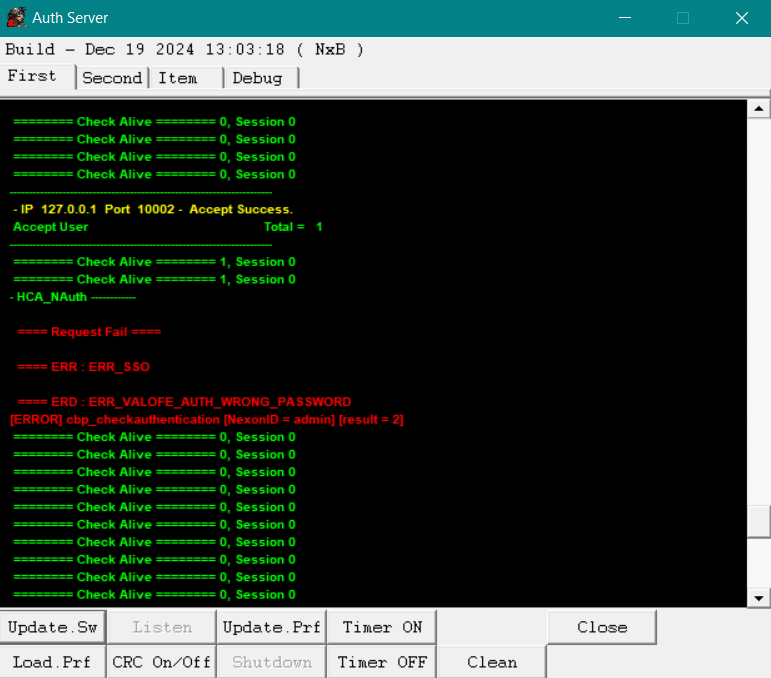
In AuthServer.exe:

And I can confirm admin is in auth table


Last edited:




 DServer won't start

